This is the hands-on version: the exact routine we would follow at a kitchen table the night before a visa appointment, with the reservation PDF on one side and the visa form on the other. It covers which airline page to use, what each major airline's lookup asks for, what to compare on screen, and what to do when a lookup fails. If you first want to understand what a PNR is and what a successful lookup does and doesn't prove, read verifiable dummy ticket: what a PNR really proves. This page assumes you know that and gets straight to the checking.
Pre-submission check: key facts
| Question | Short answer |
|---|---|
| Where do I check? | On the operating airline's own Manage booking page, typed into the browser yourself. |
| What do I need? | The booking reference from the PDF and the passenger's last name. Emirates, Air India, British Airways and others ask for exactly this pair.[1][6][7] |
| When should I check? | As soon as the email arrives, the evening before the appointment, and that morning. |
| How long does it take? | A few minutes per booking once you have the airline page open. |
| What if it fails at delivery? | A PNR not verifiable on the airline website at delivery qualifies for a full refund under our policy.[9] |
| How long will it stay live? | Up to 2 weeks, but the airline sets the precise end point.[10] |
How do you verify a dummy ticket before submission, step by step?
Follow these steps in order. Each one catches a different kind of problem.
- Read the airline off the PDF. Look at the first flight. The two-letter code before the flight number (EK, QR, EY, LH, BA, SQ, AI) tells you which website to open. On a shared flight, the operating carrier is the one to try first.
- Find the right reference. Copy the six-character booking reference. If the PDF shows two, one may be the agency's and one the airline's; our PNR number guide explains the labels.
- Type the airline's address yourself. Skip links in messages and skip "PNR status" sites run by third parties.
- Open Manage booking. The menu label varies, so look for Manage, My bookings or My trips.
- Enter the reference and surname exactly as printed. Watch for look-alike characters such as O and 0, or I and 1.
- Compare the screen with your visa form, field by field. The checklist below shows what to compare.
- Take a dated screenshot. Include the browser bar or the device clock so you know when you looked.
- Repeat for each airline in the trip. A multi-city route on two carriers means two lookups.
What does each airline's lookup ask for?
The table lists what the airlines' own pages ask for. Layouts change, so treat it as a guide to the fields, not a screenshot of the page.
| Airline | Where to look | What it asks for | Worth knowing |
|---|---|---|---|
| Emirates (EK) | Manage Your Booking on emirates.com | Last name and booking reference[1] | Bookings made through an agency may show a second six-character reference; see Emirates guide |
| Qatar Airways (QR) | Manage booking on qatarairways.com | Six-character booking reference and last name[2] | References use letters A to Z and numbers 1 to 9, so a round character is the letter O; last name in letters only[2] |
| Etihad (EY) | Manage on etihad.com | Booking reference and last name; no account login needed[3] | Etihad replaces hyphens and apostrophes in names with a space[4] |
| Lufthansa (LH) | My bookings on lufthansa.com | Booking code and surname[5] | The site also offers a Travel ID login; you don't need one for a lookup |
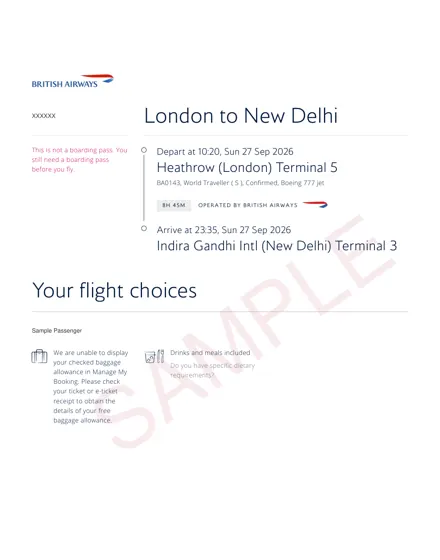
| British Airways (BA) | Manage My Booking on ba.com | Booking reference (six letters and numbers) and surname[6] | Use a passenger's last name exactly as shown on the booking |
| Singapore Airlines (SQ) | Manage booking on singaporeair.com | Six-character booking reference and last or family name as in the passport[8] | Agency bookings can be retrieved; if travellers have different surnames, enter theirs too[8] |
| Air India (AI) | Manage Booking on airindia.com | Booking reference (PNR) and last name[7] | The last name must match the booking exactly, including spacing[7] |
If your reservation is on another airline, the pattern is almost always the same pair of details. Our airline guides go deeper for Qatar Airways, Lufthansa, British Airways, Singapore Airlines, Etihad and Air India.
What should you compare once the booking opens?
Put the airline screen next to your application form, not next to the PDF. The PDF came from the booking, so of course it matches. The form is what the officer reads.
| On the airline page | Compare with | Typical slip |
|---|---|---|
| Passenger names | Passport bio page and the name fields on the form | Middle name missing, or given and family names swapped |
| Number of travellers | Everyone listed on the application | A child added to the visa file but not to the booking |
| Outbound date | "Intended date of arrival" | Overnight flight landing the day after departure |
| Return or onward date | "Intended date of departure" | Return a day later than the stay length on the form |
| Airports | Main destination and point of entry | Arriving in one country but applying to another |
| Flight numbers and times | Your cover letter and hotel check-in | First hotel night booked for the day before landing |
An example of the date trap. Your flight leaves Mumbai at 01:55 on 3 December and lands in Frankfurt the same morning. Your form should say 3 December, not 2 December, even if you leave home the evening before. Get this wrong and your insurance or hotel can look a day short.
A reservation you can test yourself
Look it up on the airline's site the moment it lands. From ₹699 / $9 each, usually in your inbox within 10 minutes.
When should you run the check?
Three times, each for a different reason.
- On delivery. This is the check that counts for our refund policy, which covers a PNR that was invalid or not verifiable on the airline website at the time of delivery.[9]
- The evening before. Confirms the booking is still live and gives you a night to fix anything.
- The morning of the appointment. A last look, and your dated screenshot.
Timing the order itself matters as much as timing the checks. A reservation stays valid for up to 2 weeks and the airline decides the exact period, and our terms recommend booking no more than 24 hours before the appointment.[10] Our validity guide explains why airlines drop unpaid holds.
The lookup didn't work. What should you try?
Work through these in order before you worry. Most failures come down to the way something was typed.
- Retype the surname only. Try it as printed on the PDF, with any space removed and then with it kept. Air India stresses that the name must match exactly.[7]
- Check hyphens and apostrophes. On Etihad, a hyphenated or apostrophised surname is stored with a space instead.[4]
- Check zeros and ones. On Qatar Airways, references contain no zero, so a round character is the letter O.[2]
- Try the other reference. If the PDF carries a second code, use it.
- Try the operating airline's site. On a codeshare, the marketing airline's site may not show the booking.
- Switch browser or device. Airline sites occasionally fail under load. Try again later before deciding the booking is missing.
- Contact us in writing. Send the order reference and a screenshot of the airline's message on WhatsApp or by email.
Do not submit a reservation you could not open. And never fix a typo by editing the PDF. If a detail is wrong, the booking page explains that a correction needs a fresh order, and a name, date or route that differs from what you submitted is our mistake and a full-refund case.[9][11]
Checking a family or group booking
One lookup usually opens the whole booking, but you still need to read every name. Enter the lead traveller's surname first. If family members have different surnames and the page doesn't show them, Singapore Airlines' guidance is to enter their last names as well; other airlines may need a separate lookup with each surname.[8] Count the travellers on screen against the people on the visa application, including infants. For more on family files, see dummy ticket for a family visa.
How do you cross-check the rest of the file?
Once the flights check out, line up the documents that hang off those dates. This takes ten minutes and catches the inconsistencies officers notice most easily.
- Hotels: first night on the arrival date, last night before the return. See hotel and flight dates and dummy hotel booking.
- Insurance: from departure to return, inclusive. See insurance dates.
- Leave letter and cover letter: same dates, and the cover letter calls the flights a reservation. See cover letter wording.
- Destination rules: check what your country asks for in flight reservation requirements by country, and the Schengen visa guide if you are applying to Europe.
Will anyone else check it? Possibly. Consulates do not publish their methods; do visa officers verify flight reservations sets out what is known. Checking it yourself means you see what they would see first.
A worked example: a two-airline itinerary
Here is how the routine plays out on a slightly fiddly trip. The details are invented for illustration.
Meera is applying for a Schengen visa with an appointment on a Tuesday. Her reservation shows Delhi to Frankfurt on Lufthansa and, two weeks later, Paris to Delhi on Air India. Her PDF arrives on Monday afternoon.
- She opens lufthansa.com, chooses My bookings and enters the booking code shown for the Lufthansa flight with her surname. The Frankfurt flight appears with her full name.
- She then opens airindia.com, goes to Manage Booking and enters the reference shown for the Air India flight with the same surname. The return appears.
- She compares both dates with the arrival and departure fields on her form and with her hotel bookings in Frankfurt and Paris.
- She takes two dated screenshots and puts them in her appointment folder behind the printed reservation.
- On Tuesday morning she repeats steps 1 and 2 on her phone before leaving home.
The point of the example: one trip can mean two lookups on two websites, and each one is worth doing.
What should go in your appointment folder?
Keep it simple and in the order the checklist asks for. For the flight part, that usually means the printed reservation, plus your own dated screenshots kept separately for reference. The screenshots are for you, so you can show what the airline page displayed if a question comes up later; you don't need to submit them unless asked. Add a note of the airline's website and your booking reference on a sticky note inside the folder, so you can look it up quickly at the centre if anything is queried.
Does the same check work for onward travel at the airport?
Yes, with a different deadline. For proof of onward travel, run the lookup the day before you fly and again at the airport. Check-in staff look at your travel documents against the destination's entry rules, and some rules want a paid ticket rather than a reservation. Our onward ticket page explains which.
Where do you get a reservation you can check?
From a provider whose booking opens on the airline's own website. With us, you enter the route, dates and passport names on the booking page and pay by UPI, card or netbanking through Razorpay. The PDF arrives by email in about 10 minutes, and you can follow the order on find my booking.
Prices are per passenger, one way or round trip; details on dummy ticket price. For the reservation-versus-ticket question, read flight reservation for visa, or start from the home page.
Frequently asked questions
01How do I check my dummy ticket on the airline website?
Open the operating airline's site by typing its address, go to Manage booking or My bookings, and enter the booking reference with the passenger's last name exactly as printed. When the booking opens, compare names, flights and dates with your visa form, not just with the PDF, and save a dated screenshot.
02Which reference do I enter if the PDF shows two?
Start with the one labelled as the airline's booking reference. Bookings made through agency systems can carry an agency code as well as the airline code, and Emirates, for one, documents this. If the first code doesn't open, try the second before contacting the provider.
03Why does the airline say my booking cannot be found?
Usually a typing issue: surname spacing, a hyphen, or a zero entered for the letter O. It can also be the wrong airline's site on a shared flight, or a busy website. If none of those explain it, the hold may have ended. Don't submit until the booking opens.
04Is it safe to use a third-party PNR checker?
We'd avoid them. They aren't the airline, may show stale or no data, and you hand your name and booking reference to an unknown site. The airline's own Manage booking page is the only lookup that shows what the airline holds, so use that.
05How close to the appointment should I check?
Check on delivery, again the evening before and once more that morning. The delivery check matters for refunds, since our policy covers a PNR not verifiable at delivery. The later checks confirm the hold is still live, since reservations last up to 2 weeks and the airline decides the exact period.
06What if a name is wrong on the airline page?
Compare it with what you entered on our booking form. If we issued something different from your order, that is our mistake and a full-refund case. If the error was in what you typed, the booking page explains that a correction needs a fresh order. Message support on WhatsApp either way.
07Does a successful check mean the visa will be approved?
No. It shows the booking exists and matches your plan on that day. The consulate decides on the whole application, including funds, ties and purpose. Our longer article on verifiable reservations explains what a lookup can and cannot tell an officer.
Sources
All sources last checked: October 2026.
- Emirates, Manage Your Booking.
- Qatar Airways, Manage a booking: retrieve booking.
- Etihad Airways, FAQ: how to manage your Etihad flight booking.
- Etihad Airways, Name format guidelines.
- Lufthansa, Manage your bookings.
- British Airways, Manage My Booking.
- Air India, Manage Booking.
- Singapore Airlines, FAQ: Booking online.
- DummyTicketPrice, Cancellation and refund policy: section 1.
- DummyTicketPrice, Terms and conditions: sections 2 and 3.
- DummyTicketPrice, Booking page: "Can I change details after paying?"
Related: flight reservation for visa · dummy ticket price · sample tickets · refund policy.