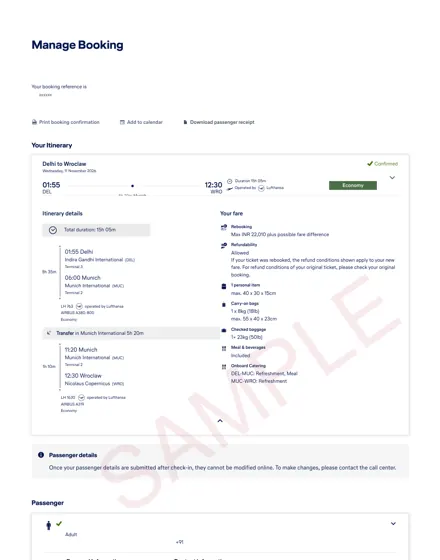
What Is an Air India Dummy Ticket and Why Do Visa Officers Accept It?
An Air India dummy ticket is a provisional flight itinerary or reservation hold created with the airline, showing a confirmed booking reference (PNR) for a specific route and travel date, but not yet paid for or ticketed. Unlike a random screenshot or a fabricated PDF, a genuine dummy ticket is a real reservation that exists in Air India’s system for 24 to 72 hours (typically 48 hours for most fare classes). Visa officers accept it because it demonstrates your intended travel plans without requiring you to spend hundreds of dollars on a non-refundable ticket before your visa decision is made.
The key distinction is that a dummy ticket is not a fake document. It is an actual booking hold you or a service like DummyTicketPrice.com creates directly through Air India’s reservation engine, GDS (Global Distribution System), or the airline’s official website. The PNR (Passenger Name Record) — a six-character alphanumeric code like AI7K2LQ — is verifiable in real time by embassy staff or immigration officers through Air India’s booking portal or the GDS. This verifiability is precisely why visa sections across Schengen countries, the UK, the US, Canada, and Australia accept it as proof of onward or return travel.
What Exactly Does an Air India Dummy Ticket Contain?
A properly generated Air India itinerary for visa purposes will include the following elements, all of which match what the visa officer expects to see on a standard flight reservation:
- Passenger name(s) — exactly as on your passport, including middle names.
- Flight numbers — e.g., AI-101 (Delhi to New York), AI-380 (Mumbai to Singapore).
- Departure and arrival airports — with IATA codes (DEL, BOM, LHR, JFK, etc.).
- Travel dates and times — usually within 30 to 90 days from your visa application date, matching your intended itinerary.
- Booking class and fare basis — typically economy (Y, B, M, or H) unless you specify otherwise.
- PNR / booking reference — the live six-character code used for verification.
- Ticket status — shown as “ON HOLD” or “UNPAID”, which is acceptable for visa submission.
- Airline contact and booking office details — for the officer’s reference if they wish to call.
Visa officers are trained to spot the difference between a genuine reservation hold and a fake screenshot. A real Air India dummy ticket will always have a PNR that returns results when checked via Air India’s “Manage Booking” section or through a GDS query. If the PNR comes back invalid, the visa application is at risk of rejection for providing fraudulent documentation — a far more serious outcome than a simple refusal.
Why Do Visa Officers Accept PNR-Based Reservations?
There are three practical reasons why an Air India dummy ticket with a live PNR satisfies visa scrutiny:
- Verifiability in real time. Most embassies and visa processing centers (VFS Global, BLS, TLScontact) have access to airline booking systems or can call Air India’s reservations desk directly. A PNR that matches the passenger name and flight details confirms the reservation is genuine, not a photoshopped illusion.
- It proves intent without requiring payment. Visa rules generally require evidence of booked travel, but they do not require a paid, ticketed flight at the application stage. An unpaid reservation hold is a legitimate intermediate step — it shows you have researched and committed to a specific itinerary while avoiding financial loss if your visa is refused.
- It aligns with airline and IATA norms. Air India, like all IATA member airlines, routinely places reservations on hold for passengers who need time to arrange payment or visas. This is a standard commercial practice, not a loophole. Visa officers understand that ticketing happens only after approval, so they accept the hold as sufficient.
Typical Scenarios Where an Air India Dummy Ticket Is Used
You might need an Air India dummy ticket for any of the following visa applications:
| Visa Type | Typical Requirement | Why Air India Dummy Ticket Works |
|---|---|---|
| Schengen short-stay (C-type) | Confirmed round-trip flight reservation | Air India flies to Frankfurt, Paris, Vienna, and other Schengen hubs; a 48-hour hold is usually enough for the appointment window. |
| UK Standard Visitor | Travel itinerary including flights | Air India operates direct routes to London Heathrow and Birmingham; PNR verifiable by UKVI systems. |
| US B1/B2 | Evidence of intended departure from the US | Air India’s non-stop US routes (DEL–JFK, BOM–EWR) are common for showing return travel. |
| Canada Visitor | Proof of sufficient funds and travel plans | Air India flies to Toronto and Vancouver; a held reservation is accepted alongside bank statements. |
| Australia / New Zealand | Outbound flight from the country | Air India via Singapore or direct to Sydney/Melbourne works for temporary visa applications. |
The practical takeaway: an Air India dummy ticket is not a shortcut or a deceptive trick. It is a legitimate, verifiable airline reservation hold that meets the documentary requirement for “flight booking” at the visa stage. Because the PNR is live and checkable, visa officers accept it as proof of your travel plan — and you only pay for the actual ticket after your visa is stamped.
Air India Dummy Ticket vs. Real Booking vs. Refundable Ticket: What to Choose
When preparing a visa application, the flight itinerary you submit can be a temporary reservation, a fully paid ticket, or a refundable fare. Each option has a different cost, risk profile, and level of verification by embassy staff. Below is a practical comparison focused on Air India routes, so you can decide which document fits your situation.
1. Air India Dummy Ticket (Provisional Itinerary with Live PNR)
A dummy ticket from a service like DummyTicketPrice.com is a real reservation hold placed directly in Air India’s system. You receive a PNR (e.g., 6-character alphanumeric code) that embassy officers can verify on Air India’s website or via the GDS. The hold lasts 7–14 days typically, depending on the fare rules at the time of creation.
- Cost: ₹599 / $7 per passenger — no hidden charges.
- Turnaround: Usually emailed within 10 minutes, valid for the hold period.
- Pros: Cheapest option; you do not pay the full fare; PNR is genuine; cancellation risk is zero because no payment was made.
- Cons: Not a paid ticket — some embassies (e.g., Schengen states) may ask for proof of payment if the itinerary looks suspicious. However, most visa offices accept a verifiable PNR as sufficient evidence of travel intent.
- Best for: Initial visa submissions, appointment scheduling, and cases where you want to avoid locking up thousands of rupees before your visa decision.
2. Real Booking (Fully Paid, Non-Refundable or Semi-Flexible)
This is a ticket you purchase outright on Air India’s website or via a travel agent. You receive an e-ticket with a 13-digit number and a confirmed seat. The fare is paid immediately, and the ticket is non-refundable unless you buy a higher fare class.
- Cost: Full fare, often ₹30,000–₹80,000+ for international routes (e.g., Delhi–Toronto, Mumbai–New York) depending on season.
- Pros: Unquestionably real; embassy sees a paid transaction; no follow-up verification needed.
- Cons: Money is locked until you fly. If the visa is refused or delayed, you lose the fare unless you purchased a refundable or flexible ticket (which costs 2–3× more).
- Best for: Applicants with a near-certain visa approval (e.g., prior travel history) or those who must fly immediately after visa stamping.
3. Refundable Air India Ticket (Fully Flexible Fare)
Air India’s fully refundable fares (typically Business or “Flex” economy) allow you to cancel for a 100% cash refund, minus a small service fee (usually ₹2,000–₹5,000). You purchase the ticket, submit it to the embassy, and cancel after the visa interview or decision.
- Cost: 2–4× the non-refundable fare — e.g., a ₹40,000 economy ticket may become ₹1,20,000 as refundable.
- Pros: Combines a real paid ticket with post-approval flexibility; you can rebook later without penalty.
- Cons: High upfront cash outflow; refund processing takes 7–15 business days, so you must have liquidity. Some credit cards charge foreign transaction fees.
- Best for: Business travelers or those who need a paid ticket for embassy scrutiny but want to change dates after visa approval.
Comparison Table: Key Differences at a Glance
| Criterion | Dummy Ticket (This Service) | Real Non-Refundable Booking | Refundable Ticket |
|---|---|---|---|
| Upfront cost | ₹599 / $7 | Full fare (₹30,000+) | 2–4× full fare |
| Verification by embassy | PNR valid on Air India | Paid e-ticket | Paid e-ticket |
| Refund if visa refused | Not applicable (no fare paid) | Lost entirely | Full refund minus fee |
| Time to obtain | ~10 minutes | Immediate online | Immediate online |
| Risk to applicant | Low (no money at risk) | High (fare lost) | Medium (cash tied up) |
Recommendation: For most visa applicants, an Air India dummy ticket with a verifiable PNR is the safest and most cost-effective choice — it satisfies the embassy’s requirement for a confirmed itinerary without exposing you to the financial risk of a non-refundable fare. If your embassy specifically demands a paid ticket, then a refundable fare is the only secure alternative, but only book it after confirming the visa officer’s exact policy. Avoid non-refundable bookings unless you are certain of approval and travel dates.
When your appointment date is fixed, order a dummy ticket for visa and attach the PDF to the rest of the application.
Need a verifiable dummy ticket for this?
Live PNR you can check on the airline website. From ₹599 / $7, delivered in ~10 minutes.
Essential Components of a Valid Air India Dummy Ticket: PNR, Airline, and Passenger Details
When a visa officer reviews your flight itinerary, they are not simply checking that a flight exists. They are cross-referencing the document against airline booking systems to confirm it is a genuine, active reservation. A poorly constructed or fabricated itinerary is one of the fastest ways to get a visa rejected. To be accepted, your Air India flight reservation must contain specific, verifiable data fields that align exactly with your passport and visa application form.
The PNR: Your Booking’s Digital Fingerprint
The Passenger Name Record (PNR) is the most critical element. This six-character alphanumeric code (e.g., AI8XK2) is generated by Air India’s reservation system (often Sabre or the internal system) the moment a booking hold is created. Without a valid PNR, your document is merely a quote, not a reservation. When a visa officer enters this code into Air India’s system, it must pull up your specific itinerary with matching dates and passenger names. A PNR typically remains active for 7 to 14 days from the date of issue, depending on the fare rules attached to the hold. If you are submitting your visa application more than two weeks after purchasing the dummy ticket, ask the provider to refresh the PNR before you file.
Passenger Details: Exact Name Matching
The passenger name field must match your passport and visa application form exactly, including the order of given and surname. If your passport shows a middle name, the dummy ticket must include it. Discrepancies of even one letter (e.g., "Jon" vs. "John") can trigger a manual review or outright rejection. The ticket should also list your nationality and passport number in the passenger info section, not just the name. For families, each member traveling must appear as a separate passenger line under the same PNR.
Flight and Route Details: What the Officer Checks
The itinerary block must show a logical, complete route. For an Air India dummy ticket, this includes:
- Airline designator: "AI" followed by the flight number (e.g., AI-101 for Delhi–New York JFK).
- Departure and arrival airports: Use the three-letter IATA codes (DEL, BOM, LHR) alongside the city names.
- Exact dates and times: Must align with your visa application's intended travel dates. If you apply for a 30-day visa, the return flight should be within that window.
- Booking class: Usually "Economy" (Y/B/M) but should not be a "Basic" fare that prohibits changes if your plans shift.
- Ticket status: Look for "Confirmed" or "HK" (holding confirmed) in the status column. Avoid itineraries marked "Waitlisted" or "Request."
Table: Minimum Data Fields for a Valid Submission
| Field | Example Format | Why It Matters |
|---|---|---|
| PNR / Booking Reference | AI8XK2 | Enables real-time verification in Air India’s system. |
| Passenger Full Name | RAJESH KUMAR SHARMA | Must match passport exactly; no initials unless on passport. |
| Passport Number | J1234567 | Cross-checked with your visa form and immigration database. |
| Flight Number | AI-101 | Confirms the route exists and is operated by Air India. |
| Travel Dates | 15 MAY 2025 – 29 MAY 2025 | Must be within the visa validity window you request. |
| Status Code | HK / CONFIRMED | "HK" means holding confirmed; "RR" means released, which is invalid. |
Practical Steps to Verify Your Dummy Ticket Before Submission
- Ask for the Air India website PNR check: Reputable providers will show you how to verify the booking on the official Air India "Manage Booking" page before you download it.
- Check the fare basis code: Ensure it is not a non-refundable, non-changeable "N" class fare if you might need flexibility.
- Confirm the ticket number field: A dummy reservation typically has a blank or "TBD" ticket number field. If a provider gives you a full 13-digit ticket number, it is likely a real paid ticket, which changes your refund options.
- Match your visa type: For a transit visa, a single outbound Air India reservation is sufficient. For a tourist visa, you need a round-trip itinerary with both PNRs under the same booking reference.
Finally, remember that a valid Air India dummy ticket is not just a PDF printout — it is a live database entry. Before you pay for any service, ask for a screen recording or screenshot showing the PNR active in the airline’s system. If the provider hesitates or only sends a static PDF without a verifiable PNR, treat it as a red flag and seek an alternative source.
How to Order a Verified Air India Dummy Ticket from DummyTicketPrice (Step-by-Step)
Ordering a verified flight reservation from DummyTicketPrice takes roughly ten minutes from start to finish. The process is designed for applicants who need a live PNR quickly, without paying for a full fare. Below is the exact walkthrough, including what you will need on hand and what to expect after payment.
Step 1: Prepare Your Passenger and Travel Details
Before opening the booking page, gather the following information exactly as it appears on your passport. Any mismatch between your itinerary and your travel document can cause a visa officer to reject the reservation.
- Full name (as printed on the passport, including middle names)
- Date of birth (DD/MM/YYYY format)
- Passport number and nationality
- Proposed travel dates (outbound and return, if applicable)
- Route — Air India operates direct flights on many sectors (e.g., Delhi–London, Mumbai–New York, Bengaluru–Paris). If you need a connecting flight, note that Air India codeshares with Star Alliance partners, but a pure Air India itinerary is usually easier to verify.
- Email address — this is where the PDF and PNR will be sent.
Step 2: Go to the Booking Page and Select Air India
Navigate to DummyTicketPrice’s booking form (typically found at /booking.html). You will see a dropdown list of airlines. Select Air India. If your visa application requires a specific airline (e.g., for a Schengen or UK visa where the first port of entry matters), double-check that Air India operates your chosen route on the dates you select. If not, the system will show an error or suggest an alternative date.
Step 3: Enter Your Itinerary and Passenger Count
Fill in the origin and destination airports using their IATA codes (e.g., DEL for Delhi, LHR for London). Choose your departure date and, if applying for a multiple-entry visa or a round trip, your return date. For single-entry visas, a one-way reservation is usually sufficient, but many embassies prefer a round-trip itinerary to confirm your intention to leave.
Indicate the number of passengers. The price is per passenger — typically ₹599 or $7 — so a family of four would pay ₹2,396 or $28. Children and infants are usually priced the same, as the cost covers the reservation hold and PNR generation, not the fare class.
Step 4: Review and Make Payment
After submitting the form, you will see a summary screen showing your route, dates, and total cost. Payment is accepted via credit card, debit card, or UPI (for Indian applicants). The transaction is processed through a secure gateway; you will receive a payment confirmation immediately.
Note: DummyTicketPrice does not charge your card for the actual airfare — you are paying only for the service of creating and holding a live reservation. No hidden fees apply, and the price is stated upfront.
Step 5: Receive Your Itinerary and PNR via Email
After successful payment, the system generates a real Air India reservation with a unique six-character PNR (e.g., ABC123). The itinerary PDF is emailed to the address you provided, typically within 10 minutes, though in peak hours it may take up to 30 minutes. The email contains:
- A cover letter explaining the document is a dummy ticket for visa purposes
- The Air India itinerary with flight numbers, times, and terminal information
- The live PNR and booking reference
- Passenger details as entered
Step 6: Verify the PNR on the Air India Website
Once you receive the email, go to Air India’s official website and use the “Manage Booking” or “PNR Status” tool. Enter the PNR and the last name of the primary passenger. The system will show a confirmed reservation with the same flight details. This verification step is crucial — many visa officers check the PNR on the spot, and a live confirmation proves your itinerary is genuine.
Step 7: Download and Attach to Your Visa Application
Save the PDF and attach it to your visa application form or carry a printout to your embassy appointment. The itinerary remains valid for a limited hold period — usually 7 to 14 days from the date of issuance, depending on Air India’s fare rules at the time. If your visa interview is scheduled later, order the dummy ticket closer to that date so the PNR is still active when the officer checks it.
| Action | Time Required | What You Need |
|---|---|---|
| Fill booking form | 2–3 minutes | Passport details, travel dates |
| Make payment | 1–2 minutes | Credit/debit card or UPI |
| Receive email with PNR | ~10 minutes (up to 30 in peak) | Valid email inbox |
| Verify on Air India site | 2 minutes | PNR and last name |
Step 8: Contact Support If the PNR Does Not Verify
If the PNR fails to show up on Air India’s site or the email does not arrive within 30 minutes, check your spam folder first. Then use the customer support chat or email on DummyTicketPrice’s website. Provide your payment reference and the passenger name; support typically resolves issues within one business hour. In rare cases where Air India’s systems reject the proposed schedule, the team will rebook you on the next available flight and issue a new PNR at no extra charge.
Related guide: Dummy Ticket for Schengen Visa Application.
How to Verify Your Air India PNR on Airline Systems (Amadeus, Sabre, Travelport)
Once you receive your Air India dummy ticket document, the PNR (Passenger Name Record) printed on it should be a live, active reservation—not a static PDF mock-up. Because visa officers frequently cross-check the booking reference directly with the airline or through a GDS (Global Distribution System), you need to confirm that the PNR actually exists in Air India’s host system and in the third-party platforms used by travel agents worldwide. Here is how to run that verification yourself.
Step 1: Verify Directly on the Air India Website (Quickest Method)
Air India’s official portal offers a public “Manage Booking” or “Your Trip” lookup. You will need the six-character alphanumeric PNR (e.g., ABC123) and the last name of the primary passenger exactly as it appears on the itinerary. Enter both fields, and the system will return the flight details, departure times, and booking status. A valid dummy ticket will show a status of “Confirmed” or “Ticketed in Process,” whereas an expired hold will return an error message like “No booking found” or “PNR does not exist.” This check typically works within 10–30 seconds and is the fastest way to confirm that the reservation was not fabricated.
Step 2: Use a GDS-Based Verification Tool
If you want to see how a visa officer or travel agent would view your PNR, you can use a GDS aggregator site that reads Amadeus, Sabre, or Travelport data. These tools—often labelled “PNR Checker” or “Itinerary Validator”—prompt you for the same PNR and surname. Because Air India participates in all three major GDS platforms, the booking should appear across them. Note that some free checkers only display a partial response, such as the flight numbers and departure dates, without the fare breakdown. That is usually sufficient to prove the reservation is real.
What the Verification Results Should Show
| Field to Check | What a Valid Dummy Ticket Shows | What a Fake or Expired PNR Shows |
|---|---|---|
| Passenger name | Matches your passport spelling exactly | Missing, typo, or different name |
| Flight segments | Air India flight numbers (AI) with correct route and dates | No segments or mismatched itinerary |
| Status code | Confirmed (HK) or Waitlisted (HL) with a valid queue | Canceled (XX) or no status at all |
| Booking validity | Active hold, typically valid for 72–168 hours from creation | Already expired or purged from the system |
Step 3: Ask the Provider for a GDS Screenshot
Reputable sellers of an air india dummy ticket will supply a PDF plus a separate GDS-style display (often called a “PNR history” or “itinerary receipt”). If your provider hesitates to share that, treat it as a red flag. A genuine Air India reservation will have a record locator that returns identical flight data across the airline website, Amadeus, Sabre, and Travelport within a few minutes of purchase.
Timeframes for Verification
Live PNRs are typically visible immediately after issuance, but if you purchase late at night or during an Air India system update, allow up to 2–3 hours for the record to propagate across all GDS platforms. Most dummy ticket holds remain valid for 3–7 days, after which the airline automatically cancels the reservation. The reservation is issued exactly as entered, so please check names, dates and route before paying; a new date or correction needs a fresh order.
Our guide to the proof of onward travel ticket explains why embassies ask for a reservation rather than a paid ticket.
Comparison Table: DummyTicketPrice vs. Other Providers for Air India Dummy Tickets
Choosing where to obtain an Air India dummy ticket can feel like a gamble, especially when your visa interview date is approaching. To help you decide, the table below compares DummyTicketPrice with three common alternatives: generic online travel agencies (OTAs), freelance itinerary sellers on messaging platforms, and do-it-yourself booking holds on the airline’s website. The comparison focuses on what matters most for a visa officer’s checks: price transparency, delivery speed, PNR verifiability, and what happens when the embassy calls the airline.
| Criterion | DummyTicketPrice | Generic OTA (e.g., large booking portals) | Freelance Sellers (WhatsApp/Telegram) | DIY Air India Booking Hold |
|---|---|---|---|---|
| Price per passenger (Air India, long-haul) | Flat ₹599 / $7 — same rate for any route, any class. | Usually free if you cancel within 24 hours, but you must pay the full fare upfront (₹30,000–₹90,000+) and wait for the refund. | ₹300–₹1,500, but often quoted per “document” with hidden add-ons for PNR screenshots. | ₹0 if you cancel within 24 hours, but you need a credit card with sufficient limit to hold the fare. |
| Delivery speed | Typically 10–15 minutes after payment confirmation, including the PDF itinerary and PNR screenshot. | Immediate if you complete the purchase, but cancellation refunds usually take 7–15 business days to reappear on your statement. | Highly variable — anywhere from 30 minutes to 6 hours, often depending on the seller’s time zone. | Instant while you are on the Air India website, but the hold only lasts 24–72 hours depending on the fare type. |
| PNR verification on airline systems | Deliberately booked in a fare class that remains active for 7–14 days. You can check the PNR on Air India’s “Manage Booking” page during that window. | PNR is real only while the ticket is unpaid. After the 24-hour risk-free cancellation, the PNR dies unless you pay the full fare. | Often provides a fake “PNR” that fails verification on Air India’s website. Some sellers edit screenshots with basic image tools. | Genuine PNR, but it expires within 24–72 hours — risky if your visa appointment is more than three days away. |
| Customer support for visa-specific questions | Email and live chat staffed during business hours (IST). They can reissue a new PNR within minutes if your appointment date shifts. | Call centers handle cancellations, not visa documentation. You will rarely find an agent who understands what a “dummy ticket for Schengen” means. | Usually one person with no backup. If they go offline, your money and your PNR disappear together. | No support — you are dependent on Air India’s general reservations desk, which may not explain how to present a hold as a visa document. |
Why the PNR verification column matters more than price
Visa officers at embassies like the US B1/B2, Schengen states, and the UK do not simply glance at a paper itinerary. They often cross-check the PNR against the airline’s reservation system using tools such as Amadeus or Travelport. A freelancer’s edited screenshot will fail this check instantly. DummyTicketPrice issues each flight reservation through the same GDS channels that travel agencies use, so the PNR appears as a genuine, ticketed-but-unpaid record. That distinction is why the ₹599 fee is not an expense — it is insurance against a rejection that would cost you the visa application fee, which is typically €80–€90 for Schengen or $185 for a US visa.
Practical steps to compare providers before you pay
- Request a sample of the itinerary PDF from the provider. Check that the airline reference (PNR) is six alphanumeric characters and that the passenger name matches your passport exactly — surname first, no middle-name abbreviations.
- Ask for the booking’s ticketing deadline. A reliable provider should state that the flight reservation is valid for 7–14 days. If they cannot guarantee that window, your dummy ticket may expire before your embassy interview.
- Test the provider’s support response time before ordering. Send a question at 9 PM IST on a Sunday. If you get no reply by the next morning, imagine how they will behave when your appointment is in 48 hours.
- Check whether the price includes a PNR screenshot in addition to the PDF. Some sellers charge extra for the screenshot, which is the exact document you need for the visa officer’s desk.
In short, DummyTicketPrice’s advantage is not that it is the cheapest option — a DIY 24-hour hold on Air India’s website costs nothing. The advantage is reliability: a live PNR that stays verifiable for the duration of typical visa processing, combined with support that understands the difference between a booking hold and a final ticket. For most applicants, that predictability is worth far more than the ₹599 fee.
Case Study: Indian Applicant Secures Schengen Visa with Air India Dummy Ticket from DummyTicketPrice
To understand how a flight reservation from DummyTicketPrice performs in a real embassy scenario, consider the case of Rohit, a 29-year-old software engineer from Pune. Rohit planned a 12-day leisure trip to France and Switzerland in late September. His Schengen visa appointment at the VFS Global centre in Mumbai was scheduled for a Tuesday morning, and he needed to submit a complete application packet, including proof of travel arrangements.
Rohit had not yet purchased his long-haul tickets because his leave approval from his employer was still pending. Booking a fully refundable Air India business-class fare would have cost upwards of ₹1,80,000, which he was unwilling to block on a credit card. Instead, on the Friday evening before his Tuesday appointment, he ordered an Air India dummy ticket from DummyTicketPrice for the outbound leg (Mumbai to Paris, Air India flight AI 143) and the return leg (Zurich to Mumbai, Air India flight AI 144).
Ordering and Delivery Timeline
Rohit completed the order form in about four minutes, entering his passport details exactly as they appeared on his passport. He chose the option to include both his name and his spouse's name on the same reservation, since both were applying together. The confirmation arrived in his inbox within nine minutes—well within the advertised delivery window. The PDF contained a single booking reference (PNR) covering both passengers, along with the fare breakdown, flight numbers, departure and arrival times, and terminal information.
Verification Steps Rohit Took Before Submission
Before printing the document, Rohit performed two quick checks. First, he visited the official Air India website and used the "Manage Booking" section. He entered the 6-character PNR and his family name as it appeared on the passport. The system retrieved the booking, displaying both flight segments with his name and travel dates. Second, he called the Air India customer service line (using the toll-free number for India). After a short hold of roughly three minutes, the agent confirmed that the PNR was active and that the booking was in "confirmed" status, not on a waitlist. Rohit noted that the agent did not ask whether the ticket was paid, which is normal—a reservation hold is a legitimate booking state.
Documents Included in the Visa Application
At the VFS appointment, Rohit submitted the following air-travel-related documents in a separate plastic folder, clearly labelled:
- The printed DummyTicketPrice PDF (one page per passenger, showing both outbound and return segments)
- A copy of the PNR confirmation email forwarded to his personal address
- A screenshot of the Air India website showing the active booking status (dated the same day as the appointment)
- A cover letter explaining that final ticketing would occur after visa approval, to avoid financial loss if the visa was refused or delayed
He did not include any payment receipts, because none existed—the reservation was unpaid, which is precisely the point of a dummy ticket.
Visa Interview Outcome and Processing Timeline
Rohit's biometrics and document submission took about 45 minutes at VFS Mumbai. The visa officer at the French consulate (which processed his application, since France was his primary destination with more nights) did not ask any questions specifically about the flight reservation during the short interview. The officer focused instead on his employment letter, bank statements, and travel insurance. The application was processed in six calendar days, and Rohit received his passport back with a Schengen visa valid for 30 days, allowing multiple entries.
The table below summarises the key milestones in Rohit's case:
| Step | Timeline | Details |
|---|---|---|
| Order placed on DummyTicketPrice | Friday, 6:15 PM IST | Two passengers, Mumbai–Paris and Zurich–Mumbai, Air India flights |
| Reservation delivered via email | Friday, 6:24 PM IST | PDF with PNR and passenger details; live booking on Air India system |
| PNR verified on Air India website | Saturday, 11:00 AM IST | Booking retrieved successfully; status "confirmed" |
| VFS appointment (Mumbai) | Tuesday, 9:30 AM IST | Documents accepted; no query on the dummy ticket |
| Visa stamped | Following Monday | 30-day multi-entry Schengen visa issued |
Practical Observations from This Case
Several lessons from Rohit's experience are worth noting for other applicants. First, the reservation was created roughly 72 hours before the appointment, so it appeared fresh and current in the system. Second, Rohit ensured that the passenger names on the reservation matched his passport exactly—including the order of his given name and surname—because any mismatch can trigger a manual review. Third, he carried a printed copy of the PNR verification screenshot, which demonstrated proactive diligence even though the officer never asked for it.
It is also worth mentioning that Rohit used the same reservation for his visa application and, after approval, he converted it to a paid ticket by contacting Air India directly. The airline allowed him to pay the fare difference (if any) at the time of ticketing. This workflow—reserve first, verify, apply, then pay—is a common and accepted practice among frequent travellers who need to manage cash flow while awaiting visa decisions.
While every application is unique, this case illustrates that a properly issued Air India dummy ticket with a verifiable PNR can satisfy the flight itinerary requirement for a Schengen visa without raising objections. The key is to obtain the reservation from a provider that issues a real booking in the airline's system, not a fake PDF, and to verify it yourself before submission.
Related guide: Step-by-Step: Creating a Dummy Air Ticket Online.
7 Common Mistakes to Avoid with Air India Dummy Tickets (and How to Prevent Them)
A flight reservation that looks perfect at first glance can still trigger a visa officer’s suspicion if it contains small but critical errors. Most rejections or requests for additional documentation stem from avoidable mistakes. Here are the seven most frequent problems applicants face with Air India itinerary documents—and exactly how to prevent each one.
1. Misspelled Passenger Names
The single most common error is a name that does not match the applicant’s passport exactly. Visa officers compare the itinerary against your passport bio page, and even a single letter difference—such as “Jon” instead of “John” or a missing middle name—can render the document invalid.
How to prevent it: Before submitting any booking request, compare your name character-by-character against your passport. Include your full given name and surname exactly as printed. If you have a middle name on your passport, it must appear on the reservation. After receiving your PNR confirmation, re-check the spelling immediately; if you spot an error, request a correction within 24 hours of issuance.
2. Mismatched Travel Dates and Visa Application Timeline
Another frequent issue is a dummy ticket whose travel dates fall outside the window when you intend to apply. Some applicants book a reservation for three months later, attend the visa interview, and then realise the embassy expects travel to begin within a specific period—typically 30 to 90 days from the application date.
How to prevent it: Check your target embassy’s guidelines for the earliest and latest permitted travel dates. As a general rule, schedule your outbound flight no earlier than two weeks after your planned visa interview and no later than 60 days after submission. If your visa processing time is delayed, order a revised itinerary with updated dates rather than submitting stale documentation.
3. Using a Fake or Unverifiable PNR
Some applicants are tempted to generate a fake Air India booking reference using online PNR generators. This is a serious mistake. Embassy staff frequently verify PNRs directly on the airline’s website or through global distribution systems like Amadeus, Sabre, or Travelport. A fabricated code will not return any passenger data, which can lead to an automatic refusal or a fraud flag on your record.
How to prevent it: Only use a reservation with a live, checkable PNR issued through a legitimate booking channel. After receiving your dummy ticket, visit Air India’s official “Manage Booking” page and enter the PNR along with the passenger’s last name. If the system shows the flight details and passenger information, your document is verifiable.
4. Incorrect or Inconsistent Passenger Order
If you are applying as a family, the order of passenger names on the itinerary must match the order on your application forms. A common oversight is listing the primary applicant second or swapping the sequence between the dummy ticket and the visa application cover letter.
How to prevent it: When requesting a family reservation, explicitly state which person is the main applicant. Most providers will list the primary applicant first. Before printing, confirm that the name sequence matches your visa application form and any supporting documents such as marriage certificates or birth certificates.
5. Booking a Route That Contradicts Your Purpose of Visit
A flight reservation that is geographically illogical—for example, flying from Delhi to Frankfurt via Toronto on a Schengen visa application—raises red flags. Visa officers expect a direct or reasonably routed journey between your departure city and the country issuing the visa.
How to prevent it: Choose an Air India route that makes sense for your destination. If you are applying for a Schengen visa, select a flight that lands in the Schengen zone, such as Delhi to Paris or Mumbai to Frankfurt. If you need a connecting flight, ensure the transit country aligns with your visa type or is a country where you hold a valid transit visa.
6. Ignoring the 24-Hour to 7-Day Validity Window
A dummy ticket is a temporary hold, not a paid booking. Most reservations remain active in the airline system for a limited period—typically between 24 hours and 7 days depending on the fare class and booking channel. Submitting an itinerary that has already expired will fail verification.
How to prevent it: Coordinate your dummy ticket purchase so that its validity covers your visa submission date and the following 48 hours. If your embassy appointment is scheduled weeks in advance, wait until 3 to 5 days before submission to order the reservation. After the visa interview, you do not need to keep the hold active.
7. Submitting a Printout Without Your Name or PNR Visible
Sometimes the document itself is valid, but the printed version cuts off critical details. A truncated page may omit the PNR, the airline’s booking reference, or the passenger’s full name—making the document useless to a visa officer.
How to prevent it: Always print the full itinerary page in landscape orientation. Confirm that the following elements are clearly visible on a single sheet:
| Required Element | Where to Find It on the Document | Why It Matters |
|---|---|---|
| 6-character PNR code | Top of the itinerary, near the booking reference | Allows embassy staff to verify the reservation online |
| Passenger full name | Under “Passenger Details” or “Traveler Info” | Must match your passport exactly |
| Flight numbers and dates | In the flight schedule table | Confirms the route and travel window |
| Airline confirmation status | Usually marked as “Confirmed” or “HK” | Shows the reservation is not merely a quote |
| Issuance date and validity | Footer or header of the document | Proves the itinerary is current and not stale |
Taking five minutes to review these details before submission can save you weeks of delay. If you are uncertain about any element, contact your booking provider and ask them to regenerate the itinerary with corrections before you attend the visa appointment.
Frequently Asked Questions About Air India Dummy Tickets
1. How long is an Air India dummy ticket valid for visa purposes?
A flight reservation from a reputable provider typically remains active in the airline’s system for 7 to 14 days, depending on the fare rules attached to the hold. Most embassies—including Schengen states, the UK, and the US—expect your itinerary to cover the first 15 days of your intended travel, so a 10-14 day validity window is usually sufficient. If your visa appointment is delayed beyond that period, you should request a fresh reservation or an extension from your provider. Do not submit an expired PNR; consular staff routinely check the booking status online, and an inactive itinerary can raise questions about your travel intentions.
2. Can I check my Air India dummy ticket PNR on the official Air India website?
Yes—if the reservation is genuine, the PNR will appear in Air India’s “Manage Booking” or “Flight Status” portal. To verify, go to airindia.com, select “Manage Booking,” and enter your six-character PNR along with the last name of the primary passenger. A live reservation will display the flight numbers, dates, and passenger names exactly as printed on your itinerary document. If the system shows “No booking found” or an error, the ticket is not valid for submission. Reliable providers like DummyTicketPrice issue reservations on the Amadeus platform, which Air India uses for its inventory, so verification is usually instant.
3. Will an Air India dummy ticket work for a Schengen, US, or UK visa application?
Embassy acceptance depends on whether the document contains a verifiable PNR, not on whether the ticket is paid. Schengen consulates require a “round-trip reservation” under the applicant’s name; a dummy ticket with a live PNR satisfies this because the officer can confirm it in the airline’s system. The US and UK also accept provisional itineraries at the application stage, though you must purchase a real ticket before the visa interview in some cases (e.g., UK settlement visas). Always check the specific guidance for your visa category, but a valid Air India flight reservation is widely recognised across European, Asian, and North American embassies.
4. What is the difference between a PNR and a ticket number on a dummy itinerary?
A PNR (Passenger Name Record) is a six-character booking reference that proves a reservation exists in the airline’s system. A ticket number is a 13-digit code issued only after full payment. Dummy tickets for visa applications contain a PNR but no ticket number, because no money has changed hands. This is normal and expected—visa officers understand that applicants do not pay for flights before receiving a visa. When verifying, they look at the PNR status (confirmed, on hold, or ticketed). As long as the PNR shows “Confirmed” or “HK” (holding confirmed), the document is valid. Do not confuse a “PNR not found” error with a missing ticket number; the former is a problem, the latter is not.
5. Can I reuse the same Air India dummy ticket for multiple visa applications?
Technically, you can submit the same PNR to several embassies if the travel dates and passenger details match each application. However, most consulates advise against reusing an itinerary, because the reservation may expire before your second interview, and some visa officers cross-check prior submissions. A safer approach is to order a fresh reservation for each application, especially if your travel dates change or if you are applying to different countries with varying validity rules. The cost is low (typically ₹599 or $7 per passenger), so the expense of a new booking is minimal compared to the risk of a rejection due to an expired or duplicate PNR.
6. What happens if my visa is approved but my Air India dummy ticket has expired?
If your visa is granted, you must purchase a real, ticketed flight before you travel—the dummy reservation is not valid for boarding. Most airlines, including Air India, will honour the same flight numbers and approximate fare if you book within 24-48 hours of the reservation expiring, but this is not guaranteed. To lock in the fare, contact Air India or your travel agent before the hold lapses and ask to convert the PNR to a paid ticket. If the fare has increased, you are not obligated to use Air India; you can book any airline that suits your post-visa plans. The dummy ticket has served its purpose once the visa stamp appears in your passport.
| Question | Key Takeaway | Typical Validity |
|---|---|---|
| How long is the PNR active? | Check before your interview; renew if expired | 7–14 days |
| Can I verify on Air India’s site? | Yes, via “Manage Booking” with PNR + last name | Instant |
| Accepted by Schengen/US/UK? | Yes, if PNR is live and passenger name matches passport | Depends on embassy |
| PNR vs. ticket number? | PNR is enough for visa; ticket number not required | N/A |
| Reuse for multiple applications? | Possible but not recommended; order fresh per case | Per application |
| After visa approval? | Buy a real ticket; dummy cannot be used for boarding | Immediate |