A flight itinerary packs a lot into a few lines: codes for airlines and airports, a single letter for the fare, a status word, two clock times in two different time zones, and a terminal or two. None of it is difficult once you know the conventions, and most of those conventions come from IATA standards and the big reservation systems. This guide takes each field in turn, using real layouts from our sample documents, and finishes with a short checklist for anyone putting an itinerary into a visa file.
Itinerary fields at a glance
| Field | What it tells you |
|---|---|
| Flight number | Two-character IATA airline designator plus the airline's own number for that flight, e.g. BA0143.[1][3] |
| Airport codes | Three-letter IATA location identifiers for airports and metropolitan areas, e.g. LHR, DEL, MUC.[4] |
| Booking class | A single letter (the Reservation Booking Designator) that links the seat to a fare and a cabin.[5] |
| Status | Whether the seat is held: HK means "Holding Confirmed", HL "Holding Waitlist".[2] |
| Times | Local time at each airport, on a 24-hour clock.[1][6] |
| Terminal | Which building you leave from and arrive at, where the airline provides it.[1][6] |
| "Operated by" | The airline actually flying the aircraft when it differs from the one named in the flight number.[7] |
What are the parts of a flight itinerary?
Every flight in a booking is called a segment. Travelport, one of the three big global distribution systems, defines the core fields of an air segment as the carrier code, the flight number, the board point and off point (departure and arrival airports), the booking code for the class of service, the segment status, departure and arrival times, and optional extras such as terminals, aircraft type and a change-of-day indicator.[1] Airline layouts look very different from each other, but they are all presenting those same fields.
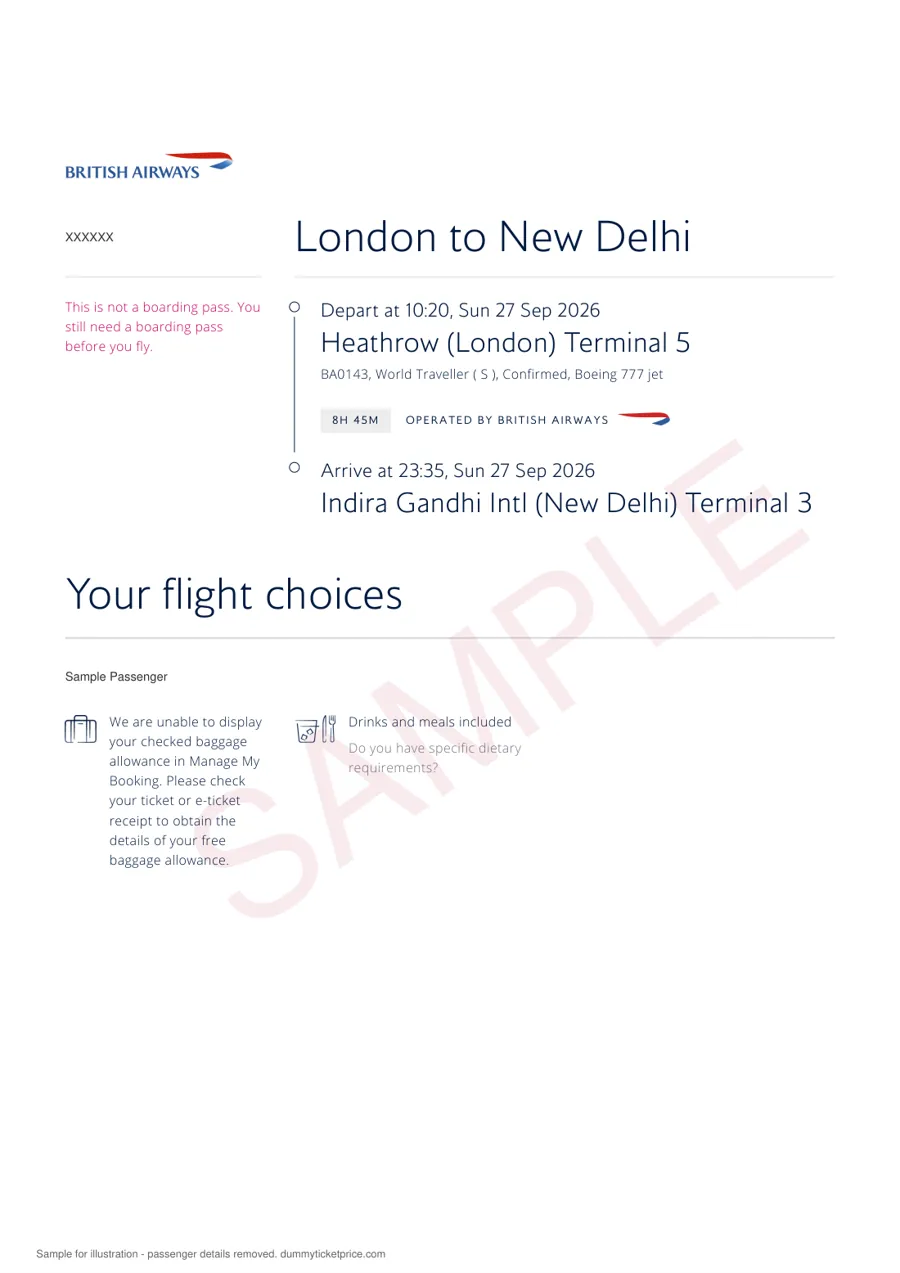
Take the British Airways sample below. One line reads "BA0143, World Traveller ( S ), Confirmed, Boeing 777 jet". In plain English: British Airways flight 143, economy cabin (which BA brands World Traveller), booking class S, seat held as confirmed, flown on a Boeing 777. Above and below that line sit the departure (10:20 from Heathrow Terminal 5) and the arrival (23:35 at Delhi Terminal 3).
How do you read a flight number?
A flight number has two parts. The first is the airline designator, the two-character code IATA assigns to airlines for reservations, schedules, timetables and other commercial uses.[3] BA is British Airways, LH is Lufthansa, EK is Emirates, QR is Qatar Airways. The second part is the number the airline gives that particular service. Travelport describes it simply as the carrier-assigned number that identifies the flight.[1]
Leading zeros don't change anything: BA0143 and BA 143 are the same flight. Some layouts put a space between the code and the number, some don't. When you search a flight-status page, the number usually works with or without the zeros.
What does "Operated by" mean?
It means another airline flies the aircraft. Under codesharing, one airline sells seats on a flight run by a partner, using its own code. In the United States, federal rules require that itineraries clearly identify such flights and that written confirmations state "Operated by" followed by the operating airline's name.[7] You will meet the line on plenty of non-US layouts as well: all three samples in this guide carry one, even where the operator is the selling airline itself.
Why does it matter for a visa file? Mostly for check-in and for verification. A reservation sold under one code may need to be checked on the selling airline's website, not the operator's. Our codeshare guide goes deeper.
What do the three-letter airport codes mean?
They are IATA location identifiers. IATA keeps the official set of three-letter codes for airports, metropolitan areas and intermodal locations worldwide, updated daily.[4] DEL is Delhi, LHR is London Heathrow, MUC is Munich, DXB is Dubai, NRT is Tokyo Narita.
Two habits help. First, read the full airport name printed under the code when there is one, because cities with several airports trip people up. Second, check that the code on your itinerary matches the city in your visa application, hotel bookings and travel insurance. A trip "to Tokyo" that lands at NRT and a hotel near the other Tokyo airport is not a problem in itself, but it's the sort of detail an officer may ask about. Our guide to matching hotel and flight dates covers the knock-on checks.
What is the booking class letter?
It is the Reservation Booking Designator, or RBD. IATA defines it as a categorisation used to give access to inventory, apply filed fares and identify cabin entitlement, "identified using a single alpha character".[5] In other words, the letter tells the airline which bucket of seats and which fare rules apply. Each airline sets its own letters within its cabins, so S on one airline and S on another may mean different fare rules.
On the BA sample, "World Traveller ( S )" shows the cabin name and then the RBD. On a Lufthansa page you might see only "Economy", with the letter hidden. Neither is wrong.
| Term | What it describes | Example on a layout |
|---|---|---|
| Cabin | The physical section of the aircraft: economy, premium economy, business, first | "Economy", "World Traveller" |
| Booking class (RBD) | One letter linking your seat to a fare bucket and its rules[5] | "( S )", "Class W", "Class L" |
| Fare brand | The airline's marketing name for a bundle of rules and extras | Varies by airline and is not standardised |
| Segment status | Whether the seat is held, waitlisted or not available[2] | "Confirmed", HK, HL |
For a visa reservation, the booking class rarely matters. An economy reservation is normal for a tourist file; if you have a reason to show business class, our business class guide discusses when it makes sense.
What do status codes like HK, HL and UN mean?
Status codes describe the state of each segment inside the booking. Travelport publishes examples, and these are the ones you are most likely to meet:
| Code | Travelport meaning | Plain English |
|---|---|---|
| HK | Holding Confirmed | A seat is held for you on this flight |
| HL | Holding Waitlist | You are on the waiting list, no seat yet |
| UC | Unable (segment closed) | The airline could not give a seat |
| SC | Schedule change | The airline changed the timing; check new times |
| PN | Pending | Waiting for the airline to reply |
| BK | Passive segment | A record of a booking held elsewhere |
Most airline pages translate these into words. "Confirmed" usually corresponds to HK. Notice what it does not say: it does not say paid. A booking can be held confirmed before any payment is taken, which is exactly how a reservation for a visa application works.
Don't confuse booking status with flight status. Lufthansa's flight-status data, for example, uses separate codes such as CD for a cancelled flight, DP for departed and LD for landed.[6] Those describe what the aircraft is doing on the day, not the state of your booking.
Are the times on an itinerary local time?
Yes. Departure times are local to the departure airport and arrival times are local to the arrival airport. Lufthansa's developer documentation states it in exactly those terms for scheduled times,[6] and Travelport formats both on a 24-hour clock.[1] So 23:35 is 11.35 pm, and 01:55 is just before 2 am.
This is why flight durations can look odd. In the BA sample, the flight leaves Heathrow at 10:20 and lands in Delhi at 23:35, yet the flight time shown is 8 hours 45 minutes. The clocks in Delhi are ahead of London, so the arithmetic only works once you account for the time difference. Trust the printed duration over your own subtraction.
What does "+1" or a different arrival date mean?
That you land on the next calendar day, local time. Travelport includes a "change of day" indicator among its segment fields for exactly this.[1] On our Emirates sample, flight EK320 leaves Dubai at 22:45 on Friday 6 November and arrives at Tokyo Narita at 13:10 on Saturday 7 November. If your hotel booking in Tokyo starts on the Friday, you've paid for a night you can't use, and if it starts on the Sunday, you have nowhere to sleep on arrival. Line the dates up carefully. Our insurance and itinerary dates guide shows the same check for policy start dates.
How should you read the terminal?
The terminal is an optional field, so some layouts show it and some don't.[1] Lufthansa's data, for instance, can carry a terminal name such as "1" or "C" and a gate.[6] On the samples in this guide you'll see "Heathrow (London) Terminal 5", "Indira Gandhi International Terminal 3" and "Munich International Terminal 2".
Terminals can change between booking and travel. Big airports publish their own lookup tools because airlines move; Heathrow's "Which terminal" page is one example.[8] For a visa reservation the terminal is information, not evidence. For a real journey, check it again on the airport's or airline's site a day before you fly.
How do you read a connection or layover?
A connection is simply two segments in a row, with the arrival airport of the first matching the departure airport of the second. The Lufthansa sample shows Delhi to Wroclaw as two flights: LH763 from Delhi Terminal 3 at 01:55 to Munich Terminal 2 at 06:00, then a 5 hour 20 minute transfer, then LH1630 from Munich at 11:20 to Wroclaw at 12:30. Total journey time is shown as 15 hours 5 minutes.
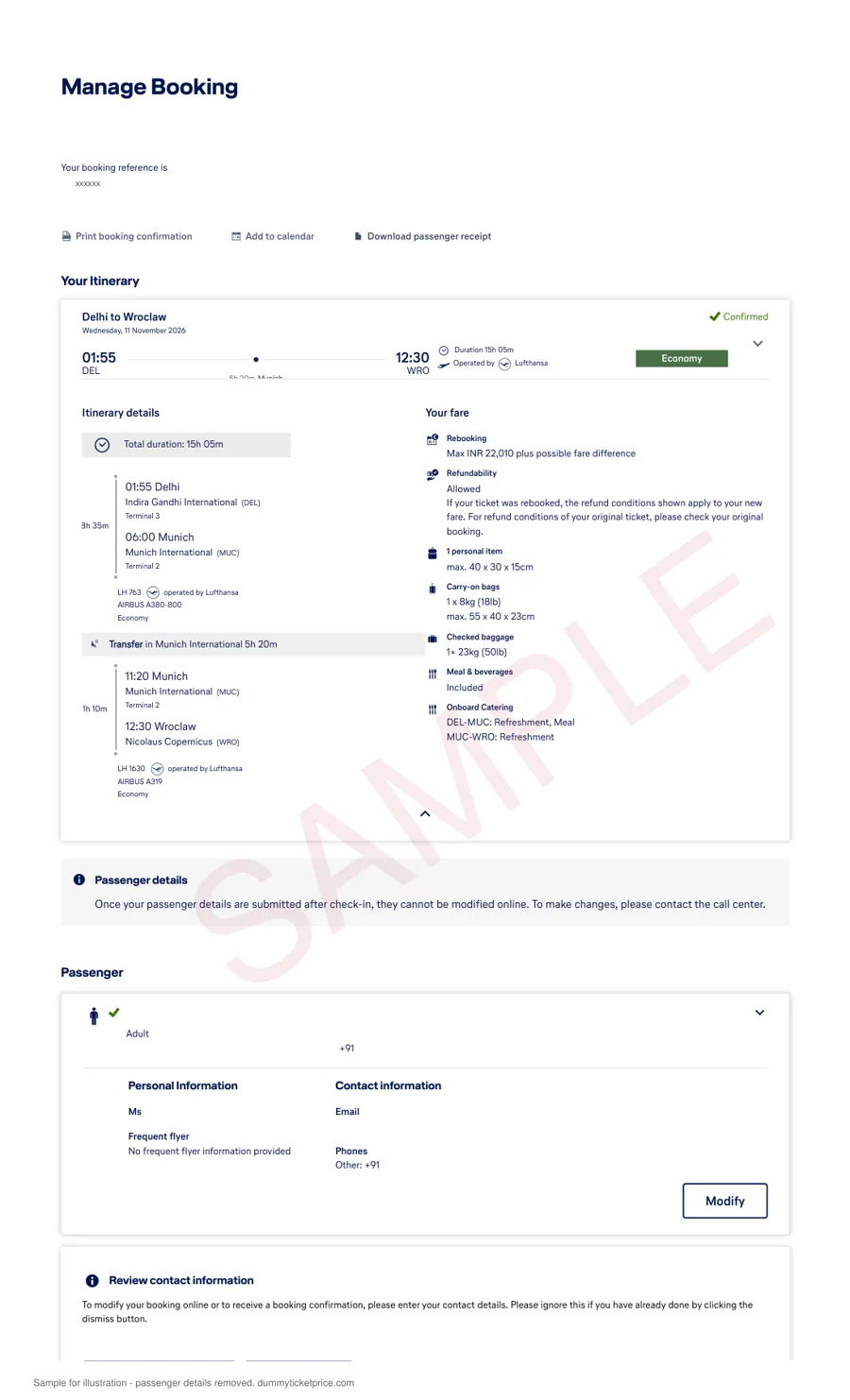
For Schengen applications, the first point of entry matters. In this example the traveller enters the Schengen area at Munich even though the final destination is in Poland. If you're unsure which consulate that points to, our Schengen visa guide explains the main-destination rule, and our open-jaw guide covers trips that fly into one city and out of another.
What should you check before submitting an itinerary for a visa?
Ten minutes with your reservation, passport and application form side by side saves a lot of grief. Work through it in this order:
- Names. Every traveller, spelt exactly as in the passport. Our name format guide covers middle names.
- Entry date. The first arrival date, in local time at the destination, matches the "intended date of arrival" on your form.
- Exit date. The last departure from the country or area matches the form, your hotel checkout and your insurance end date.
- Airports. The codes match the cities you describe in your cover letter.
- Overnight arrivals. Any "+1" or date change is reflected in your hotel dates.
- Status. Each segment shows as held or confirmed, not waitlisted.
- Booking reference. The code opens on the airline's "Manage booking" page with your surname. See how to verify before submission.
- Wording. Your form and cover letter call it a "flight reservation" or "itinerary", not something it isn't.
If your trip covers several countries, our requirements by country page shows what each destination asks for. Where a checklist insists on a paid, issued fare, a held booking might fall short, so follow the checklist or ask the mission.
Getting an itinerary you can check
We book a reservation in your name on the route and dates you choose and send it by email, usually in about 10 minutes, with the airline, flight numbers, times and booking reference set out like the samples above. You can open it on the airline's site with your surname. It is a reservation, not a paid fare, and you can't fly on it. A held booking from us lasts up to 2 weeks; precisely how long is up to the airline, so book a day or two ahead of your appointment.
Per passenger, one way or round trip. Full details are on the price page; the flight reservation for visa page compares this with buying a refundable fare. Need proof of onward travel instead? See our onward ticket page, and for accommodation, our hotel booking service.
Need an itinerary for your visa file?
Real flight numbers and a booking reference you can check. ₹699 / $9 per passenger.
Itinerary questions people ask
Is a flight itinerary the same as a booking?
An itinerary is the readable summary of a booking: flights, dates, times and passengers. The booking itself is the record in the airline's system, found with the booking reference. A typed-up itinerary with no booking behind it is just a plan on paper. One printed from a real reservation can be checked against the airline's records, which is why visa checklists value it.
What does the single letter after the cabin name mean?
It is the booking class, or Reservation Booking Designator. IATA describes it as a single letter used to reach seat inventory, apply fares and identify the cabin. Airlines choose their own letters, so the same letter can mean different fare rules on different carriers. For a visa reservation, the cabin matters far more than the letter.
Why is my arrival time earlier than my departure time?
Because each time is local to its own airport. If you fly west across several time zones, you can land at a clock time earlier than you left. Flying east, the reverse happens and the journey looks longer than it is. Use the printed duration to understand how long you'll actually be in the air.
Does "Confirmed" mean the flight is paid for?
No. "Confirmed" describes the seat: it is held for you in the reservation. In reservation-system shorthand that is usually HK, "Holding Confirmed". Payment is a separate step. A visa reservation is a held booking, so it can show "Confirmed" while being unpaid, and it cannot be used to board.
What if the terminal is missing from my itinerary?
That's normal. Terminal is an optional field in reservation data, and many layouts leave it out, especially for airports with one terminal. It has no bearing on a visa application. For an actual trip, check the airport's own website closer to the date, since airlines sometimes move terminals.
What does "Operated by" mean on a reservation?
It names the airline that actually flies the aircraft when another airline sold the seat under its own code. US rules require written confirmations to state "Operated by" with the operating carrier's name. If you're checking such a booking online, start with the airline whose code appears in the flight number.
Do I need to understand all these codes for a visa?
Not all of them. You need names, dates, airports and a booking reference that opens on the airline's site. The rest helps you spot mistakes, like a next-day arrival that doesn't match your hotel. Spend your time on the checklist above rather than memorising codes.
Sources
All sources last checked: October 2026.
- Travelport, Air Reserved Segment data definitions.
- Travelport, MIR: Waitlisted Segment / Other Air Segment section.
- IATA, Airline Coding Database and Airline and Location Codes.
- IATA, Airport & Location Identifier Database.
- IATA Airline Industry Data Model, Reservation Booking Designator (definition).
- Lufthansa Developer Center, Flight Status Response (scheduled times, terminal, flight status codes).
- US Code of Federal Regulations, 14 CFR 257.5, Notice requirement (codesharing).
- Heathrow Airport, Which terminal.
Related: flight reservation for visa · dummy ticket price · requirements by country · how to verify a PNR.