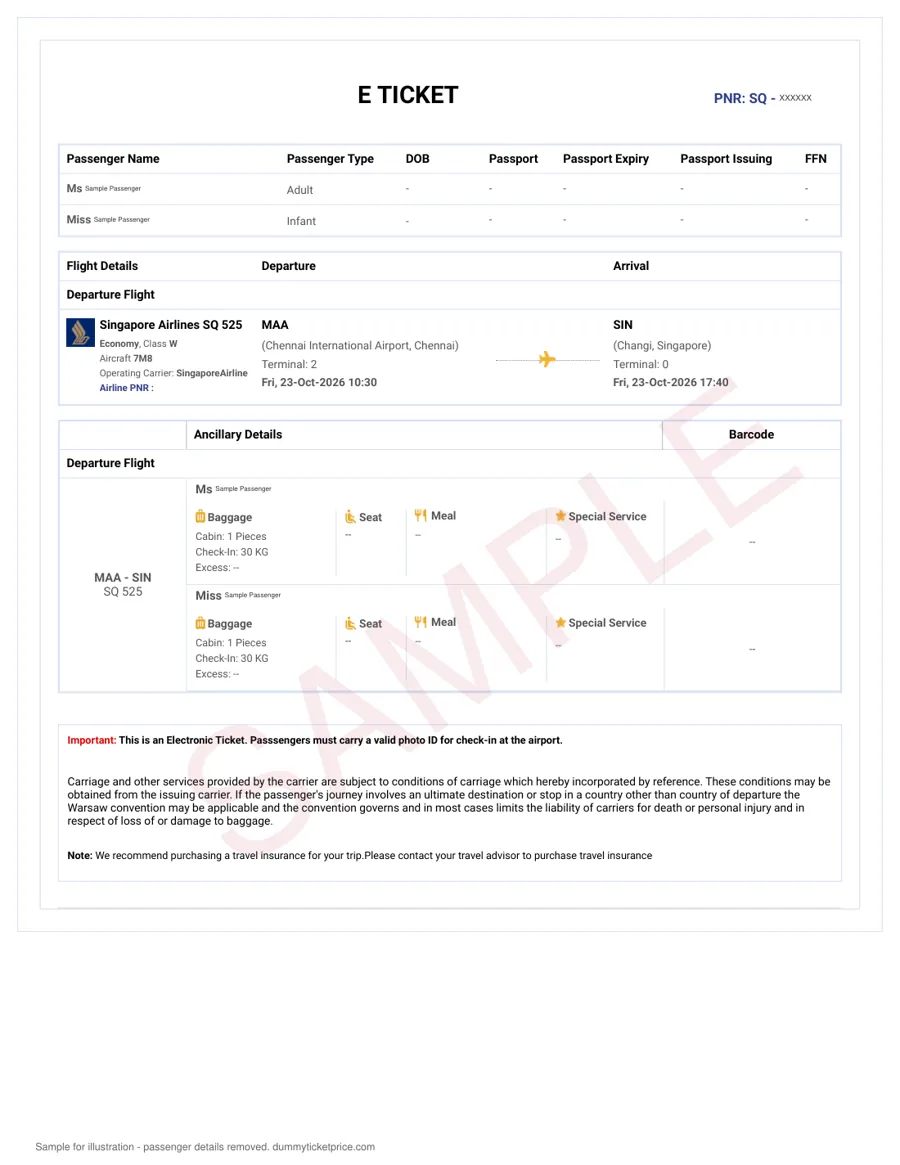
Why the Passenger Name on Your Dummy Ticket Must Match Your Passport Exactly
When you submit a visa application, the consular officer cross-checks every document against your passport bio page. The flight reservation you provide is no exception. If the name on your dummy ticket differs from the name in your passport — even by a single letter, a missing middle name, or a reversed surname order — the officer may flag it as a discrepancy. That flag typically leads to one of two outcomes: a request for corrected documents (adding weeks to your timeline) or a straight refusal under the vague grounds of "insufficient proof of travel arrangements." In the worst case, a mismatch discovered at border control can result in entry denial, because the airline is legally required to board you only if the name on your ticket exactly matches your travel document.
What "Exact Match" Actually Means in Practice
Consular systems and airline departure control systems (DCS) perform automated name-matching. They compare the surname and given names character-by-character, ignoring only spaces and punctuation in most cases. Hyphens, apostrophes, and diacritical marks (like é or ü) are not ignored — they must appear identically. If your passport shows "Maria Anna-Josefina García" and your dummy ticket shows "Maria Anna Josefina Garcia," that is a mismatch. The same applies to single-name passports (common in Indonesia, Afghanistan, or parts of South India): if your passport has only one name, the dummy ticket must show that exact single name in the surname field, with the given-name field left blank or marked "FNU" (First Name Unknown), never split into two names.
Step-by-Step Verification Before You Submit
- Open your passport bio page and write down your surname and given names exactly as printed, including hyphens and accents.
- Compare this against the name fields on your dummy ticket PDF and the PNR confirmation email from the airline.
- Check the order: if your passport lists surname first (e.g., "WANG WEI"), the ticket must show WANG as surname and WEI as given name — not reversed.
- For married names or dual surnames, use the exact sequence printed in your passport, even if your airline loyalty account or booking history uses a shorter form.
- If your passport has a middle name, include it in full on the dummy ticket. Omitting it is a discrepancy.
Common Mismatch Scenarios and How to Avoid Them
| Passport Name Format | Correct Dummy Ticket Entry | Common Mistake |
|---|---|---|
| Single name only (e.g., "SUHARTO") | Surname: SUHARTO, Given name: blank or FNU | Splitting into "SUHA" + "RTO" or adding a random given name |
| Hyphenated surname (e.g., "LOPEZ-HERNANDEZ") | Surname: LOPEZ-HERNANDEZ (hyphen included) | Writing "LOPEZ HERNANDEZ" without the hyphen |
| Two middle names (e.g., "AHMAD BIN YUSOF") | Surname: BIN YUSOF, Given: AHMAD | Dropping "BIN" or treating it as a middle name |
| Transliterated Cyrillic/Arabic (e.g., "MUKHAMMAD") | Use the exact Latin spelling from your passport | Using an alternate transliteration like "MUHAMMAD" |
What to Do If You Already Have a Mismatched Dummy Ticket
If you notice a discrepancy before submitting, do not try to edit the PDF yourself — that renders it invalid. Instead, you usually need a fresh reservation. The reservation is issued exactly as entered, so please check names, dates and route before paying; a new date or correction needs a fresh order. After 24 hours or once the PNR is ticketed, you may need to purchase a new hold. Always request a new PNR and a fresh airline verification link so the consulate can confirm the correction online. Finally, store both the old and corrected versions in your application folder — if asked, you can explain the correction transparently, which officers usually accept.
Remember the core rule: the dummy ticket name format is not a cosmetic detail. It is a data point that must match your passport to the character. Double-check it at three moments — when you receive the PDF, when you attach it to your visa form, and again before you travel.
Middle Names on Dummy Tickets: Full Name vs. Initials and What Embassies Prefer
Middle names are the most common source of mismatches on flight reservations, simply because airline booking systems and visa forms treat them inconsistently. Your passport prints your full legal name, including middle names, but online booking engines often collapse the middle field or force you into a "Given Name" box with a 30-character limit. For a visa officer, the rule is straightforward: the reservation must visibly contain the same name elements as your passport bio page, in the same order, without unexplained abbreviations.
What Embassies Actually Check
Consular staff do not run an automated exact-match algorithm on your dummy ticket name format. Instead, they perform a manual comparison between three documents: the passport bio page, the visa application form (where you typed your name), and the flight itinerary. The key question they ask is: "Can I confidently link this reservation to this applicant?" A middle name printed in full on the passport but shown only as an initial on the booking rarely causes a rejection—as long as the surname and first given name match exactly and there is no unexplained extra name or missing family name. However, omitting the middle name entirely is riskier, because the officer may wonder if the reservation belongs to a different person with the same first and last name.
Practical Guidelines by Passport Scenario
| Passport Name Format | Recommended Dummy Ticket Format | Why |
|---|---|---|
| Full middle name(s) clearly separated (e.g., MARIA ELENA SANTOS CRUZ) | First Name: MARIA ELENA / Last Name: SANTOS CRUZ (or split surname if passport shows two-word surname) | Mirror the passport's given-name block exactly; do not merge into "MARIAELENA." |
| Middle initial only (e.g., ROBERT A. SMITH) | First Name: ROBERT A / Last Name: SMITH | Keep the initial with the given name field; never move it to the surname. |
| Single name (no surname, e.g., SUPRIYADI) | First Name: SUPRIYADI / Last Name: (re-enter SUPRIYADI or use "FNU" per airline convention) | Most airlines require two fields; re-enter the full name in both or use "FNU" (First Name Unknown) consistently with your visa form. |
| Hyphenated middle or compound name (e.g., ANNE-MARIE CLAIRE DUBOIS) | First Name: ANNE-MARIE CLAIRE / Last Name: DUBOIS | Preserve hyphens exactly; do not replace with spaces or remove. |
Step-by-Step Handling for Your Booking Hold
When you request a dummy ticket from a provider or generate a PNR confirmation yourself, follow these steps to avoid name-format pitfalls:
- Photocopy your passport bio page and transcribe the name exactly as printed, including spaces, hyphens, and apostrophes (e.g., O'CONNOR). Do not rely on memory.
- Check the visa application form's name fields first. If the form splits "Given Names" and "Surname," your dummy ticket must use the same split. For example, if the form lists "Given Names: JOSE ANTONIO" and "Surname: RAMIREZ GARCIA," the reservation must show the same grouping.
- If the airline system truncates the middle name (common when exceeding character limits), use the first middle name in full and the second as an initial. Never drop a middle name that appears on your passport if you have only one.
- Request a name-correction receipt from the airline if the provider makes an error. A live PNR with a pending name change is acceptable only if the correction request is timestamped and the original name is still visible.
- For embassy-specific preferences, check the mission's website under "Supporting Documents." Most Schengen, UK, and US guidance says only "name as in passport," but a few (e.g., certain Gulf states) explicitly request the full name with no initials. When in doubt, print the full middle name—it is always the safest format.
Typically, a visa officer will spend under 30 seconds reviewing your itinerary. If the middle name appears as an initial on the booking but in full on the passport, that is usually accepted without a query—provided your first name and surname are unmistakably identical. But if you omit a middle name that is present on the passport, expect a possible request for a corrected reservation, which can delay your application by 3–5 business days. For this reason, the practical default for any dummy ticket name format is: full middle names, exactly as printed on the passport, with initials only when the airline system forces truncation. This approach minimizes the chance of a consular officer flagging your itinerary for manual review.
Practical next step: order a dummy ticket and attach the PDF to the rest of the application.
Need a verifiable dummy ticket for this?
Live PNR you can check on the airline website. From ₹599 / $7, delivered in ~10 minutes.
Handling Hyphenated Last Names and Double-Barrelled Surnames on Dummy Tickets
Hyphenated surnames—whether inherited, adopted after marriage, or combined for cultural reasons—create frequent visa rejections because airline booking systems and consular databases treat hyphens inconsistently. A passport issued in one country may print “Maria Lopez-Garcia,” while the airline’s reservation system might auto-format it as “LOPEZGARCIA” or split it into two separate surname fields. Before you purchase a flight reservation, verify exactly how your passport displays the hyphen, and replicate that character (or its absence) on the dummy ticket.
How Airline Systems Actually Store Hyphenated Names
Most Global Distribution Systems (Amadeus, Sabre, Travelport) store surnames in a single field and typically preserve the hyphen if the ticketing agent enters it correctly. However, some low-cost carriers and online booking engines strip punctuation during payment processing. The safest approach is to check the PNR confirmation email immediately after booking: if the hyphen disappeared, contact the airline or booking agent and request a correction before you submit your visa paperwork. A missing hyphen is usually acceptable if the passport itself omits it, but a present hyphen on your passport that is missing from the dummy ticket can trigger a name-mismatch flag.
Practical Formatting Rules for Double-Barrelled Surnames
- Match the passport character-for-character. If your passport shows “Garcia-Lopez,” your dummy ticket must show “Garcia-Lopez” — not “Garcia Lopez” (space instead of hyphen) and not “Lopez Garcia” (reversed order).
- Keep both parts in the surname field. Do not put the second surname in the given-name field. A dummy ticket that lists “Maria Garcia” as the given name and “Lopez” as the surname will not match your passport.
- Preserve capitalization exactly. “VAN DER BERG” on a passport should not become “Van Der Berg” on the dummy ticket if the passport uses all caps — although most consulates tolerate case differences, they do not tolerate added or removed hyphens.
- For dual passports with different formats, use the passport you will actually travel on and submit with the visa application.
What to Do When the Airline System Rejects the Hyphen
If you book a dummy ticket and the confirmation shows the surname merged (e.g., “LOPEZGARCIA”), you have two realistic options. First, contact the airline’s ticketing desk and request a name correction — most carriers allow free corrections within 24 hours of booking. Second, if the airline cannot preserve the hyphen, order a new dummy ticket from a provider that manually inputs names into the GDS rather than relying on web forms. Always allow at least 48 hours before your visa appointment to catch and fix any formatting errors.
Common Scenarios and Recommended Dummy Ticket Name Format
| Passport Surname Display | Recommended Dummy Ticket Format | Risk Level If Altered |
|---|---|---|
| Garcia-Lopez (hyphen included) | Garcia-Lopez (identical) | High — visa refusal likely |
| GARCIA LOPEZ (space, no hyphen) | Garcia Lopez or GARCIA LOPEZ | Medium — space may be merged |
| GarciaLopez (no separator) | GarciaLopez (one word) | Low — only if passport matches |
| Lopez Garcia (two separate words, no hyphen) | Lopez Garcia (same order) | Medium — reversal causes mismatch |
For married applicants whose passport retains a maiden name with a hyphen (e.g., “Smith-Jones”), ensure the dummy ticket uses that exact surname — do not switch to the spouse’s surname just because the visa form asks for a “current surname.” Consular officers compare the flight reservation against the passport bio page, not against the visa application form’s free-text fields. If your passport was recently renewed and the hyphenated surname changed, book the dummy ticket using the new passport details, not the old one.
Finally, when you receive the PNR confirmation, print it and physically compare each character of your surname against your passport. This takes two minutes and prevents the most common reason for dummy ticket rejection: a single missing hyphen that turns a valid reservation into a name-mismatch document.
Single-Name Travelers: How to Format a One-Word Name on a Dummy Ticket
If your passport shows only a single name—common for citizens of Afghanistan, Bhutan, Indonesia, Myanmar, and parts of South India—you already know the frustration of forcing that name into airline forms with separate “First Name” and “Last Name” fields. The good news: the IATA standard that airlines use for booking engines technically requires two fields, but the industry has a well-established workaround for one-word names. Getting this right on your flight reservation is critical, because a consular officer will compare the name on your itinerary against your passport bio page character by character.
How Airlines Actually Store a Single Name
When you book a dummy ticket or any flight reservation through a travel agent or online portal, the system will ask for a given name and surname. For a single-name passport holder, the correct convention is to enter the full name in the Last Name/Surname field and place a period (.) or sometimes “FNU” (First Name Unknown) in the First Name field. Most major airlines—including Emirates, Qatar Airways, Lufthansa, and Singapore Airlines—will then generate a PNR where the passenger appears as “SURNAME/FNU” or “SURNAME/MR”. This is the accepted format for visa applications.
| Passport Display | Last Name Field | First Name Field | Ticket Display Example |
|---|---|---|---|
| Single name: RAHUL | RAHUL | FNU or . (period) | RAHUL/FNU |
| Single name: DEWI | DEWI | FNU or . (period) | DEWI/FNU |
| Single name with title | DEWI | MR or MRS | DEWI/MR |
Step-by-Step: Booking a Dummy Ticket With a One-Word Name
- Locate your passport’s surname field. On the bio page, check the machine-readable zone (the two lines at the bottom). If the surname field is blank and only the given name appears, you are officially a single-name traveler.
- Enter your full name in the surname field of the booking form. Do not split it—even if your name sounds like two words (e.g., “Aung Ko” written as one word on the passport must stay as one word).
- Use “FNU” in the first name field. Some booking engines reject “FNU”; in that case, type a single period (.) or “XX” depending on the site’s instructions. A reputable dummy ticket service will handle this for you—just tell them your passport shows a single name.
- Verify the PNR after booking. Within 10–15 minutes of receiving your itinerary, check the airline’s manage-booking page. The passenger name should appear exactly as RAHUL/FNU or RAHUL/MR. If the airline displays it differently (e.g., “RAHUL RAHUL”), request a name correction immediately.
What Visa Officers Expect to See
Embassies in Schengen countries, the UK, and the US are familiar with the FNU convention. When you fill out the visa application form, type your single name in the “Surname” box and write “FNU” in the “Given Name” box—matching the dummy ticket exactly. Do not invert the order or add a space to “force” a two-name structure. Some applicants worry that “FNU” looks like an error; it does not. Consular staff see this daily on flight reservations from South Asia and Southeast Asia.
Common Pitfalls to Avoid
- Do not duplicate the name (e.g., “RAHUL RAHUL”) just to satisfy the form—this creates a mismatch with your passport.
- Do not add a middle initial or extra character to make the name look longer.
- Do not use a nickname or shortened version—if your passport says “SUKARNO,” the dummy ticket must say “SUKARNO/FNU,” not “SUKARNO S.”
- Check the airline’s name-change policy before finalizing. Full-service carriers typically allow corrections within 24 hours free of charge; budget airlines may charge a fee even for fixing FNU formatting.
If you are using a paid dummy ticket service, explicitly mention in the order notes that you have a single-name passport. A reliable provider will generate the reservation in the correct format and send you a screenshot of the PNR confirmation so you can verify the name string before submitting it with your visa paperwork. The entire process—from booking to receiving the verifiable itinerary—usually takes under 30 minutes, leaving ample time to review the name format against your passport one last time.
Related guide: Akasa Air Dummy Ticket: How the Reservation Works, PNR Verification and Visa Acceptance.
Transliteration and Special Characters: Names with Accents, Cyrillic, Arabic, or Asian Scripts
If your passport was issued in a country that uses a non-Latin script—Russian, Arabic, Chinese, Japanese, Thai, Greek, or Hindi, for example—the bio page almost always includes a machine-readable zone (MRZ) with your name transliterated into English characters. This MRZ version is the only one that matters for your dummy ticket name format. Consular officers compare the reservation against the MRZ line, not against the script on the visual display.
Step 1: Locate the Official Transliteration
Open your passport to the bio page and look at the two or three lines of tiny, all-capital letters and numbers at the bottom. Your surname and given names appear there in a strict Latin-character format. Write those down exactly, including any << placeholders that separate names. If you have an older passport without an MRZ (rare but possible for pre-2000 documents), request a certified English translation from your embassy or a sworn translator and use that spelling consistently across every form.
Step 2: Handle Accents and Diacritical Marks
Airline reservation systems (Amadeus, Sabre, Galileo) only accept the 26 letters A–Z. They strip accents, umlauts, and tildes automatically. So José becomes JOSE, Müller becomes MULLER, and Rafaël becomes RAFAEL. Your passport's MRZ already does this stripping for you. Do not manually add special characters—if you type JOSÉ into a booking form, the system will either reject it or silently convert it, potentially creating a mismatch with your visa application form, which may still show the accent.
Step 3: Cyrillic, Arabic, and Asian Scripts—Follow the Passport, Not the Pronunciation
For Russian, Ukrainian, Bulgarian, or Serbian passports, the MRZ transliteration follows ICAO standard 9303. For example, the Cyrillic Е becomes E, but Ё becomes E as well (not YO). Similarly, Arabic names often have multiple valid spellings—Mohammed, Muhammad, Mohamed—but only the MRZ version is correct. For Chinese passports, the surname appears first, and the MRZ may not include the comma you see in the visual zone. Always copy the MRZ character-for-character.
| Script on Passport | Visual Display | MRZ / Dummy Ticket Format |
|---|---|---|
| Cyrillic (Russian) | ИВАНОВ | IVANOV |
| Arabic (Egyptian) | محمد | MOHAMMED (check MRZ—could be MOHAMED) |
| Chinese | 王伟 (WANG WEI) | WANG WEI (no comma, no space changes) |
| Greek | ΠΑΠΑΔΟΠΟΥΛΟΣ | PAPADOPOULOS |
| Thai | สมชาย | SOMCHAI (per MRZ, not phonetic guess) |
Step 4: Verify Before You Pay for a Dummy Ticket
When you request a flight reservation from a provider, send them the exact MRZ transliteration. Most reputable dummy ticket services will show you a preview PNR confirmation before finalizing. Check that every letter matches—a single transposed character (e.g., AHMED vs. AHMAD) can trigger a refusal. If your passport has an apostrophe (e.g., O'CONNOR), the MRZ will omit it, so book OCONNOR. If your name contains a space within a surname (e.g., VAN DER BERG), the MRZ may compress it to VANDERBERG—use the compressed version on the dummy ticket, not the spaced version from your visa form.
Finally, request your airline reservation at least 48 hours before your visa interview so you have time to spot and correct any transliteration errors. A live PNR that you can verify on the airline's website will show the name exactly as the consulate will see it—so make that check your last step.
Comparison Table: Name Formats Across Major Passport Issuers (US, UK, Schengen, India, UAE)
Before you submit a dummy ticket with your visa paperwork, check how your passport issuer structures your name. Different countries follow different conventions, and what works for a US citizen may cause a rejection for an Indian passport holder. Below is a quick-reference table based on standard passport issuance guidelines and airline IATA booking rules.
| Passport Issuer | Name Structure on Bio Page | Expected Dummy Ticket Format | Common Pitfall |
|---|---|---|---|
| United States | Given Name(s) + Surname (no middle name field; middle names appear within given names) | First name as shown, middle name as full or initial, surname last | Omitting a second given name that appears on the passport |
| United Kingdom | Surname + Given Names (all given names listed, including middle) | Surname exactly as printed; given names in order, usually full first name + middle initials accepted | Reversing surname and given name order on the booking |
| Schengen (e.g., Germany, France, Italy) | Surname + Given Name(s); accents retained (e.g., Müller, François) | Use exact Latin characters; transliterate accents only if airline system cannot process them | Dropping umlauts or cedillas when the passport retains them |
| India | Surname + Given Name(s); many passports show only "Given Name" with no surname | For single-name passports, repeat the name in surname field or use "FNU" (First Name Unknown) in surname | Leaving surname blank on the flight reservation |
| UAE | Full name in Arabic script + English transliteration; includes "Bin" or "Bint" for patronymics | English transliteration exactly as shown; include "Bin/Bint" as part of the surname | Dropping "Bin" or splitting it as a middle name |
Practical Tips for Matching Your Booking
When generating a flight reservation for a visa application, follow these steps to avoid a mismatch:
- Read the machine-readable zone (MRZ) at the bottom of your passport bio page. The MRZ truncates long names to 39 characters, so always use the full name printed above, not the MRZ abbreviation.
- For US and UK passports, include all given names in the order they appear — typically you can use the first given name in full and middle names as initials, but confirm with the embassy guidelines for your destination country.
- For Indian single-name passports, most airlines require a surname field. The common practice is to enter your single name in both the given name and surname fields, or use "FNU" in the surname field — but check the specific embassy's preference first.
- For UAE passports, keep "Bin" or "Bint" attached to the following name (e.g., "Mohammed Bin Rashid" treated as surname "Bin Rashid" if that is how the passport prints it).
- Always order a verifiable itinerary with a live PNR from a trusted provider, and double-check the booking confirmation against your passport before submission. A small typo in a hyphen or accent can delay your visa processing.
Our guide to the dummy ticket website explains why embassies ask for a reservation rather than a paid ticket.
Step-by-Step: How to Enter Your Name Correctly When Ordering a Dummy Ticket on DummyTicketPrice.com
When you reach the booking form on DummyTicketPrice.com, the name fields look deceptively simple. But the system is strict: it sends your entry straight to the airline’s reservation engine, which generates a live PNR. If you type your name incorrectly, that PNR will carry the error, and your visa officer may reject the itinerary. Here is the exact walkthrough, field by field.
Field 1: First Name (Given Name)
Open your passport bio page. Type only the names that appear in the “Given Names” line. Do not include your surname here, even if your passport lists it second. For example, if your passport reads Given Names: MARIA ELENA and Surname: SANTOS, type MARIA ELENA in the first name field. Do not abbreviate to “M” or “M. E.” — the system will not expand it later.
Field 2: Last Name (Surname)
Copy the “Surname” line exactly. For hyphenated surnames like GARCIA-LOPEZ, keep the hyphen. For double-barrelled names without a hyphen (e.g., VAN DER BERG), include all spaces and particles exactly as printed. The airline system typically accepts up to 30 characters, which covers most surnames.
Field 3: Middle Name (If Present)
DummyTicketPrice.com usually offers a separate middle name field. Enter your full middle name(s) here, not initials. If your passport has no middle name, leave this blank — do not type “N/A” or a period. A stray character in this field can break the PNR match.
Common Pitfalls to Avoid
- Reversing names: Some applicants from cultures that place the surname first (e.g., Chinese passports) mistakenly swap fields. Always follow the passport’s own labeling, not your spoken name order.
- Adding suffixes: If your passport shows “Jr.” or “III,” do not type it unless it appears on the bio page. Most airline systems drop suffixes anyway, and adding one creates a mismatch.
- Using lowercase: The form auto-uppercases, but if you paste text, ensure it is in standard Latin uppercase (A–Z). Special characters like Ñ, É, or Ü should be transliterated per the passport’s machine-readable zone (MRZ).
Verification Step Before Payment
After completing the fields, the system displays a summary. Compare it character-by-character to your passport. A quick checklist:
| Passport Line | Example | Enter As |
|---|---|---|
| Given Names | ANNA MARIE | First Name: ANNA MARIE |
| Surname | JOHANSSON | Last Name: JOHANSSON |
| MRZ Line 1 | P| Use the MRZ order: First = ANNA MARIE, Last = ERIKSSON | |
Once you submit, the dummy ticket is emailed within ~10 minutes. Cross-check the PNR on the airline’s website using your last name and PNR code — if the name appears correctly there, it will match your visa form.
Case Study: How a Name Mismatch Almost Ruined a Schengen Visa—and How It Was Fixed
In late 2024, a frequent traveler from Mumbai—let’s call him Rajesh—applied for a short-stay Schengen visa through the German consulate. His passport showed his name as RAJESH KUMAR NAIR, with “Kumar” as a middle name. When he booked a dummy ticket through a generic online travel agency, the system truncated his middle name to an initial: RAJESH K. NAIR. The airline reservation, delivered as a PDF, looked fine at a glance. It wasn’t.
At the visa submission window, the VFS Global officer flagged the discrepancy within 90 seconds. The itinerary did not match the passport bio page exactly. The officer returned the entire application packet, noting the error in the system. Rajesh was told he could resubmit, but the appointment slot he had waited three weeks for was lost—and the German consulate’s standard processing time of 15 calendar days would restart only after a new slot opened. His travel date, set for six weeks out, suddenly felt tight.
Why the Mismatch Happened
The problem was not with Rajesh’s passport or his visa form—it was with the booking engine’s name-splitting logic. Many low-cost travel portals automatically shorten middle names to initials to match airline ticketing conventions. However, Schengen visa regulations require the name on the flight reservation to match the passport exactly, including middle names written in full. An initial is not an acceptable substitute.
The Correction Process with DummyTicketPrice.com
Rajesh contacted DummyTicketPrice.com support the same evening. Here is the step-by-step fix he followed:
- Submitted a correction request via the support email, attaching a clear scan of his passport bio page and his original PNR confirmation.
- Waited for verification—the team typically confirms receipt within 15 minutes and processes name corrections within 30–60 minutes during business hours.
- Received a reissued reservation with the full name RAJESH KUMAR NAIR in the passenger field, plus a new live PNR that he could verify directly on the airline’s website.
- Re-booked his visa appointment—the revised itinerary was accepted without further issue at the next available slot, which came two weeks later.
Notably, DummyTicketPrice.com does not charge a fee for correcting a name error if the mistake originated from their booking form. However, if a customer enters the wrong name themselves, a small reissue fee (typically ₹199 or $3) applies. The entire correction process usually completes within the same day, but if your appointment is within 48 hours, contact support immediately via live chat rather than email.
Key Takeaways from This Case
| Mistake Made | Consequence | Correction Time |
|---|---|---|
| Middle name shortened to initial | Application rejected at submission | 1–2 hours on DummyTicketPrice.com |
| Booking made on a portal with auto-truncation | Lost appointment slot, 3-week wait | N/A—had to rebook |
| Name checked only visually, not character-by-character | Missed the missing “KUMAR” | 5 minutes to cross-check |
The lesson is straightforward: always compare your dummy ticket name format against your passport bio page, character by character, before you submit. If you spot a mismatch, do not attempt to fix it at the consulate—correct the itinerary first. A verified, properly formatted flight reservation from DummyTicketPrice.com would have prevented this entire ordeal, and the same applies to any booking hold you generate elsewhere.
Related guide: Proof of Onward Travel: Meaning, Required Countries & How to Get One (2026).
7 Name-Formatting Mistakes That Get Dummy Tickets Rejected by Embassies
Even when you book a genuine, verifiable flight reservation, a single character out of place in the passenger name can trigger an automatic rejection or a request for additional documentation. Consular officers rarely have discretion to overlook a name mismatch—their systems flag it immediately. Here are the seven most frequent errors that get itineraries bounced, and how to sidestep each one.
Mistake 1: Swapping Surname and Given Name Order
Passport-issuing countries list names in different orders. If your passport places the family name first (common in China, Japan, Hungary, and Vietnam), but the airline form asks for “First Name / Last Name,” you must map the fields correctly—not copy the passport line verbatim. A booking that lists your surname in the given-name field will not match the machine-readable zone (MRZ) at the bottom of your passport page.
Mistake 2: Omitting the Middle Name Entirely
If your passport includes a middle name, it must appear on the dummy ticket in the same position—not dropped, not relocated. Many travelers assume only first and last names matter. They don’t. A visa officer cross-checking your reservation against your bio page will see the omission instantly. Include the full middle name exactly as printed, even if your airline loyalty account omits it.
Mistake 3: Using an Initial When the Passport Shows the Full Name
The reverse error is equally common: passengers abbreviate a middle name to an initial to fit the booking form. Unless your passport itself shows only the initial (rare, but possible in some Gulf states), this creates a mismatch. The reservation must mirror the passport, not your usual signature.
Mistake 4: Hyphen Errors in Double-Barrelled Surnames
If your passport shows “Garcia-Lopez” with a hyphen, the dummy ticket must reproduce that hyphen exactly. Writing “Garcia Lopez” (space) or “Garcialopez” (no separator) will cause a rejection. Conversely, if your passport shows two surnames without a hyphen—common in Spanish-language passports—do not add one yourself.
| Passport Shows | Correct on Dummy Ticket | Rejected Format |
|---|---|---|
| Maria Ana Santos-Dominguez | Maria Ana Santos-Dominguez | Maria Santos Dominguez |
| Chen Wei Ming | Given Name: Wei Ming / Surname: Chen | Given Name: Chen / Surname: Wei Ming |
| Anand Kumar (single name) | Given Name: Anand Kumar / Surname: FNU | Surname left blank |
Mistake 5: Typing “FNU” or “LNU” Incorrectly
For single-name travelers, many booking systems require a surname field. The standard workaround is “FNU” (First Name Unknown) in the surname field, or “LNU” if the single name is your surname. The dummy ticket must show the same convention consistently across booking confirmation and PNR. Do not alternate between FNU and LNU across documents.
Mistake 6: “Name as per Passport” vs. “Name as per Airline Ticket” Mismatches
Some travelers book a flight reservation through an agent who transliterates the name differently from the passport. For example, a Cyrillic passport showing “Dmitrii” may be rendered “Dmitriy” by the airline system. Always compare the exact Latin-script spelling in your passport’s MRZ against the booking confirmation before payment.
Mistake 7: Silent Character Changes in Special Characters
Passports with accented characters (é, ü, ñ) or non-Latin scripts cause particular trouble. If your passport shows “José” with an accent, the dummy ticket must either include the accent (if the airline system supports it) or drop it consistently—but never replace it with a different letter. A booking showing “Jose” when the passport has “José” is usually accepted; “Jösé” is not. For Cyrillic or Arabic names, ensure the transliteration matches the passport’s English line, not a phonetic guess.
Before submitting any application, print your booking confirmation and hold it beside your passport bio page. Check every character, space, and hyphen. If your travel agent or the booking portal flags a name issue, ask them to reissue the dummy ticket immediately—most reputable providers, including DummyTicketPrice.com, will correct errors within minutes if you catch them before the PNR is finalized.
Frequently Asked Questions About Dummy Ticket Name Formats
1. What happens if my dummy ticket name doesn’t match my passport exactly?
Consular officers typically cross-check the passenger name on your flight reservation against the machine-readable zone (MRZ) of your passport bio page. Even a single transposed letter, an omitted middle name, or an added suffix can trigger a manual review or, in stricter jurisdictions, an outright refusal. If you notice a mismatch after receiving your itinerary, contact the provider immediately—most reputable services, including DummyTicketPrice.com, offer a free correction window of usually 24 to 48 hours after issuance. Beyond that window, a fresh booking may be required, which typically costs the same as the original. Always proofread the PNR confirmation against your passport before submitting your visa file.
2. Should I use my full middle name or just the initial on the booking hold?
Embassies generally prefer the full middle name as printed on your passport, because that is what appears in the MRZ and on the visa sticker itself. Using only an initial can create a discrepancy if your passport spells out the middle name in full. For example, if your passport reads “JOSE ANTONIO SANTOS,” a reservation showing “JOSE A SANTOS” may be flagged. However, some airline systems truncate names at 20–25 characters; in that case, the provider should still include the full middle name in the passenger record (PNR) even if the e-ticket receipt shows an abbreviated version. When in doubt, request a screenshot of the airline’s internal booking view, not just the PDF summary.
3. My last name has a hyphen, like “Garcia-Lopez.” How do I enter it on the form?
Enter the hyphen exactly as it appears on your passport—do not remove it or replace it with a space. Most modern airline reservation systems handle hyphens without issue, and the PNR will display “GARCIA-LOPEZ” as a single surname field. If your passport shows the surname without a hyphen (e.g., “GARCIA LOPEZ” as two words), then replicate that spacing. The critical rule is to mirror the passport’s MRZ character-for-character, including punctuation and spacing. If your passport uses a double-barrelled surname joined by “Y” (common in Spanish-speaking countries), type that “Y” as well. Never merge or split names to “simplify” them—that creates a mismatch.
4. I have only one name on my passport. What should I put in the first and last name fields?
For single-name travelers, the standard practice is to place your entire name in the surname (last name) field and enter “FNU” (First Name Unknown) or “F” in the given-name field, depending on the airline’s requirement. This matches how many immigration systems, including the U.S. ESTA and Schengen VIS, handle mononymic passengers. However, some embassies prefer the full single name in the given-name field with “LNU” (Last Name Unknown) in the surname field—check the specific consulate’s guidance if available. A reliable dummy ticket provider will ask you to select your country of passport issuance and automatically format the name fields accordingly. After booking, verify that the PNR confirmation shows your single name exactly once, with no duplicated or split entries.
5. Can I correct a typo in my name after the dummy ticket is issued?
Yes, but the process and cost depend on the airline and the fare type used for the booking hold. Most providers can process a name correction within 24 hours of issuance at no charge, since the reservation is still in the “option” or “hold” stage. After that, airlines typically allow minor corrections (up to 3 characters changed) for a fee, usually between $25 and $75, but major changes—like swapping the first and last name—require a full cancellation and rebooking. For visa purposes, never attempt to submit a ticket with a known typo and an explanation letter; consulates rarely accept such exceptions. Always re-read the booking confirmation aloud against your passport before paying, and if you spot an error, contact support immediately via email or live chat.
6. How do consulates verify that the name on my itinerary is real?
Visa officers typically verify flight reservations in one of three ways: by checking the PNR directly in the airline’s booking system using the record locator, by calling the airline’s verification desk, or by using the IATA (International Air Transport Association) verification portal available to consular staff. The name check is automated in most cases—the system compares the MRZ of your passport scan against the passenger name in the PNR. A genuine dummy ticket with a live PNR will pass this check because the name is tied to an actual booking in the airline’s database. However, a screenshot of an itinerary from a travel agency without a verifiable PNR will fail immediately. Always choose a provider that gives you a PNR you can check on the airline’s own website, and keep the booking active until your visa decision is rendered.
| Scenario | Passport MRZ Display | Correct Dummy Ticket Entry | Common Mistake |
|---|---|---|---|
| Full middle name | JOSE ANTONIO SANTOS | First: JOSE ANTONIO / Last: SANTOS | First: JOSE A / Last: SANTOS |
| Hyphenated surname | MARIA GARCIA-LOPEZ | First: MARIA / Last: GARCIA-LOPEZ | First: MARIA / Last: GARCIA LOPEZ |
| Single name | PUTRI (no surname) | First: FNU / Last: PUTRI | First: PUTRI / Last: PUTRI |
| Accented character | FRANÇOIS DUBOIS | First: FRANCOIS (if airline lacks Ç) / Last: DUBOIS | First: FRANÇOIS with special char rejected |