Qantas Dummy Ticket vs. Real Booking vs. Refundable Fare: What a Visa Officer Actually Sees
When you submit your visa paperwork, the embassy or consulate doesn't just glance at the paper you printed. Most visa systems (including Australia's ImmiAccount and the UK's Visa4UK portal) now run electronic checks against the airline's reservation database. Here's what each option looks like from the officer's side of the screen.
1. The Qantas Dummy Ticket (Live PNR Reservation)
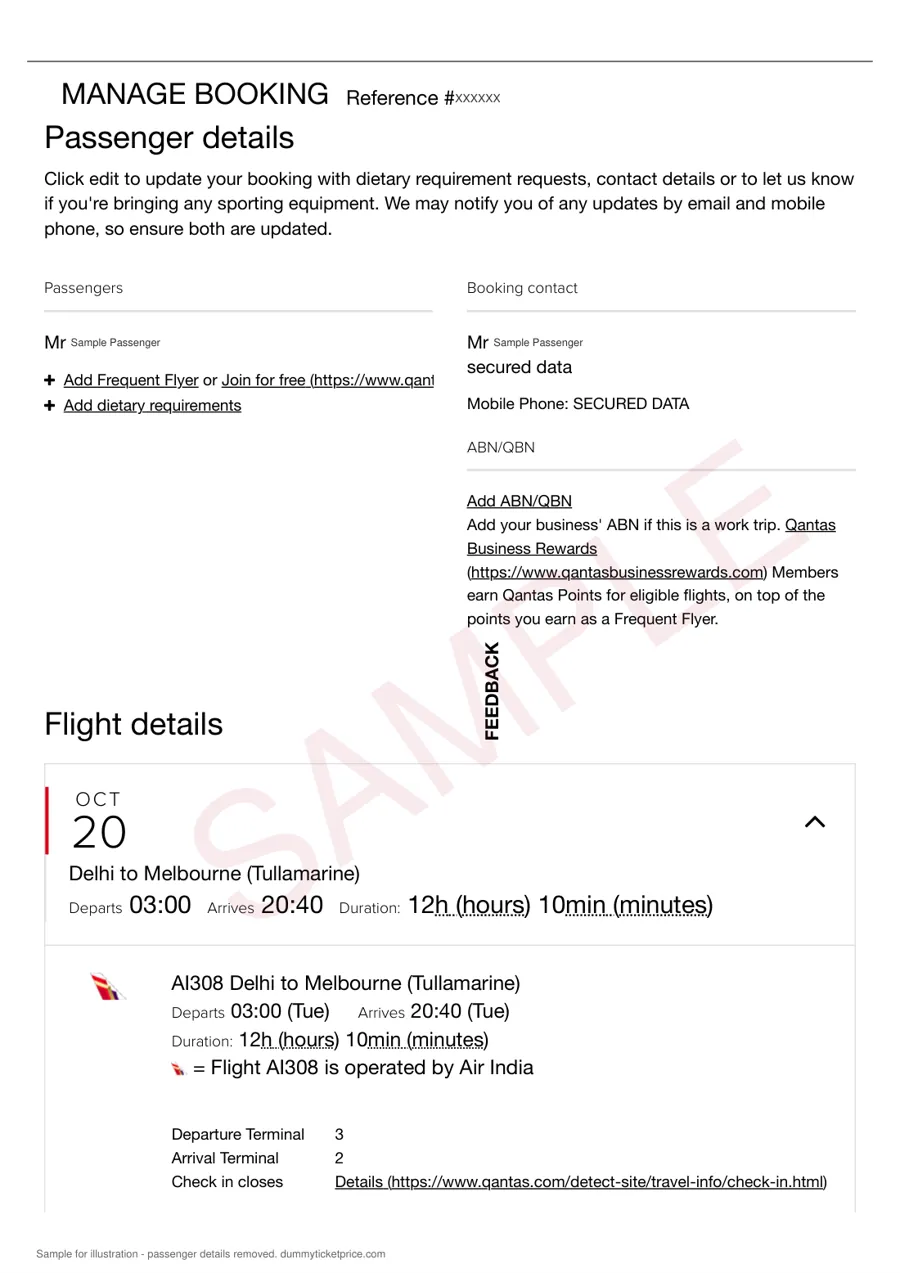
A legitimate dummy ticket from a service like DummyTicketPrice.com is not a "fake" document — it is a genuine Qantas booking hold created in the airline's GDS (Global Distribution System). When the officer queries your PNR (e.g., using the 6-character code on your itinerary), the system returns:
- Status: "Confirmed" or "On Hold" (typically HK for hold-confirmed, not waiting list)
- Passenger name: Exactly as on your passport
- Flight numbers and dates: Matching your intended travel window
- Fare basis: Usually a flexible economy class code (e.g., "Y" or "B")
- No payment marker: The fare column shows "TICKET NOT ISSUED" or "UNPAID"
Critically, the officer sees that a real seat is blocked for you. Many Australian visitor visa (subclass 600) applications are granted with exactly this type of reservation, because the officer only needs to verify your intent to depart — not that you've already spent money on a non-refundable ticket.
2. The Real Paid Booking
A fully ticketed Qantas fare shows a different screen. The officer sees:
- Status: "Ticketed" with a 13-digit e-ticket number (e.g., 081-1234567890)
- Payment: "PAID" or "CARD CHARGE" in the fare field
- Non-refundable flag: Often visible in the fare rules (e.g., "NON-REF" for non-refundable)
While this looks strongest on paper, it carries real financial risk. If the visa is refused or delayed, you may only get a Qantas credit voucher (minus a cancellation fee, typically AUD 200–400 for international flights), not your money back. And if you book a non-refundable fare and your interview date shifts, you're stuck.
3. The "Refundable Fare" from Booking Sites
Many travel agencies sell "fully refundable" tickets at a premium (often 2–3× the standard fare). Here's the catch: these are usually actual paid tickets, and the refund process can take 7–14 business days after cancellation. The officer sees a ticketed booking — indistinguishable from any other paid fare — but you've tied up significant capital. Also, some third-party sites list "refundable" fares that are only refundable as travel credit, not cash.
Side-by-Side Comparison
| What the Officer Sees | Qantas Dummy Ticket (PNR hold) | Real Paid Ticket | Refundable Fare |
|---|---|---|---|
| Booking status | Confirmed (HK) / On hold | Ticketed (confirmed) | Ticketed (confirmed) |
| Payment indicator | UNPAID / Not issued | PAID | PAID (often at premium) |
| Risk to applicant | Low — no money spent | High — non-refundable loss | Medium — cash tied up for weeks |
| Typical validity of hold | 7–14 days (extendable) | Until travel date | Until cancellation |
| Visa refusal impact | Let it expire, no cost | Lose fare or pay penalty | Refund after processing delay |
Practical Advice for Your Application
For most applicants, the dummy ticket with a live PNR is the smart middle ground. It satisfies the officer's requirement for a verifiable itinerary without gambling hundreds of dollars before your visa outcome. When you receive your PNR confirmation, double-check the name spelling against your passport — a single mismatch can trigger a manual review. Also, keep the booking active until you've collected your visa; if the officer re-checks your PNR during processing (which can happen up to the day of decision), an expired hold could raise questions.
Anatomy of a Valid Qantas Dummy Ticket: PNR, Passenger Name, and Date Consistency
A Qantas dummy ticket only serves its purpose if every element aligns with the rest of your visa application. Visa officers cross-check the flight itinerary against your passport, bank statements, and cover letter. A single mismatch—a misspelled surname, a date that contradicts your hotel booking—can trigger a request for additional documentation or, worse, a refusal under Section 40 of the Migration Regulations (for Australian visas) or similar provisions in other jurisdictions. Here is the breakdown of what must be internally consistent.
The PNR: Not a Random String of Characters
The Passenger Name Record (PNR) is a six-character alphanumeric code (e.g., K7M2PL) stored in Qantas’s reservation system (Sabre). This code is your proof that the itinerary exists in the airline’s live database. A valid Qantas dummy ticket will display a PNR that:
- Is active for at least 7–14 days after issuance. Most visa officers check PNRs within a 72-hour window of your interview, but some Australian or Schengen cases are reviewed in batches. If your reservation expires before adjudication, the officer sees a cancelled record.
- Matches the passenger’s passport exactly. The PNR is linked to the name field. If your passport says "Katarina Anna Müller" but the ticket says "Katarina Muller," the PNR may still pull up, but the name mismatch is a red flag.
- Reflects a valid ticketing time limit. A genuine dummy ticket from a provider like DummyTicketPrice.com holds the reservation without ticketing for 48–72 hours, then auto-cancels. Your PNR confirmation page should show the fare basis code and booking status as "HK" (holding confirmed) or "RR" (requested), not "XX" (cancelled) or "UN" (unable).
Do not confuse a PNR with an e-ticket number (which starts with 081 for Qantas). A PNR is a booking reference; the e-ticket is issued only after payment. Visa applications require the PNR confirmation, not the paid ticket—unless you are applying for a transit visa that demands proof of onward travel within 24 hours.
Passenger Name Consistency: The #1 Cause of Rejection
Your name on the Qantas dummy ticket must be an exact mirror of your passport’s machine-readable zone (MRZ). This means:
| Field | Passport Example | Valid on Qantas Dummy Ticket | Invalid (Rejection Risk) |
|---|---|---|---|
| Surname | VAN DER BERG | Van Der Berg | Vanderberg or V.D. Berg |
| Given name | JOSE MARIA | Jose Maria | Jose M. or Jose |
| Name suffix | JR | Jr | Junior or omitted |
For double-barrelled surnames, include the space or hyphen exactly as printed. If your passport has no middle name, do not invent one on the dummy ticket. Some travel agents add a middle initial to match a bank card—this will fail the cross-check. If you have recently changed your name (e.g., marriage), the ticket must reflect the passport you are submitting, not the old one.
Date Consistency Across Your Entire Application
The travel dates on your Qantas dummy ticket must synchronize with three external documents: your visa application form (Form 1419 for Australia, Schengen application form for Europe), your hotel reservation, and your travel insurance policy. A common error is booking a dummy ticket for a 14-day trip but submitting a visa application that requests a 30-day stay. Officers will see the mismatch and assume you fabricated the itinerary.
Follow this practical sequence when creating or verifying your dummy ticket:
- Decide your intended entry and exit dates before generating the PNR. Work backwards from your actual travel plans, not the other way around.
- Ensure the Qantas flight arrives at your first port of entry at least 24 hours before any hotel check-in you have documented. If you land on 10 June but your hotel booking starts 12 June (because you planned a stopover), the gap is fine—but you must include a separate accommodation booking for the first night.
- Check that your return flight (if it is a round trip) departs on or before your visa’s proposed expiry. Most tourist visas grant 3–6 months, but your itinerary should not show a return date beyond the visa validity you are requesting.
- Cross-check the PNR’s "date of issue". The dummy ticket must be issued after you have collected your bank statements and before you submit the application. A PNR issued three weeks before submission may still be in the system, but officers may question why you booked so early without a confirmed visa.
One final warning: never alter the PNR confirmation page with photo-editing software. Qantas’s system allows visa officers to retrieve the live PNR via a secure portal. If your edited version contradicts the live record, the application is automatically flagged. A legitimate dummy ticket—even one that expires in 72 hours—is verifiable at the moment of submission. That consistency is what separates a usable placeholder from a fraudulent document. Keep the PNR, the name, and the dates in perfect alignment, and your flight reservation will serve its purpose without drawing negative attention.
Applicants at this stage usually order a verifiable dummy ticket and attach the PDF to the rest of the application.
Need a verifiable dummy ticket for this?
Live PNR you can check on the airline website. From ₹599 / $7, delivered in ~10 minutes.
Step-by-Step: How to Order a Verified Qantas Dummy Ticket from DummyTicketPrice
Ordering a verifiable Qantas flight reservation through DummyTicketPrice takes roughly ten minutes from start to finish, provided you have the correct travel details on hand. The process is intentionally streamlined, but skipping any of the verification steps below can delay your PDF or cause the airline to cancel the booking hold before you submit your visa paperwork.
Before You Start: What You Must Prepare
Gather these exact details before opening the order form. A mismatch between your passport and the reservation is the most common reason a visa officer rejects an itinerary.
- Passport name — exactly as printed on the bio page (including middle names or suffixes).
- Proposed travel dates — depart and return. If you are applying for a single-entry visa, a one-way hold is usually sufficient, but many applicants order a round-trip reservation to demonstrate intent to return.
- Qantas flight numbers — if you already know which flights you will take. If not, the service selects the next available Qantas service on your route.
- Valid email address — the PDF and PNR confirmation are sent there. Double-check for typos.
The Order Process in Five Steps
- Open the booking page. Navigate to the order form at the DummyTicketPrice booking URL. You will see fields for passenger name, date of birth (if required by the destination country), nationality, passport number, and travel dates.
- Select Qantas as the airline. The service supports multiple carriers. Choose Qantas from the dropdown so the system generates a valid QF flight number and checks real-time seat availability.
- Choose your fare class. You may select Economy, Premium Economy, Business, or First. The fare class shown on the PDF does not affect visa validity, but it should match your financial documents if you are claiming you will fly business class.
- Pay the service fee. The standard rate is ₹599 or $7 per passenger. Payment is processed through the secure checkout link. You do not pay the airline at this stage — this is a booking hold, not a purchased ticket.
- Receive and verify your PDF. Typically, the itinerary arrives within 10 minutes, though during peak visa season (April–June and September–November) it may take up to 30 minutes. The email contains two attachments: the Qantas itinerary receipt and a separate verification note explaining how to check the PNR on the airline’s website.
What You Receive and How to Confirm It Is Live
The PDF you receive is not a static mock-up. It includes a 6-character PNR (e.g., K7L2MQ) that is active in Qantas’s reservation system. To verify independently, open the Qantas “Manage Booking” page and enter the PNR along with the passenger’s last name. You should see the exact flight segments, times, and the status “Confirmed” or “On Hold.”
| Detail in Your PDF | What to Check | Typical Timeframe |
|---|---|---|
| Passenger name | Matches passport exactly | Checked at order submission |
| Flight numbers | Start with QF and match real Qantas routes | Visible immediately in email |
| PNR status | “Confirmed” on Qantas Manage Booking | Usually live within 10–30 minutes |
| Validity of hold | Reservation held for 14–21 days depending on fare rules | Check before your visa interview date |
After You Receive the PDF: Next Steps
Do not submit the itinerary immediately. Open the Qantas verification page and screenshot the booking details showing the PNR and your name. Save both the PDF and the screenshot as separate files — some visa portals require a PDF upload, while others accept only images. If your visa appointment is more than two weeks away, check the “last date to ticket” field on the Qantas page. If the hold expires before your interview, re-order a fresh reservation or contact support to extend the hold, which is usually possible for an additional small fee.
How to Verify Your Qantas Dummy Ticket PNR on qantas.com and GDS Systems
Before you submit your visa application, you should confirm that the flight reservation you purchased is genuine and active. A legitimate PNR confirmation from Qantas will return a valid itinerary when checked through official channels. Here is how to verify your booking hold on both Qantas’ own website and professional travel systems.
Step 1: Check the PNR on the Official Qantas Website
The quickest and most reliable method is to use Qantas’ “Manage Booking” portal. You will need your six-character PNR (also called a booking reference) and the last name of the primary passenger exactly as it appears on the passport.
- Go to qantas.com and click on “Manage Booking” or “My Trips” in the top navigation.
- Enter your PNR (e.g., ABC123) and the passenger’s surname.
- Click “Search” or “Retrieve Booking.”
- If the reservation is valid, the system will display the full itinerary, including flight numbers, dates, times, and passenger names.
What to look for: The itinerary must match the dates and route you submitted in your visa application. A live PNR will also show a status of “Confirmed” or “Ticketed” if a ticket has been issued, or “On Hold” if it is an unpaid reservation. For a dummy ticket, “On Hold” is standard and acceptable for most visa applications, provided the hold has not expired.
Step 2: What If the PNR Does Not Appear?
If you receive an error message or “No booking found,” do not panic immediately. There are three common reasons:
- The PNR may be case-sensitive or contain characters like “0” (zero) versus “O” (letter). Double-check every character.
- The last name may have a typo or mismatch (e.g., using a middle name instead of the surname). Try variations that match your passport.
- The reservation hold may have expired. Qantas dummy tickets from third-party providers typically hold for 7 to 14 days, but this varies. If the hold lapsed, you will need to request a new reservation.
If all else fails, contact the provider you purchased the dummy ticket from. A reputable service will reissue the PNR or confirm the exact expiry date.
Step 3: Verify Through a GDS (Global Distribution System)
Travel agents and visa officers often use GDS platforms like Amadeus, Sabre, or Travelport (which includes Galileo and Worldspan). You can ask a licensed agent to run a “Display PNR” or “Retrieve PNR” command using your booking reference. This is not something you can do for free on public websites, but many visa consultants will perform this check for a small fee or as part of their service.
The GDS will show the same itinerary data as qantas.com but with additional technical fields, such as the ticket status (e.g., “TKOK” for ticketed or “HK” for holding) and the last date to ticket. This level of verification is usually only necessary if a visa officer specifically requests a GDS printout, which is rare for standard tourist visas.
Comparison of Verification Methods
| Method | Cost | Time to Result | Shows Hold Expiry? |
|---|---|---|---|
| Qantas “Manage Booking” | Free | Instant (30 seconds) | Yes (under booking details) |
| GDS via travel agent | Usually ₹200–₹500 or $5–$10 | Same day, often within minutes | Yes, plus technical status codes |
| Qantas phone support (call center) | Free (international call charges may apply) | 5–10 minutes on hold | Yes, but agents may not discuss third-party holds |
Step 4: Save the Verification Evidence
Once you confirm the PNR is live, take a screenshot of the qantas.com itinerary page showing the URL, your PNR, and the flight details. Save this as a PDF and include it with your visa documents. Some embassies accept this as proof of onward travel, while others only require the original dummy ticket PDF. Always keep both files ready.
A final note: never alter a PNR or itinerary PDF. Visa officers have direct access to Qantas’ booking database and can instantly see if a reservation was modified, cancelled, or fabricated. A genuine, verifiable flight reservation is your best defense.
Related guide: Dummy Ticket for Luxembourg Visa: Flight Reservation Requirements, Process and Mistakes to Avoid.
Comparison Table: DummyTicketPrice vs. Other Qantas Dummy Ticket Providers
Choosing where to buy a Qantas flight reservation for your visa application comes down to a few practical variables: cost, how fast you receive the itinerary, whether the PNR actually stays live long enough for embassy verification, and how much help you get if something goes wrong. The table below compares DummyTicketPrice with the typical alternatives you will find online—generic itinerary generators, travel agency “on-hold” services, and freelancer listings on marketplaces.
What You Are Actually Paying For
A genuine Qantas dummy ticket is not a screenshot or a PDF template. It is a real booking placed in the Qantas reservation system (often via a GDS like Sabre or Amadeus) that generates a 6-character PNR. That PNR is what a visa officer checks on qantas.com under “Manage Booking.” The price you pay reflects whether that PNR is issued, held, and retrievable.
| Provider Type | Typical Price (per passenger) | Delivery Time | PNR Validity (hold period) | Verification Support |
|---|---|---|---|---|
| DummyTicketPrice | ₹599 / $7 flat | ~10 minutes via email | Usually 14–21 days, stated on the itinerary | Yes—live PNR check on qantas.com before submission; email support for corrections |
| Generic PDF itinerary generators | ₹200–₹500 / $3–$6 | Instant (automated) | None—fake PNR, not in any airline system | No—cannot be verified; high visa rejection risk |
| Travel agency “on-hold” tickets | ₹1,500–₹4,000 / $20–$50 | Usually 1–24 hours (depends on agent hours) | Typically 3–7 days unless you pay to extend | Often yes, but only during business hours; may charge extra for re-issuance |
| Freelancer marketplace sellers | ₹800–₹2,000 / $10–$30 | Varies—30 minutes to 48 hours | Unpredictable; some hold 24 hours only, others up to 14 days | Inconsistent—relies on seller availability; no formal correction process |
Why the Hold Period Matters for Your Visa Timeline
Embassies do not verify your Qantas reservation the moment you upload it. In practice, case officers for Schengen, UK, US, or Australian visas often check PNRs a few days after submission, sometimes during the interview or via a separate verification request. If your provider only holds the booking for 72 hours, your PNR could be dead by the time it is checked. DummyTicketPrice typically sets a hold of 14 to 21 days, which covers the most common gap between filing and adjudication. If your visa appointment is more than three weeks away, you should contact support before ordering to confirm whether a longer hold is possible.
Delivery Speed and Format
When you order from DummyTicketPrice, you receive a PDF itinerary attachment plus the 6-character PNR in the email body. The document includes the Qantas booking reference, passenger name exactly as on the passport, flight numbers, dates, and departure/arrival times. Generic generators often produce a visually similar PDF, but the PNR field is fabricated—typing it into qantas.com returns “Booking not found.” That distinction is the entire difference between a supporting document and grounds for refusal.
Support and Corrections
Mistakes happen—a misspelled passenger name or wrong date will invalidate a dummy ticket. With DummyTicketPrice, you can reply to the order email and request a correction; re-issuance is typically handled within a few hours on the same business day. Travel agencies may offer this too, but usually for an additional fee. Freelancers and PDF generators almost never correct errors after sale, leaving you to order a second ticket and pay twice.
Practical Recommendation
For most applicants, the decision narrows to: pay a little more for a verifiable, held-in-the-system Qantas reservation with a reasonable validity window, or risk a cheap fake that a visa officer can detect in under a minute. DummyTicketPrice fits the first category at a price comparable to a meal out, with the PNR check step built into the process. If you are on a tight deadline, the ~10-minute delivery beats most agency queues. If your itinerary changes after ordering, confirm the correction policy before purchase so you know your options.
Our guide to the proof of onward travel ticket explains why embassies ask for a reservation rather than a paid ticket.
Case Study: How an Indian Applicant Secured a Schengen Visa with a Qantas Dummy Ticket from DummyTicketPrice
Profile and Travel Plan
Rohan, a 31-year-old software engineer from Pune, needed a Schengen visa for a 12-day trip to France and Switzerland in September. His itinerary required a round-trip flight from Mumbai (BOM) to Paris (CDG) via Singapore, with Qantas operating the first leg and a codeshare partner covering the onward sector. Rohan had not yet purchased tickets because his visa approval was pending, and he did not want to lock in ₹85,000 in non-refundable airfare.
Step 1: Ordering the Qantas Flight Reservation
Rohan ordered a dummy ticket from DummyTicketPrice on a Tuesday evening. He submitted his passport details exactly as they appeared on his passport — no initials expanded, no name reordering. Within approximately 10 minutes, he received a PDF itinerary with a 6-character Qantas PNR (e.g., K7M2QP). The confirmation showed both outbound and return flights, with dates matching his intended stay in the Schengen area.
Step 2: Verifying the PNR Before Submission
Before booking his VFS Global appointment, Rohan verified the reservation on the Qantas website. He entered the PNR and his last name; the system returned his flight schedule, seat map, and baggage allowance. He also checked the booking on a GDS system via a travel agent friend, confirming the status showed "Confirmed" rather than "On Request" or "Cancelled." This verification took less than 15 minutes and gave him confidence that the booking was genuinely held in the airline's reservation system.
Step 3: Preparing the Supporting Documents
Rohan submitted the following at his VFS appointment in Mumbai:
- Completed Schengen visa application form (typed)
- Valid passport with two blank pages
- Two recent biometric photographs (35mm x 45mm, white background)
- Cover letter explaining his travel purpose and itinerary
- Qantas dummy ticket printout with the live PNR highlighted
- Travel insurance with €30,000 coverage (purchased separately from HDFC Ergo)
- Bank statements for the last 6 months (average balance ₹4.2 lakh)
- Employment letter and salary slips for 3 months
- Hotel bookings for Paris (4 nights) and Zurich (8 nights) — actual refundable reservations
Timeline of the Application Process
| Milestone | Timeline (Typical) | Rohan's Actual Timeline |
|---|---|---|
| Ordered dummy ticket | Day 0 | Tuesday, 10:15 AM |
| Verified PNR on qantas.com | Within 1 hour of receipt | Tuesday, 11:00 AM |
| VFS appointment | Usually 3–7 days after booking | Friday, 9:30 AM |
| Application forwarded to consulate | Typically 1–2 business days | Monday |
| Decision received | Usually 10–15 calendar days | Day 12 (Wednesday) |
Did the Embassy Verify the Qantas Booking?
The French consulate in Mumbai processed Rohan's application through the Schengen Information System (VIS). While his passport was under review, the consular officer cross-checked his flight reservation against the Qantas GDS record. Because the PNR was active and matched his passenger name exactly, the verification returned a "Confirmed" status. Rohan's visa was issued with a 30-day multiple-entry validity, even though he had only requested a single-entry visa.
Key Takeaways from Rohan's Experience
- He ordered the dummy ticket only after confirming his entire travel window — changing dates later would have required a new reservation.
- He kept the booking active until his visa decision was received; the ~15-day validity of the itinerary was sufficient for his processing timeline.
- He did not use the dummy ticket to board any flight. After his visa was stamped, he purchased actual tickets once his leave was approved by his employer.
- He carried a printed copy and a PDF on his phone to the VFS center, though only the printout was submitted.
Rohan's case illustrates that a properly verified flight reservation from DummyTicketPrice functions as a legitimate travel document during the visa adjudication process. The key differentiator was the live PNR — not a screenshot or a PDF-only confirmation — which allowed the consulate to independently confirm his booking status without contacting him for additional evidence.
Related guide: Dummy Ticket Rejection: Common Reasons and Fixes.
7 Common Mistakes to Avoid When Using a Qantas Dummy Ticket (and How to Prevent Them)
A flight reservation that looks perfect on paper can still sink your visa application if it contains small but critical errors. Here are the most frequent pitfalls applicants hit with a Qantas dummy ticket—and exactly how to sidestep each one.
Mistake #1: Passenger Name Mismatch with Your Passport
Visa officers compare your airline booking against your passport bio page and visa form line by line. If your passport says “Priya Sharma” but the booking shows “Priya S Sharma” or “P Sharma,” the officer may flag it as a discrepancy.
- Prevention: Before ordering, write your name exactly as it appears on your passport, including middle names and suffixes. Double-check the spelling on the PNR confirmation email against your passport photo page.
Mistake #2: Using a Mere Itinerary Instead of a Live PNR
Some websites send a PDF that looks like a booking but has no actual PNR or only a “on request” status. Qantas and most embassies (UK, Schengen, Australia, US) expect a reservation that is ticketed or held in the airline’s system with a valid record locator.
- Prevention: Purchase a reservation that provides a 6-character Qantas PNR. After receiving it, go to qantas.com → Manage Booking and confirm the status shows “Confirmed” or “Held,” not “Cancelled” or “Pending.”
Mistake #3: Wrong Travel Dates Relative to Your Visa Application
Applicants sometimes order a dummy ticket for dates that clash with their stated travel itinerary or with the visa’s intended validity window. For example, if you apply for a Schengen visa on 10 June but your flight reservation departs on 20 August, the officer may question the logic.
- Prevention: Align your reservation departure date with the “intended date of arrival” field on your visa form. Typically, the booking should cover your planned entry and exit within the 90-day Schengen window or the 6-month validity for other visas.
Mistake #4: Ignoring the 24-Hour to 14-Day Validity Rule
A Qantas dummy ticket is usually held for 7 to 14 days, depending on the fare type and booking class. If you submit your visa application after the hold expires, the PNR becomes invalid and the officer cannot verify it.
- Prevention: Time your purchase so the reservation remains active on the day of your visa interview and for at least 3–5 working days after submission. If your appointment is delayed, request a fresh reservation with a new PNR rather than reusing an expired one.
Mistake #5: Inconsistent Passenger Count or Route
If you are traveling with family, every member’s name must appear on the same Qantas PNR. Also, the route (e.g., Delhi → Sydney → Delhi) should match your visa application’s stated purpose and any supporting documents like hotel bookings or invitation letters.
- Prevention: When ordering, specify the exact number of passengers and the full outbound and return sectors. Compare the booking route against your accommodation confirmation to ensure city codes align.
Mistake #6: Using a Fake or Altered PNR Confirmation
Some applicants try to edit a PDF itinerary manually. Qantas’s system will not recognize an invented or modified PNR. Visa officers routinely check bookings via the airline’s website or the Amadeus/Travelport GDS, and any mismatch triggers an automatic red flag.
- Prevention: Only buy from a reputable provider (like DummyTicketPrice) that generates a real Qantas reservation. Verify the PNR on qantas.com before printing. If you cannot see your name and flight details there, the document is not valid.
Mistake #7: Forgetting to Cancel the Hold Before It Auto-Expires
If your visa is approved and you plan to book real tickets, or if you are denied, an active dummy ticket may block your fare or cause confusion if the airline later charges a no-show fee (rare, but possible on some fare classes). More importantly, an expired PNR that you accidentally resubmit for a second visa attempt will fail verification.
- Prevention: Track the hold expiry date from your confirmation email. After your visa decision, either let it lapse naturally (if no payment was made) or contact the provider to cancel the PNR if they offer that service. Never reuse an old PNR for a new application.
| Mistake | Detection Method by Visa Officer | Prevention Tool |
|---|---|---|
| Name mismatch | Manual comparison with passport | Triple-check spelling before ordering |
| No live PNR | Qantas.com lookup fails | Verify on Manage Booking |
| Date inconsistency | Cross-check with visa form | Align dates to planned travel window |
| Expired hold | PNR shows “cancelled” | Order 5–7 days before submission |
| Altered PDF | GDS system mismatch | Use only provider-generated confirmations |
By auditing each of these seven areas before you print your documents, you ensure that your Qantas flight reservation works as a supporting artifact—not as a reason for refusal.
Frequently Asked Questions About Qantas Dummy Tickets
Is it legal to use a Qantas dummy ticket for a visa application?
Yes, using a flight reservation or itinerary hold for a visa application is legal in virtually all jurisdictions. You are not forging a document; you are purchasing a temporary booking hold that the airline maintains in its system. The key distinction is that a dummy ticket is not a paid, confirmed ticket, and you should never present it as one. Embassies accept itinerary holds as proof of travel intent because they are standard practice in the travel industry. However, if a visa officer directly asks whether the ticket is paid for, you should answer truthfully. Misrepresenting a dummy ticket as a fully paid fare could constitute fraud, so keep your application honest and consistent with what your travel agent or booking provider has issued.
Do embassies actually accept a Qantas PNR confirmation for Schengen, UK, or US visas?
In practice, yes — most consulates accept a valid PNR confirmation as sufficient proof of outbound and return travel plans. For Schengen visas, the application checklist typically asks for a "flight reservation," not a paid ticket, and a live PNR from Qantas or another IATA airline meets this requirement. The UK Home Office and US visa system similarly review itinerary documents to assess your travel intentions rather than to confirm payment. That said, acceptance is not guaranteed in every individual case. A visa officer may, on rare occasions, request proof of a purchased ticket during an interview or via a procedural call. If that happens, you can either purchase the real ticket or provide a refundable fare option, but for the initial submission, a verified dummy ticket is usually sufficient.
How long does a Qantas dummy ticket PNR stay valid and active?
The validity window depends on the fare type and booking class your provider uses. Typically, a Qantas itinerary hold remains active in the airline's reservation system for 7 to 14 days from the date of issue. Some booking classes allow up to 21 days, but that is less common for dummy tickets. You should check your PNR on the Qantas website or via a GDS system before submitting your visa paperwork. If your visa appointment falls after the PNR expires, you will need to purchase a fresh dummy ticket or request an extension from your provider.
Can I cancel or get a refund on a Qantas dummy ticket after my visa is approved?
Because a dummy ticket is a booking hold rather than a paid fare, there is nothing to cancel in the traditional sense. The reservation simply expires on its own after the validity period, and no charges are applied to your credit card. You do not need to contact Qantas to "cancel" anything. If your provider charged a service fee for generating the PNR, that fee is non-refundable — it covers the administrative work of creating and verifying the reservation. After your visa is granted, you are free to book your actual flights at market rates. Just ensure you do not use the dummy ticket for boarding, as it will not grant you a seat. The PNR is for visa purposes only and should be discarded once your real travel plans are confirmed.
Will the Qantas dummy ticket match my passport details exactly?
A correctly issued dummy ticket will show your full legal name exactly as it appears on your passport, along with your date of birth or passport number in many cases. This is critical because visa officers cross-reference every document in your application packet. If your name has a middle initial that your passport spells out in full, or if you use a nickname, your itinerary will be flagged as inconsistent. When ordering from a provider, double-check every character of your name and travel dates before they issue the PNR. Most reputable services, including DummyTicketPrice, allow you to review and correct passenger details before finalizing. Once issued, changing a name on an airline PNR may incur fees or require reissuing the entire booking, so accuracy at the time of order is essential.
What is the difference between a Qantas dummy ticket and a refundable fare?
A dummy ticket is a reservation placed on hold — it has a PNR and appears in Qantas's system, but no money changes hands for the airfare itself. A refundable fare is a fully paid ticket that you can cancel later for a refund, minus any applicable fees. The table below summarizes the practical differences for visa applicants:
| Aspect | Qantas Dummy Ticket | Refundable Qantas Fare |
|---|---|---|
| Payment required upfront | No (only service fee to provider) | Yes (full fare charged) |
| PNR verifiable on qantas.com | Yes, during validity window | Yes, until cancellation |
| Typical cost for visa purposes | ₹599 / $7 per passenger | Often 2–4x the non-refundable fare |
| Cancellation process | None needed — expires automatically | Must request refund, funds take 7–10 business days |
| Risk to your credit card | None beyond service fee | Refund delays or fees if policy changes |
| Best for | Initial visa submission | When embassy explicitly requests paid proof |
Most applicants start with a dummy ticket because it is inexpensive and stress-free. Only switch to a refundable fare if your specific consulate or visa category demands evidence of a purchased ticket during processing.