Book a dummy ticket
HomeGuides › Article

Dummy Ticket for Panama Visa: Flight Reservation Requirements, Process and Mistakes to Avoid

Understand everything about dummy tickets for Panama visa applications, including what embassies check, how to obtain a verifiable reservation, and common pitfalls.

What a Dummy Ticket for Panama Visa Is and Why You Need One

A dummy ticket for a Panama visa—often called a flight reservation, itinerary, or booking hold—is a provisional airline itinerary that proves you intend to leave Panamanian territory before your authorized stay expires. Unlike a purchased ticket, it is not paid for and does not grant you a seat on any aircraft. It exists solely as documentary evidence for immigration and consular officers.

How a Dummy Ticket Differs from a Real Ticket

The distinction matters because many applicants mistakenly buy a fully refundable fare, then spend weeks waiting for a refund after their visa is approved or denied. A dummy ticket holds your route, dates, and passenger details in the airline’s reservation system for a set period—typically 24 to 72 hours, though some agencies extend holds to 14 days. You receive a PNR confirmation (six alphanumeric characters) that consular staff can verify online, but no money changes hands. If your visa appointment is delayed, you simply request a new hold with updated dates at minimal or no cost.

Why Panama Specifically Requires This Document

Panama’s immigration law (Decree 360 of 2015, as amended) treats proof of onward travel as a core admissibility requirement. The logic is straightforward: Panama is a transit hub, and its visa regime is designed to prevent overstays. A confirmed return or onward itinerary demonstrates that you are a genuine visitor, not a potential illegal resident. For visa applicants, the consulate in your jurisdiction will typically ask for this document at the interview stage, alongside your passport, bank statements, and letter of employment. Even after the visa is stamped, the airline at your departure airport will independently check your onward reservation before issuing a boarding pass—so this requirement applies twice.

What the Reservation Must Show

Not every itinerary will satisfy Panamanian officials. Your reservation should include:

  • Your full legal name exactly as it appears on your passport
  • A flight departing Panama within the allowed stay period (usually 30 to 180 days, depending on visa type)
  • A confirmed PNR that can be validated on the airline’s website or via a GDS system
  • Realistic routing and layover times—a 45-minute connection in Bogotá will raise red flags

Typical Scenarios Where You Will Need It

StageWho ChecksWhat Happens If Missing
Visa application submissionPanamanian consulate or embassyApplication returned as incomplete; new appointment slot required
Visa interview (if required)Consular officerPossible refusal or request for additional documentation
Airport check-in before departureAirline ground staffBoarding denied; you must purchase a full-fare ticket at the counter
Immigration at Tocumen International AirportPAN immigration officerEntry refused and you are placed on the next flight out at your expense

The practical takeaway: a dummy ticket for a Panama visa is not a loophole or a fake document. It is a legitimate booking hold that satisfies a specific regulatory checkpoint without requiring you to commit hundreds of dollars before your visa outcome is known. Secure it only after you have confirmed your interview date, and ensure the itinerary’s exit date aligns with the length of stay your visa category permits. This single piece of paper—or PDF—often determines whether your application proceeds smoothly or stalls at the first hurdle.

Panama Visa Flight Reservation Requirements: What the Embassy Actually Checks

When you submit a Panama visa application, the consular officer reviews your flight reservation as part of the broader evidence that you will comply with the terms of your tourist or business visa. The officer is not looking for a paid ticket—you can and should hold off on purchasing until the visa is approved. Instead, they verify four specific technical elements of your itinerary. Understanding these checks in advance will help you avoid a refusal or a request for additional documentation.

1. Passenger Name Match (PNR vs. Passport)

The most common reason a dummy ticket is rejected is a name mismatch. The name on the flight reservation must exactly match the name on your passport—same spelling, same order, and no nicknames or abbreviations. For example, if your passport shows "MARIA ELENA GARCIA RUIZ," your reservation must show the full name or at least the same first and last name fields as the airline system displays. A reservation for "M. GARCIA" or "Maria Garcia" without the middle name will typically be flagged.

  • Check your passport's machine-readable zone (MRZ) for the exact spelling.
  • Compare it character-by-character with the booking confirmation email.
  • If you have two passports (e.g., old and new), use the one you will travel with.

2. Date Consistency Across Your Entire Application

The embassy cross-references your flight reservation dates with other documents in your file: your hotel booking, your travel insurance policy, and your stated purpose of visit. If your dummy ticket shows arrival in Panama City on March 10 but your hotel confirmation starts on March 12, the officer will notice the gap. Similarly, if your travel insurance covers only 5 days but your itinerary shows 10 days, that is a red flag.

Document What the Embassy Checks Typical Tolerance
Flight reservation (outbound) Date of entry matches hotel check-in or visa start date ±1 day is usually acceptable
Flight reservation (return) Date of exit matches hotel check-out and insurance end date ±1 day is usually acceptable
Travel insurance policy Coverage spans the entire stay, including transit days Must cover 100% of dates on the itinerary
Hotel booking Name matches passenger; address in Panama is clearly stated No gaps of more than 24 hours

If your plans are flexible, choose a single set of dates and build all other reservations around them. Do not submit a dummy ticket for one week and a hotel booking for a different week.

3. PNR Validity and Airline Rules

A PNR (Passenger Name Record) is a six-character alphanumeric code that proves your reservation exists in the airline's system. The embassy does not always call the airline to verify, but they do check the PNR format and, in some cases, query the airline's ticketing desk. A valid dummy ticket for a Panama visa must have:

  • A live PNR that is not a "fake" or generated code—usually 6 characters (letters and numbers).
  • A status of "confirmed" (not "waitlisted" or "on request").
  • A booking that is still within the airline's hold period—typically 24 to 72 hours for most carriers, though some allow up to 7 days.

Be aware that many airlines automatically cancel un-ticketed reservations after 72 hours. If you submit your visa application more than three days after generating the dummy ticket, the PNR may no longer be valid. In practice, the embassy will not re-check the PNR on the day of your interview, but if they do a spot check and find it cancelled, they may request a new itinerary. To avoid this, generate your dummy ticket as close as possible to your visa submission date—ideally within 48 hours.

4. Airline and Route Realism

Panama's Tocumen International Airport (PTY) is a hub for Copa Airlines, and most international flights connect through it. The embassy is familiar with typical routes. A dummy ticket that shows an impossible connection (e.g., a 40-minute layover in a different continent) or an airline that does not fly to Panama on that date will raise questions. Stick to realistic itineraries with at least 2 hours of connection time. Also, ensure your return flight departs from Panama to your home country or onward destination—a one-way reservation without a return is almost always rejected for a tourist visa.

Finally, remember that a dummy ticket for a Panama visa is not a substitute for a real booking. Once your visa is approved, you must purchase the actual ticket. Use the dummy reservation only to satisfy the application requirement, and be ready to show proof of the real purchase at immigration if asked.

If you need the document itself, you can order a dummy ticket for visa and attach the PDF to the rest of the application.

Need a verifiable dummy ticket for this?

Live PNR you can check on the airline website. From ₹599 / $7, delivered in ~10 minutes.

Book a dummy ticket

Step-by-Step Process to Get a Panama Visa Dummy Ticket via DummyTicketPrice

Getting your flight itinerary through DummyTicketPrice.com is a straightforward process, but knowing exactly what happens at each stage helps you avoid delays. Below is the numbered walkthrough from the moment you place your order to the moment you submit the PDF with your Panama visa application.

Step 1: Prepare Your Travel Details Before Ordering

Before you open the booking page, gather the information you will need. Having this ready reduces the risk of typos on your reservation, which can cause mismatches with your passport and visa form. You will need:

  • Passenger names exactly as they appear on each applicant's passport bio page (including middle names).
  • Passport numbers for all travelers.
  • Planned arrival and departure dates for Panama. Most applicants book a 10–15 day stay, but you can request any length.
  • Your departure city (e.g., Bogotá, Mexico City, Madrid) and your onward destination after Panama (typically your home country or a third country where you hold a visa).
  • A valid email address — the PDF will be delivered there.

If you are unsure about the dates, choose a tentative range. The reservation is a provisional hold, not a paid ticket, so you can later book your real flights for different days without losing your visa fee.

Step 2: Place the Order on the Booking Page

Go to the DummyTicketPrice.com booking page. Select the number of passengers (₹599 / $7 per passenger). Enter each traveler's full name and passport number in the form fields. Double-check the spelling — a single letter off can trigger a query from the consular officer. Select your flight dates and route from the dropdown options. If your specific route is not listed, choose the closest international hub (e.g., Tocumen International Airport, PTY) and note that the reservation is a placeholder.

Complete the payment using a credit or debit card. The transaction is processed securely, and you will receive an on-screen confirmation with an order reference number. Save this number — it is useful if you need to contact support for a reissue or correction.

Step 3: Receive the Reservation and Verify the PNR

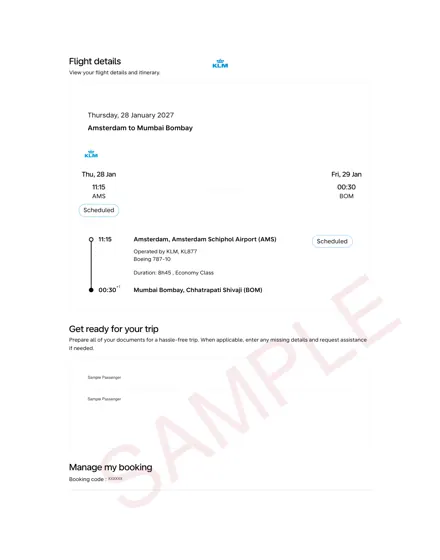
Typically, the PDF arrives within 10 minutes, though in our experience most orders land in the inbox in under 5 minutes. Check your spam or promotions folder if it does not appear. The email contains a single PDF attachment with your flight reservation. Open it and verify the following before you use it:

  • All passenger names match the passports exactly.
  • The flight numbers show a real airline (e.g., Copa Airlines, Avianca, American Airlines).
  • A 6-character PNR (Passenger Name Record) code is visible. This is your live booking reference.
  • The itinerary shows your arrival in Panama and your departure to your onward destination.

If any detail is incorrect, contact DummyTicketPrice support immediately with your order reference. Corrections are usually processed within 30–60 minutes during business hours.

Step 4: Validate the Reservation with the Airline (Optional but Recommended)

Because the PNR is live, you can verify it directly with the airline. Go to the airline's website (the one operating your first flight) and look for the "Manage Booking" or "My Trips" section. Enter the PNR code and the last name of the first passenger. You should see the same flight segments and passenger details. This step takes about 3 minutes and gives you confidence that the document will pass the embassy's checks. Note that the reservation is on hold, not ticketed, so the airline's site will show "on hold" or "unpaid" status — this is normal and expected for a dummy ticket.

Step 5: Print the PDF and Use It with Your Panama Visa Application

Print the PDF in color on a clean sheet of paper. The embassy does not require a high-quality print, but legibility matters. The single page contains all the essential details — passenger info, flight numbers, dates, and the PNR. Attach this printout to your visa application package alongside your passport, completed application form, passport photos, bank statements, and proof of accommodation. The reservation is typically valid for 14–21 days from issuance, so schedule your visa appointment within that window.

Typical Timeline Summary

Action Typical Timeframe
Order placement and payment 2–3 minutes
Email delivery of PDF 5–10 minutes
PNR verification via airline website 3–5 minutes
Correction requests (if needed) 30–60 minutes
Validity period of the reservation 14–21 days

Once your visa is approved, you are free to book your actual flights for any dates. The dummy ticket for panama visa served its purpose — proving your travel intentions without requiring you to pay for expensive non-refundable airfare before the embassy decision. Keep the PDF and the order confirmation email until your visa is stamped, as some applicants are asked to show the reservation again during the passport collection stage.

How to Verify Your Panama Dummy Ticket PNR on Airline Systems (Amadeus, Sabre, Travelport)

Once you receive your dummy ticket for Panama visa purposes, the booking hold is stored in a Global Distribution System (GDS) — typically Amadeus, Sabre, or Travelport (which includes Galileo and Worldspan). The airline you are "flying" with determines which GDS holds your PNR confirmation. Verifying that your reservation actually exists in the system is a critical step before your embassy appointment, as consular officers frequently cross-check the itinerary in real time.

Step 1: Identify the GDS Used by Your Airline

Your flight reservation email should state the issuing airline. Each carrier primarily uses one GDS, though many use multiple. Use this general reference table to know where to check:

Airline (Example) Primary GDS Verification Portal
Copa Airlines Sabre Sabre Virtually There (viewtrip.com)
Avianca Amadeus Amadeus CheckMyTrip (checkmytrip.com)
American Airlines Sabre Sabre Virtually There
United Airlines Travelport (Apollo/Galileo) Travelport ViewTrip (viewtrip.com)
Delta Air Lines Travelport (Worldspan) Travelport ViewTrip
Turkish Airlines Amadeus Amadeus CheckMyTrip

If your provider does not state the GDS, look at the PNR confirmation code itself — a 6-character alphanumeric string. While not definitive, codes starting with a letter often indicate Amadeus, while Sabre codes frequently begin with a digit. When in doubt, contact the dummy ticket provider and ask explicitly which GDS platform they used to issue the booking hold.

Step 2: Verify on Amadeus (CheckMyTrip)

For reservations held in Amadeus, the passenger-facing portal is CheckMyTrip. Follow these practical steps:

  1. Go to the CheckMyTrip website (no app download required for verification).
  2. Select "My Trips" or "Manage Booking" from the main menu.
  3. Enter your 6-character PNR confirmation code exactly as shown in the email, including any hyphens (remove them if present).
  4. Enter the last name of the primary passenger exactly as it appears on the passport — case-sensitive matching is not required, but spelling must be identical.
  5. Click "Retrieve" — the system typically loads the full itinerary within 10–15 seconds.

If the system returns an error, first re-check for character confusion (O vs 0, I vs 1). If the PNR still fails, contact your dummy ticket provider immediately — do not wait until the day before your visa interview.

Step 3: Verify on Sabre (Virtually There)

For bookings held in Sabre, the passenger portal is Virtually There, now integrated with ViewTrip. The process is similar:

  1. Navigate to the ViewTrip portal.
  2. Click "Retrieve a Trip" or "Find My Trip."
  3. Enter the PNR confirmation code and the passenger's last name.
  4. Review the displayed itinerary — it should show the exact flight numbers, departure and arrival times, and booking status (typically "Confirmed" or "HK" which means "holding confirmed" in airline jargon).

Note that some Sabre bookings show a status of "SS" (sold) or "PN" (pending) — for a dummy ticket, "HK" is the ideal status you want to see.

Step 4: Verify on Travelport (ViewTrip)

Travelport powers both Galileo and Worldspan. The unified verification portal is ViewTrip, which serves most airlines using Travelport systems:

  1. Go to the ViewTrip website.
  2. Select "Traveler" and then "Retrieve Booking."
  3. Input your PNR confirmation and last name.
  4. Check that the itinerary displays the correct flight segments and that the ticket status line reads "Confirmed" or "OK."

What to Check After Retrieval

Once you retrieve the booking hold, verify these four critical details against your Panama visa application:

  • Passenger name spelling — must match your passport exactly, including any middle names or suffixes.
  • Flight dates — confirm the outbound date is within 15 days of your intended arrival and that the return date reflects your stated departure from Panama.
  • Flight numbers and routing — ensure the itinerary shows a realistic connection (e.g., a layover of at least 60–90 minutes) and that the destination city code is PTY (Panama City Tocumen).
  • Booking status — the PNR must not show "Canceled," "Waitlisted," or "Expired." A valid dummy ticket for Panama visa purposes typically holds for 7–14 days, but some providers extend holds to 30 days — confirm your hold's expiration date.

If any detail mismatches your passport or visa application form, request a corrected dummy ticket at least 48 hours before your embassy appointment. Most reputable providers reissue corrected itineraries within 2–4 hours during business hours, but hedging with extra time avoids last-minute stress. Save a screenshot of the retrieved PNR as a backup — some applicants bring a printed copy to the embassy as supplementary evidence, though it is not always required.

Related guide: Dummy Ticket for Schengen Visa Application.

Comparison Table: DummyTicketPrice vs. Other Providers for Panama Dummy Tickets

Choosing where to buy a flight reservation for your Panama visa application can be confusing, especially when prices and promises vary widely. Below is a side-by-side look at how DummyTicketPrice typically compares with three common alternatives: general travel agencies, free online itinerary generators, and airline hold options. Use this to match the provider type to your specific needs, such as a same-day embassy appointment or a multi-week application window.

What Each Provider Typically Delivers

  • DummyTicketPrice: A live booking hold in the airline’s GDS (Amadeus, Sabre, or Travelport). You receive a PDF itinerary with a real PNR you can verify on the airline’s website for a set validity window, usually 24 to 72 hours.
  • General travel agencies: Many will issue a full-fare ticket or a hold, but they often charge a service fee of $20–$50 per passenger. Turnaround can be 2 to 4 hours if they are busy, and some require you to pay a deposit toward the actual flight.
  • Free online itinerary generators: These produce a PDF that looks like an airline confirmation but contains no actual reservation. The PNR, if shown, is typically fake or copied from a public template. No GDS record exists.
  • Direct airline hold: Most carriers let you reserve a flight without paying for 24 to 72 hours. This is free but limited to one or two airlines, and you must cancel manually if your visa interview is delayed. It also ties up your credit card authorization.

Key Comparison Points

Feature DummyTicketPrice Travel Agency Free Generator Airline Hold
Typical Price per Passenger $7 / ₹599 $20–$50 plus ticket deposit $0 (but unusable for visa) $0 hold, but full fare if not cancelled
Delivery Time ~10 minutes via email 2–4 hours, sometimes same day Instant download Instant confirmation
Verifiable PNR on Airline Site Yes, live for 24–72 hours Usually yes, if they issue a real hold No, PNR is fictional Yes, but only on that airline’s system
Refundable / Cancellable Yes, before the hold expires; no charge Varies; often non-refundable fee N/A Yes, but you must remember to cancel
Customer Support for Visa Questions Email support; responds within hours Depends on agency size None Airline desk, not visa-specific

Practical Steps to Choose Wisely

  1. Check your embassy’s validity requirement. Panama consulates usually ask for a reservation that is valid at the time of submission, not necessarily at the time of travel. If your appointment is 3 days away, a 24-hour hold is risky; request a 72-hour hold from DummyTicketPrice or your agency.
  2. Verify the PNR immediately. Within 30 minutes of receiving any itinerary, go to the airline’s website, select “Manage Booking,” and enter the PNR plus the passenger’s last name. If it does not load, request a replacement before your interview day.
  3. Read the refund clause. For a genuine itinerary, the provider should confirm that no payment is taken from your card and that the hold lapses automatically. Avoid any service that charges a “cancellation penalty” on a dummy booking.
  4. Ask for the GDS locator format. Panama visa officers sometimes cross-check the PNR in their own system. A real locator is 6 alphanumeric characters (e.g., ABC123). Free generators often produce 10–12 digit fake numbers, which is an immediate red flag.

In practice, the choice comes down to your timeline and budget. If you need a document within the hour and want the confidence of a live airline record, DummyTicketPrice is the most direct option. If you have a week’s lead time, a travel agency’s hold might work, but confirm their refund policy in writing. Free generators are not recommended for any Panama visa application, as consular staff frequently spot these and may request additional proof of funds or a real paid ticket. Airline holds are excellent if you have not yet chosen your exact flight dates, but they require disciplined follow-up to avoid accidental charges.

Our guide to the dummy ticket booking explains why embassies ask for a reservation rather than a paid ticket.

Case Study: Panama Visa Approved with a Dummy Ticket from DummyTicketPrice

Background: The Applicant’s Situation

In early 2025, a Colombian national—let’s call her “María”—needed to attend a business conference in Panama City. She had a valid passport, a clean criminal record, and a stable job in Bogotá, but she had never traveled abroad. Her visa application was straightforward on paper, except for one critical gap: she had not yet purchased flights because her employer required visa approval before releasing travel funds. This is a common catch-22. María used a flight reservation from DummyTicketPrice to satisfy the Panama consulate’s requirement without paying for a non-refundable round-trip ticket upfront.

What She Submitted to the Panama Consulate

María’s application package included the following documents, all of which she organized in a single folder:

  • A completed Panama visa application form (Formulario de Solicitud de Visa), signed and dated.
  • Her valid Colombian passport with at least six months of remaining validity and two blank pages.
  • Two recent passport-size photographs with a white background, taken within the last three months.
  • A bank statement from the last three months, showing a consistent average balance of approximately USD 3,500.
  • A letter from her employer confirming her role, salary, and approved leave dates (the conference ran from a Tuesday to a Friday, plus two travel days).
  • Proof of accommodation—a hotel booking confirmation for six nights in Panama City, refundable.
  • The dummy ticket for Panama visa purposes: a round-trip itinerary from Bogotá (BOG) to Panama City (PTY), departing on a Tuesday morning and returning the following Monday evening.

How the DummyTicketPrice Reservation Worked for Her

María ordered her flight reservation approximately two weeks before her consular appointment. She received the itinerary as a PDF within about 10 minutes of payment. The reservation included a live PNR (passenger name record) that she could verify directly on the airline’s website under the “Manage Booking” section. This was crucial—Panama consular staff in Bogotá sometimes spot-check PNRs, and a dead or fake code would have raised red flags.

The itinerary showed the following details, which she confirmed matched her intended travel dates exactly:

Field Details on the Reservation
Passenger Name María [Last Name] (exactly as on passport)
Flight Numbers AV 123 (outbound) / AV 456 (return)
Route Bogotá (BOG) → Panama City (PTY) → Bogotá (BOG)
Departure / Return Tuesday 08:15 / Monday 19:40 (local times)
PNR 6-character alphanumeric code, verifiable online
Booking Status Confirmed (not “on request” or “waitlisted”)

At the Consular Interview

María attended her appointment at the Panamanian consulate in Bogotá. The visa officer spent roughly 15 minutes reviewing her file. The officer specifically asked about her return flight and why she had not yet paid for the ticket. María explained that her employer would purchase the actual ticket only after the visa was approved, per company policy. She then showed the officer the live PNR on her phone, demonstrating that the reservation was genuine and held in the airline’s system. The officer did not call the airline to verify further.

Timeline and Outcome

María’s visa was approved in five business days—a typical processing time for a single-entry tourist/business visa at that consulate, though some applications take up to two weeks depending on workload. She received a visa valid for 30 days of stay. Once approved, she used the same itinerary to guide her actual ticket purchase; the dates and flight numbers matched, so there was no confusion.

Practical Lessons from This Case

  1. Match every detail exactly. María ensured her name, passport number, and travel dates on the reservation were identical to her application form. Any discrepancy could trigger a request for additional documentation.
  2. Use a verifiable PNR. A dummy ticket with a live PNR that can be checked on the airline’s website adds a layer of credibility that a simple PDF screenshot cannot provide.
  3. Keep the booking hold active. María’s reservation was valid for 14 days, which covered her appointment and the decision window. She did not let it expire before the visa was granted.
  4. Prepare a natural explanation. She practiced explaining why the ticket was not yet purchased. A calm, logical answer (“my employer pays after approval”) satisfied the officer.

This case illustrates that a properly prepared flight reservation—not a fabricated document—can be the decisive piece of evidence in a successful Panama visa application. The key is to treat the dummy ticket as a placeholder that must be verifiable, consistent, and aligned with your broader travel plans.

Related guide: Best Websites to Generate a Dummy Ticket.

7 Common Mistakes to Avoid When Using a Dummy Ticket for Panama Visa

Even a perfectly valid flight reservation can sink your Panama visa application if you mishandle the details. Consular officers at the Panamanian embassy or consulate cross-check your itinerary against airline systems, and small discrepancies can trigger delays, requests for additional documents, or outright refusals. Here are the seven most frequent errors applicants make—and how to steer clear of each one.

1. Misspelled or Mismatched Passenger Names

The most common—and most damaging—mistake is a name that doesn’t exactly match your passport. Your flight reservation must show your full legal name exactly as it appears on the biographical page of your passport. If your passport lists a second middle name and the booking omits it, or if you use a nickname (e.g., "Liz" instead of "Elizabeth"), the officer may flag the itinerary as fraudulent.

How to prevent it: Before paying for any booking hold, double-check every character of your name against your passport. If you have a two-part surname (e.g., "García López"), ensure both parts appear in the correct order. The reservation is issued exactly as entered, so please check names, dates and route before paying; a new date or correction needs a fresh order.

2. Using a PNR That Cannot Be Verified

A PNR (Passenger Name Record) is only useful if it is live and searchable in the airline’s or GDS’s system. Some cheap providers send PDF files that look professional but contain a PNR that returns "No record found" when the consulate checks. Panama visa officers typically verify via Amadeus, Sabre, or Travelport, and they expect to see your name, flight numbers, and dates match exactly.

How to prevent it: Within an hour of receiving your itinerary, go to the airline’s official website (or the GDS check-in page) and enter your PNR and last name. Confirm that the displayed flights, times, and passenger details match your dummy ticket. If the system shows an error, request a replacement immediately. Never submit an unverified PNR—this is the single fastest way to get a rejection.

3. Last-Minute Changes to Your Travel Dates

If you alter your intended travel dates after securing your flight reservation—but before your visa interview—the itinerary you submit will contradict your application form. Panama visa officers sometimes ask about date discrepancies, and any inconsistency can raise doubts about the genuineness of your plans.

How to prevent it: Decide your travel window before purchasing a dummy ticket. If your Panama visa appointment is scheduled 3–4 weeks out, choose a reservation that falls within that timeframe and matches the planned arrival and departure dates on your application. If your circumstances genuinely change, buy a new flight reservation rather than trying to explain an old one.

4. Ignoring the 24-Hour or 72-Hour Validity Window

Many booking holds are only valid for a limited period—typically 24 to 72 hours—after which the airline releases the seats and the PNR becomes inactive. If you order a dummy ticket weeks before your visa appointment and the reservation expires in the interim, the officer will see a dead PNR and may assume you attempted to deceive them.

How to prevent it: Time your purchase so the reservation is active on the day of your visa interview and for at least 2–3 days afterward (in case the officer performs a delayed check). If your appointment is more than a week away, ask your provider for a reservation with a longer hold—or plan to purchase a second dummy ticket closer to the interview date. Many applicants order two: one for the initial application and one for the interview itself.

5. Submitting a Round-Trip Itinerary Without a Return Date

Panama visa officers want proof that you will leave the country—not just that you plan to arrive. An itinerary showing only an inbound flight, or one with an open-ended return, will be rejected. Your flight reservation must include both your arrival into Panama (e.g., Tocumen International Airport, PTY) and your departure to a third country.

How to prevent it: Ensure your dummy ticket displays a complete round-trip or onward journey with specific dates for both legs. The return flight should be to your home country or a destination you have a valid visa for. If you are transiting through Panama en route to another country, your itinerary must clearly show the connecting flights.

6. Booking with an Airline That Does Not Serve Panama

Some applicants purchase the cheapest dummy ticket available without checking whether the airline actually operates flights to Panama. If your reservation lists a carrier that does not fly to PTY or any other Panamanian airport, the officer will immediately know the itinerary is fabricated.

How to prevent it: Stick to major airlines with established Panama routes—such as Copa Airlines, Avianca, American Airlines, United, or Iberia—or their codeshare partners. Verify the flight numbers on a public flight tracker or the airline’s own schedule before submitting. A genuine route with a verifiable flight number is far more credible than a bargain-basement itinerary from an obscure carrier.

7. Using the Same Dummy Ticket for Multiple Applications

Reusing a single flight reservation across two different visa applications—whether for the same applicant or different people—is a red flag. Consular systems can detect duplicate PNRs, and if the officer sees the same booking referenced in another application, both are likely to be flagged for fraud review.

How to prevent it: Purchase a new dummy ticket for each visa application and for each individual traveler. Even if you are applying as a family, each passport holder should have their own reservation with their own PNR. If you are reapplying after a rejection, always obtain a fresh itinerary with new dates—never resubmit the same one.

Quick Reference: Common Errors and Fixes

Mistake Typical Consequence Prevention
Name mismatch with passport Delayed processing or rejection Compare character-by-character before purchase
Invalid or expired PNR Automatic refusal for unverifiable itinerary Verify on airline website within 1 hour of receipt
Dates changed after booking Inconsistency flagged by officer Finalize travel dates before ordering
Expired 24–72 hour hold Dead PNR at time of interview Purchase 2–3 days before appointment
Missing return flight Rejection for insufficient departure proof Always include onward or round-trip leg
Airline does not serve Panama Immediate fraud suspicion Use Copa, Avianca, American, United, Iberia
Duplicate PNR reused Fraud flag on multiple files Buy fresh reservation per application

Treat your dummy ticket for the Panama visa process as a formal document, not a placeholder. Verify every detail, keep the reservation live until your appointment passes, and never attempt to modify or reuse it. A few minutes of careful checking can mean the difference between a smooth approval and a costly rejection.

Frequently Asked Questions About Dummy Tickets for Panama Visas

Is it legal to use a dummy ticket for a Panama visa application?

Yes, using a flight reservation for a Panama visa application is legal in most circumstances, provided you do not misrepresent it as a purchased, ticketed flight. Panamanian immigration authorities and consulates understand that applicants often need to show an itinerary before they have committed to a specific travel date. The key distinction is that a dummy ticket is a genuine booking hold stored in the airline's reservation system — not a fabricated PDF. What crosses into illegality is submitting a completely fake or altered document, which can result in a permanent ban from applying for any Panamanian visa in the future. Always use a reputable service that provides a verifiable PNR.

How long is a Panama visa dummy ticket valid?

A standard flight reservation for a Panama visa application typically remains active in the airline's system for 7 to 14 days, depending on the fare rules of the specific carrier and the booking class. Some low-cost carriers may only hold a reservation for 72 hours, while major airlines like Copa Airlines or Avianca often maintain the hold for up to two weeks. If your visa appointment is scheduled more than two weeks out, you should plan to obtain a fresh reservation closer to your interview date. After your visa is approved, the dummy ticket serves its purpose — you will need to purchase a real ticket before actually traveling to Panama.

Will the Panama embassy call the airline to check my dummy ticket?

Panamanian consular officers do not typically call airlines to verify each flight reservation individually — they have hundreds of applications to process. However, they do have access to the Global Distribution Systems (GDS) like Amadeus, Sabre, and Travelport that house your booking record. In practice, the officer will enter your PNR code into their system to confirm the reservation exists and matches your name and travel dates. This verification takes seconds. If your dummy ticket was properly issued with a live PNR, it will pass this check. Attempting to submit a reservation from a non-existent airline or an invented booking reference will be immediately flagged.

Can I use the same dummy ticket for both the Panama visa and other visas?

Technically, you can reuse the same flight reservation for multiple visa applications if the travel dates and passenger details align, but this is not recommended. Each embassy or consulate may check the PNR at different times, and if one officer sees that the booking has been cancelled or modified, it could raise questions about your intentions. Additionally, visa processing timelines vary — your Panama visa appointment might occur two weeks after your Schengen visa interview, and the reservation may have expired in between. The safer approach is to obtain separate dummy tickets for each visa application, tailored to the specific travel dates you state in each application form.

What happens if my Panama visa is denied — do I lose money on the dummy ticket?

No, you do not lose any significant money if your Panama visa application is denied. A dummy ticket from a reputable provider costs around $7 to $15 per passenger — a fraction of the price of a refundable airline ticket, which can cost $500 or more. Unlike a real ticket, you never paid for the airfare itself, only for the service of generating the reservation. If your visa is refused, you simply let the booking hold expire naturally after 7 to 14 days. You can then reapply with a fresh dummy ticket once you have addressed the reasons for the initial refusal, such as insufficient bank statements or missing proof of employment.

Does the Panama visa dummy ticket need to show a return flight?

Yes, for most Panama visa categories, your flight reservation must show both an inbound flight to Panama and an outbound flight departing Panama. This demonstrates to the consular officer that you intend to leave the country before your authorized stay expires. The return flight should ideally be dated no more than 90 days after your arrival, as Panama typically grants tourists a 90-day stay. For business visa applicants, the itinerary should align with your meeting schedule. Some applicants mistakenly provide only a one-way reservation, which often leads to requests for additional documentation or outright refusal. Ensure your dummy ticket clearly displays both segments with matching passenger names.

FAQ TopicKey TakeawayTypical Validity
Legality of dummy ticketsLegal if verifiable and not misrepresentedN/A
Reservation validity periodDepends on airline fare rules7–14 days
Embassy verificationCheck via GDS systems with PNRInstant
Reusing for other visasPossible but risky — avoidN/A
Cost if visa deniedOnly lose the ~$7–15 service feeN/A
Return flight requirementRequired for most visa typesWithin 90 days
SECURED PAYMENTS BYRazorpay