People search for "how to make a dummy ticket" when what they really need is a flight reservation that a visa officer can look up. Nobody at a consulate wants a document you made yourself. They want a booking that exists in an airline's system, in your name, on the dates you put on your form. This guide walks through every honest way to get one, what to have ready before you start, how to check the booking reference (PNR) once it lands in your inbox, and how to time it against your appointment. Each rule we quote links to the official page it came from, and the full list sits at the bottom.
Key facts before you book
| Question | Short answer |
|---|---|
| What is a "dummy ticket"? | Trade slang for a flight reservation: a held, unpaid booking with a PNR. It is not a paid ticket and you cannot fly on it. |
| Do consulates ask for one? | Many do. German missions in India list a "Flight reservation" on the tourism checklist.[2] The Dutch checklist states that a paid travel ticket isn't required.[3] |
| Are there exceptions? | Yes. Germany's Islamabad embassy lists confirmed round-trip tickets,[5] while the German Embassy in Dar es Salaam wants an itinerary and no flight booking.[6] |
| Schengen timing | Apply at least 15 days and no more than 6 months before the trip.[1] |
| How to check it | On the airline's "Manage booking" page, using the booking reference and your last name.[7][8] |
| Our price | Per passenger, one way or return: ₹699 (India), $9 (worldwide), £7 (UK). |
What are you actually booking?
You are booking a reservation, not buying a seat. When a seat is reserved, the airline's system creates a passenger name record with a six-character code. That code is the PNR. Until someone pays and the airline issues a ticket number, the booking is just a hold. It can lapse, and it cannot be used at check-in.
That is exactly why it suits a visa file. The officer sees a real plan with real flights, and you have not spent the full fare on a trip that may never be approved. The US State Department puts it bluntly on its visitor visa page: there is no guarantee of a visa, so don't make final travel plans or buy tickets until you have one.[12]
One honest caveat. Call it what it is. On your form and in your cover letter, write "flight reservation" or "flight itinerary". Never describe it as a purchased ticket, because it isn't one.
What are the four ways to get a flight reservation?
There are four realistic routes. None is wrong; each fits a different situation. Here is how they compare in practice.
| Route | What you pay up front | How long it holds | Best for | Main catch |
|---|---|---|---|---|
| Airline hold or price lock | Free on a few airlines, a small fee on others | Usually 24 to 72 hours | Travellers booking on a carrier that offers it, well ahead of departure | Short window; often needs departure 7 to 10 days away or more |
| Refundable or free-cancellation fare | The full fare, refunded later minus any fees | Until you cancel | Applicants whose checklist demands a confirmed ticket | Money tied up for weeks; refund rules vary |
| Travel agent hold | Whatever the agent charges | Set by the airline's ticketing deadline | People who already use a local agent | Deadline may fall before your appointment |
| Reservation service (like us) | A fixed fee per passenger | Shown on the booking form before you pay | Most visa files that ask for a reservation | You must check the PNR yourself and book close to the appointment |
Airline holds
Some carriers let you park a booking before paying. American Airlines will hold some flights for 24 hours at no charge if departure is at least a week away.[11] Under US rules, airlines selling in the US must either let you hold a fare for 24 hours without payment or cancel within 24 hours without penalty, when you book a week or more ahead.[10] The trouble is the clock. A 24-hour hold placed on Monday is gone by Tuesday, and your appointment might be next week. We cover every hold we could confirm in our guide to a flight reservation for a visa without payment.
Refundable fares
If your checklist says "confirmed ticket", a refundable fare is the clean answer. You pay, the ticket is issued, and you cancel if the visa doesn't come through. Read the fare rules before paying: "refundable" sometimes means refundable minus a fee, and refunds can take weeks.
Travel agents
A good agent can create the booking on their airline system and email you the itinerary. Ask two questions before agreeing: when does the airline's ticketing deadline expire, and will the agent re-book if it lapses before your appointment?
A reservation service
This is what we do. You give us route, dates and names; we create a reservation with a live PNR and email the PDF, usually in about ten minutes. It costs less than tying up a full fare, and you don't depend on one airline's hold window. Our flight reservation for visa page explains the service in more depth.
Ready to book your reservation?
Live PNR you can look up yourself. ₹699 / $9 per passenger, sent by email in about 10 minutes.
What details should you have ready before booking?
Five minutes of preparation saves most of the problems we see. Get these in front of you first.
- Passport, open on the photo page. Copy the surname and given names exactly as printed, in the same order. If your passport shows no surname and only a given name, tell us at the booking stage so the name is entered the way airlines expect.
- Your visa form dates. The arrival and departure dates on the application must match the flights. Decide them before booking, not after.
- Departure and arrival airports. Usually your home city out and back. For Schengen, the inbound and outbound airports can differ if your trip does.
- Every traveller. Spouse, children, parents: each person needs to be on a reservation. Children are priced per passenger like adults.
- Your appointment date and time. This drives when you book (more on that below).
- An email address you check. The PDF arrives there. A typo here is the most common reason someone thinks their booking "never came".
Example: say you live in Pune, your Germany appointment is at VFS Mumbai on 14 November, and you plan to fly 2 to 16 December. Your reservation should show Mumbai (or Pune) to Frankfurt on 2 December and back on 16 December, and the same dates should appear on your application form, hotel bookings and insurance.
How do you book a dummy flight ticket, step by step?
This is the sequence we suggest for a visa reservation booked through us. The same logic applies if you use an agent.
- Read your mission's checklist first. Confirm it asks for a reservation or itinerary, not a paid ticket. Malta's VFS checklist in India, for instance, lists "Flight reservations of return or round ticket".[4]
- Fix your dates. Pick travel dates that fit your leave, your hotel and the visa rules. For Schengen, that means applying 15 days to 6 months ahead.[1]
- Open the booking page. Choose one way, return or multi-city. Multi-city is priced per pair of legs.
- Enter each name as printed in the passport. The reservation is created exactly as typed. Double-check before paying.
- Check the hold window. The booking form shows how long the reservation is held before you pay. Make sure that window covers your appointment.
- Pay. UPI, cards or netbanking through Razorpay. Prices are per passenger.
- Receive the PDF. Usually within about ten minutes. If it hasn't arrived, look in spam, then use order tracking.
- Verify the PNR on the airline's website. Details in the next section.
- Print it and file it with your other documents. Keep the airline name and PNR handy at the appointment.
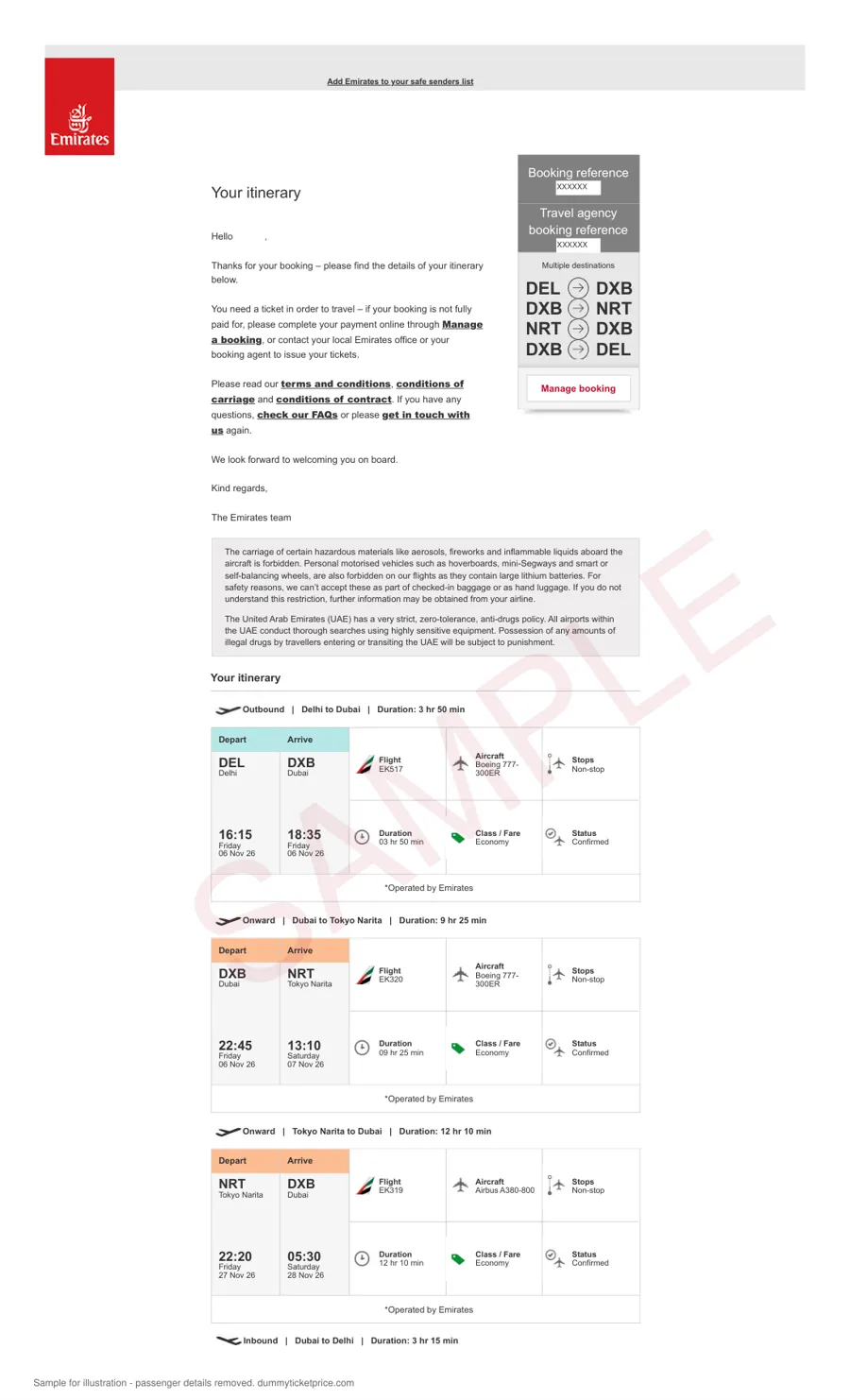
How do you check the PNR after booking?
Do this yourself, every time. It takes two minutes, and it's the single best protection you have. Most airlines let anyone retrieve a booking with just two pieces of information: the booking reference and the passenger's last name.
- Emirates: the Manage booking page asks you to have your booking reference and last name ready.[7]
- Singapore Airlines: its booking FAQ points you to Manage Booking with the booking reference and last name.[8]
- Qatar Airways: the "Manage a booking" retrieval page takes the booking reference and last name.[9]
- British Airways: its Manage My Booking help says you need the booking reference and last name.[13]
When the booking opens, check four things: the name spelling, the dates, the airports, and the number of passengers. If anything differs from your form, fix it before the appointment, not after. A held reservation can show differently from a ticketed one (some airline pages show it as unpaid or "on hold"), which is normal. What matters is that it exists and matches. Our walkthrough on how to verify a dummy ticket before submission goes through each field in more detail.
When should you book it relative to your appointment?
Book close to the appointment. One to two days before is the sweet spot for most people. Here's why: a reservation is held for a limited time, and you want it to be live on the day you hand over your file. Book three weeks early and you risk an officer finding nothing when they look.
A worked example. Your VFS slot is Thursday at 10:00. Book on Tuesday evening or Wednesday morning, check the PNR the same day, and print it on Wednesday night. If something looks wrong, you still have a full working day to sort it out. If your appointment is in a few hours, our same-day dummy ticket guide covers the fast version.
What about the period after you submit? There's no published rule on when, or whether, a consulate checks a flight booking. The EU's standard decision time is 15 days, extendable to 45.[1] A reservation will not stay live for that whole period, and it isn't designed to. If the mission later asks you for an updated booking, get a fresh one on the same dates.
What do consulates actually write on their checklists?
The wording varies more than people expect. Here are the lines we checked this month, quoted sparingly and summarised otherwise.
| Mission | What it asks for | Does a reservation fit? |
|---|---|---|
| Germany, India (tourism) | "Flight reservation"; a booked ticket does not lead to preferred processing[2] | Yes |
| Netherlands (all countries) | Booking in your name or other proof of travel plans; paid ticket not required[3] | Yes |
| Malta, VFS India | "Flight reservations of return or round ticket"[4] | Yes |
| Germany, Pakistan | Confirmed round-trip tickets covering the stay[5] | Follow the checklist: a confirmed, refundable ticket is safer |
| Germany, Tanzania | A flight itinerary, with "NO flight booking"[6] | An itinerary is enough; no booking needed |
| United Kingdom (visitor) | Flight bookings appear in the list of less useful documents, unless you are transiting[14] | Optional; it is not a key document |
For a Schengen trip specifically, our Schengen dummy ticket guide covers a dozen consulates in detail.
Can you make a dummy ticket yourself?
Not in the sense people often mean. Editing an old e-ticket, using a "ticket generator" or filling in a template with an invented code produces a document that fails the moment someone types the PNR into an airline site. The EU Visa Code makes doubt over whether your supporting documents are genuine a ground for refusal.[15] That's not a risk worth taking for the price of a reservation.
What you can do yourself is use an airline's own hold, if one is offered for your route and dates, or buy a refundable fare. Both are real bookings. The only question is whether they fit your timeline and budget.
Do you need a hotel booking too?
Usually, yes. Most visitor checklists ask for proof of accommodation alongside the flights. We also arrange hotel reservations for visa files, priced per stay, per traveller. Make sure the hotel check-in and check-out dates line up with your arrival and departure flights. A one-night gap between the flight landing and the hotel booking is the sort of small thing that invites questions.
If you're not applying for a visa at all, but an airline wants proof you're leaving a visa-free country, that's a slightly different job. See onward ticket for that case.
What does it cost with us?
That is per passenger, whether one way or return. Multi-city itineraries are priced per pair of legs. Full details are on the dummy ticket price page. If you're comparing providers, our notes on choosing a dummy ticket website list what to look for, and our guide on whether a dummy ticket is safe for a visa covers the risks honestly.
Frequently asked questions
01Is a dummy ticket the same as a real ticket?
No. You cannot check in or board with it. It exists to show a consulate your planned dates and route, and it should always be described as a reservation or itinerary on your forms.
02How long does it take to get one?
From us, the PDF usually arrives by email in about ten minutes after payment. Airline holds are instant when offered. Travel agents vary. Whatever route you pick, allow time afterwards to look the booking up on the airline website and correct anything before your appointment.
03Can I book a dummy flight ticket for free?
Sometimes. A few airlines offer short free holds, and US rules give travellers a free day to hold or cancel when they book seven or more days before the flight. The windows are short, though, so the hold may lapse before your appointment. Our guide to holds without payment lists what we could confirm.
04How many days before my appointment should I book?
One or two days before is ideal for most applicants. That gives you time to verify the PNR and fix mistakes, while keeping the reservation current on the day you submit. The exact hold window for your booking is shown on our form before you pay.
05What if my name is spelt wrongly on the reservation?
Contact us straight away through WhatsApp or email with your order details. Do not submit a reservation whose name doesn't match the passport. A mismatch between documents is one of the easiest problems for an officer to spot, and it's simple to fix before the appointment.
06Will the consulate accept it?
Nobody can promise that, and you should be wary of anyone who does. The decision belongs to the consulate. What you can control is that the reservation is genuine, matches your form, and fits what your mission's checklist asks for. If the checklist demands a confirmed ticket, follow it.
07Can I get one for my whole family?
Yes. Add every traveller's name exactly as printed in each passport. Pricing is per passenger, including children. Families usually prefer one reservation listing everyone, so the officer sees the whole group travelling on the same flights and dates.
Sources
Last checked: October 2026. Policies and checklists change; confirm on the official page before you rely on them.
- European Commission, Migration and Home Affairs, Applying for a Schengen visa.
- German Missions in India, Checklist for a Schengen visa for Tourism.
- Netherlands Worldwide, Checklist: applying for a Schengen visa for tourism.
- VFS Global for Malta in India, Malta tourist visa checklist (PDF).
- German Embassy Islamabad, Tourist visa (Schengen).
- German Embassy Dar es Salaam, Schengen Visa (Category C).
- Emirates, Manage your booking.
- Singapore Airlines, Booking online (FAQ).
- Qatar Airways, Manage a booking.
- US Code of Federal Regulations via Cornell LII, 14 CFR 259.5, Customer service plan (paragraph (b)(4), 24-hour reservation requirement).
- American Airlines, Hold your reservation.
- U.S. Department of State, travel.state.gov, Visitor Visa.
- British Airways, Manage My Booking help.
- GOV.UK, Guide to supporting documents: visiting the UK (updated 25 February 2026).
- EUR-Lex, Regulation (EC) No 810/2009 (Visa Code), consolidated text, Article 32.
Related: flight reservation for visa · dummy ticket price · requirements by country · how to verify a PNR.