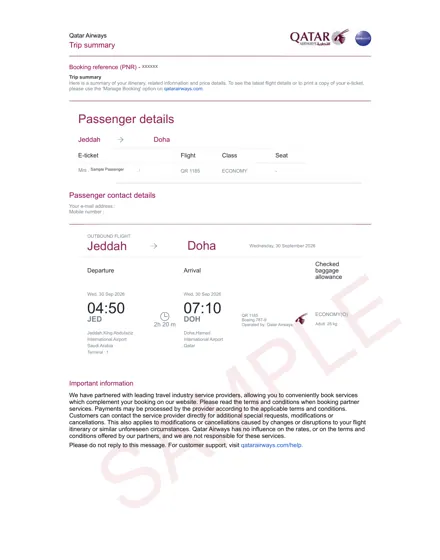
What Argentina Visa Officers Verify in Your Flight Reservation
Argentine consular officers do not simply glance at your flight document to confirm you plan to leave the country. They cross-check specific data points against your visa application form, passport, and supporting financial documents. A mismatch as small as a reversed surname can trigger a request for additional documentation or, in some cases, a refusal under Article 29 of Argentina’s Migration Law (which permits denial when the applicant provides false or incomplete information). Here is what they actually look for:
1. Passenger Name Match (Exact Spelling)
The primary field verified is the passenger name. Officers compare the name on the flight itinerary against the name on your passport’s biodata page. They expect an exact match — including middle names if your passport includes them. If your passport shows “Maria Elena Garcia Rodriguez,” your flight reservation must show the same full string, not “Maria Garcia.” A common error is using the name format from a frequent-flyer account or an old booking, which often abbreviates middle names. The consulate will also verify that the name on the reservation matches the name on your visa application form (Form DS-160 equivalent for Argentina, the Formulario de Solicitud de Visa).
2. Live PNR Status (Not Just a PDF)
Argentine visa officers typically check whether your booking reference (PNR) is active in the airline’s global distribution system. They do not call the airline for every application, but they do run spot checks — usually on a randomized basis or when the application raises other red flags (e.g., a short bank history). When they check, they verify that the PNR returns a valid record with the same passenger name, the same flight numbers, and the same travel dates you submitted. A reservation that was cancelled after you printed the PDF will show as “cancelled” or “no record found” in the airline’s system. For this reason, your flight reservation must be a genuine booking hold (also called a “fare lock” or “ticketless reservation”) that remains active for at least 14–21 days after submission, which is the typical visa processing window for Argentina (though it can extend to 30 days during peak season).
3. Travel Date Consistency with Your Stated Itinerary
Officers verify that your intended entry and exit dates align with the rest of your application. If you stated in your cover letter that you will attend a business conference in Buenos Aires from 10–14 March, your flight reservation should show arrival on 9 or 10 March and departure on 14 or 15 March. A reservation showing a one-month stay when your hotel booking covers only three days will raise questions about your true purpose of travel. The consulate also checks that your dates are not in the past — a surprisingly common mistake when applicants reuse an old itinerary.
4. Return/Onward Ticket Requirement
Argentine immigration law requires that visa applicants demonstrate they will leave Argentina before their authorized stay expires. For most nationalities, that means a return ticket to your home country or an onward ticket to a third country. The consulate verifies that your reservation includes a departure leg from Argentina (EZE or AEP) within 90 days of entry for tourist visas. If you are applying for a work or student visa, the departure date must align with your contract or course end date. The officer will also check that the return flight goes to a country where you hold residency or a valid visa — a reservation returning to a country where you have no legal status will be rejected.
5. Flight Numbers and Airline Codes
Each flight leg on your itinerary must show a valid IATA airline code and flight number (e.g., AR 1301 for Aerolíneas Argentinas). Officers verify that these codes exist and that the routing is logical. A reservation showing a flight from Buenos Aires to Santiago on LATAM (LA 430) followed by a connection to São Paulo on the same day is plausible; a reservation with a 45-minute connection at an airport known for long immigration queues may be flagged as unrealistic. They also check that the airline actually operates that route on the date shown — codeshare flights are acceptable, but the operating carrier must be listed.
Summary Table: What Officers Check vs. What They Accept
| Field Verified | What They Accept | What Causes a Hold or Refusal |
|---|---|---|
| Passenger name | Exact match to passport (full middle name) | Initials, shortened names, nickname |
| PNR status | Active booking hold in airline system | Cancelled booking, fake PDF, expired hold |
| Travel dates | Consistent with cover letter, hotel, and purpose | Past dates, mismatch with stated itinerary |
| Return/onward leg | Departure within 90 days (tourist) or aligned with visa type | No departure leg, return to a country without residency |
| Flight codes | Valid IATA code, logical routing, realistic connection times | Fictitious flight numbers, impossible connections |
Finally, note that officers may verify your reservation a second time — once at the initial review stage and again just before visa issuance. If your booking hold expires between those two checks, you may be asked to provide a refreshed itinerary. Keep your reservation active until you receive your passport with the visa vignette, not merely until you submit the application.
Dummy Ticket vs. Real Booking vs. Refundable Ticket for Argentina
When preparing your Argentine visa file, the flight document you submit can be one of three things: a dummy ticket, a fully paid real booking, or a refundable ticket. Each option differs sharply in cost, validity, and how the Argentine consulate treats it. Understanding these differences before you pay will save you both money and a potential visa refusal.
Dummy Ticket (Flight Reservation with Live PNR)
A dummy ticket for Argentina visa purposes is a genuine airline reservation placed on hold through a travel agency or consolidator system. It carries a real PNR (Passenger Name Record) and displays your name, flight numbers, dates, and route — but it has not been paid for. Typically, the airline will auto-cancel the hold after 7 to 14 days, depending on the carrier and fare class.
- Cost: Usually between $5 and $15 per passenger from a reputable provider.
- Validity: 7–14 days, sufficient for the visa interview and processing window.
- Acceptance: Widely accepted by Argentine consulates, provided the PNR is verifiable on the airline's website or via the GDS (Global Distribution System) at the time of your appointment.
- Risk: Some applicants worry that consular staff will call the airline. In practice, officers typically check the PNR status electronically; they do not require payment proof.
Real Booking (Fully Paid, Non-Refundable)
This is a ticket you purchase outright, paying the full fare. You receive an e-ticket with a 13-digit ticket number, not just a PNR. It is irrevocable unless you pay hefty change or cancellation fees.
- Cost: Full international fare — often $800 to $2,000+ for round-trip to Buenos Aires from North America or Europe.
- Validity: Indefinite until the travel date, but if your visa is refused or delayed, you lose most or all of the money.
- Acceptance: Unquestionably accepted — it is the strongest possible proof of onward travel. However, it is financial overkill for the visa stage.
- Practical note: Only choose this if your visa is already approved (e.g., you are applying at a consulate that requires payment first) or if your travel date is under 14 days away and you are certain of approval.
Refundable Ticket (Fully Flexible Fare)
A refundable ticket is a real, paid booking in a fare class that allows cancellation with a full refund, usually minus a small administrative fee ($50–$200). You pay upfront but can claw back the money after the visa decision.
- Cost: The fare itself is often 3–5× higher than a non-refundable economy fare. You must also have the cash available on your credit card for the hold period.
- Validity: You can hold it for months, but the refund window typically closes 24–48 hours before departure if you do not cancel.
- Acceptance: Fully accepted — it is a paid ticket with a real ticket number. Some applicants use this when the consulate specifically asks for a "paid" itinerary.
- Drawback: The temporary charge on your card can be substantial, and refunds take 7–10 business days to post after you cancel.
Side-by-Side Comparison
| Criteria | Dummy Ticket | Real Booking | Refundable Ticket |
|---|---|---|---|
| Upfront cost | $5–$15 | $800–$2,000+ | $2,500–$6,000+ (temporary hold) |
| PNR verifiable | Yes (7–14 days) | Yes (until flight) | Yes (until cancellation) |
| Ticket number | No | Yes | Yes |
| Money at risk | Minimal | Full fare | Admin fee only (if cancelled in time) |
| Best for | First-time applicants | Approved visas / urgent travel | Consulates demanding paid proof |
| Refund turnaround | N/A (auto-expires) | N/A (non-refundable) | 7–10 business days after cancellation |
Which Should You Choose?
For the vast majority of Argentine visa filings, a dummy ticket is the correct choice. It satisfies the consulate's requirement to see a confirmed reservation with your name and a live PNR, costs less than a meal, and carries no financial risk if your visa is refused or delayed. A real booking is only sensible when your appointment is within days and you are confident of approval. A refundable ticket is rarely necessary — reserve it for the rare consular officer who explicitly writes "paid ticket" in their checklist. Whichever you pick, verify the PNR on the airline's website 24 hours before your interview to ensure it has not dropped from the system. If it has, request a fresh hold from your provider immediately.
Applicants at this stage usually order a dummy air ticket and attach the PDF to the rest of the application.
Need a verifiable dummy ticket for this?
Live PNR you can check on the airline website. From ₹599 / $7, delivered in ~10 minutes.
Argentina Dummy Ticket Requirements: Passenger Name, Dates, and Airline Rules
To pass Argentine embassy scrutiny, your flight reservation must be formatted exactly as airlines and consular systems expect. Small discrepancies in passenger names, date logic, or fare codes are the most common reasons a dummy ticket gets rejected. Below are the specific data fields and formatting rules that your itinerary document must satisfy.
Passenger Name Field: Must Match Your Passport Exactly
The primary passenger name on your flight reservation must appear in the same order and spelling as the machine-readable zone (MRZ) of your passport. If your passport lists your surname first (e.g., GARCIA LOPEZ, JUAN CARLOS), the airline booking must reflect that exact sequence — not the Western convention of “Juan Carlos Garcia Lopez.” Consular officers compare the name field line by line against your passport bio page.
- Surname: Must match your passport’s surname field exactly, including double-barreled surnames (e.g., “Garcia-Lopez” with a hyphen must retain the hyphen).
- Given names: Use your full first and middle names as printed. Do not abbreviate “Carlos” to “C.” unless the airline system truncates it automatically (which is acceptable, but note the character limit).
- No nicknames or alternative spellings: A reservation for “Juan C. Garcia” when your passport says “Juan Carlos Garcia Lopez” will be flagged as a mismatch.
- Accents and diacritics: Most airline systems drop accents (e.g., “José” becomes “JOSE”). This is standard and accepted. Do not manually add or remove accents inconsistently.
Date and Itinerary Logic: Entry/Exit Consistency
Your dummy ticket must show a logical sequence that aligns with your visa application form and intended travel period. The Argentine consulate typically expects your itinerary to cover your entire stay, not just the inbound flight.
| Data Field | Required Format | Common Rejection Reason |
|---|---|---|
| Outbound flight date | Must be within the visa validity window you request (usually 15–30 days after intended arrival). | Date falls before your visa appointment or after your declared trip end. |
| Return flight date | Must be after the outbound date, typically 7–30 days later for tourist visas. | Return date before outbound date, or a stay exceeding 90 days (standard tourist limit). |
| Transit stops | Each layover must show a realistic connection time (minimum 1 hour for international transfers). | Impossible connection (e.g., 20 minutes between flights in different terminals). |
| Date format | DD MON YYYY (e.g., “15 JUN 2025”) or YYYY-MM-DD, depending on the airline’s ticket template. | Mix of US (MM/DD/YYYY) and European (DD/MM/YYYY) formats that creates ambiguity. |
Your itinerary should also show the same passenger name on every segment. If you have a multi-city route (e.g., Buenos Aires → Iguazú → Buenos Aires), each internal flight must be under the same PNR or clearly linked to the same passenger profile.
Airline and Fare Rules: What Makes a Reservation “Valid”
Consular officers do not require a paid ticket, but they do require a live reservation that a real airline can retrieve. Your document must include the following airline-specific fields:
- Airline PNR (Passenger Name Record): A 6-character alphanumeric code (e.g., “K7M2QP”). This must be a genuine booking in the airline’s system, not a fake string.
- Ticket status: Should read “OK” or “CONFIRMED” — not “WAITLIST” or “REQUEST.” A waitlisted reservation is usually rejected.
- Fare basis code: Look for a code like “NONREF” or “NONEND” — this is normal and acceptable. What is not acceptable is a fare basis marked “BULK” or “CHARTER,” which may not be a scheduled service.
- Issuing airline: Must be an IATA-member carrier. Budget airlines with separate booking systems (e.g., some low-cost carriers that don’t share global distribution system data) may be harder for consular staff to verify.
- Validity of booking hold: Most airline reservations are held for 24 to 72 hours before auto-cancellation. Your dummy ticket provider should confirm that the PNR remains active for at least 7–10 days to cover the visa processing window.
One practical rule: your reservation should show a single round-trip fare, not two one-way tickets from different airlines. Two separate one-way bookings are a red flag because they suggest you may not actually return. If your travel plan genuinely requires two different airlines, ensure both PNRs are printed on the same document, with the same passenger name and a logical date gap.
Finally, the document itself should be a clean PDF or printed itinerary from the airline or a booking agent, not a screenshot of a search results page. It must show the airline logo, your PNR, the fare rules summary, and the total journey time. If your dummy ticket provider cannot generate a document with these exact fields, it will likely fail the embassy’s visual and database checks.
Step-by-Step Process: Getting Your Argentina Dummy Ticket via DummyTicketPrice
Ordering a flight reservation from DummyTicketPrice is a straightforward, web-based transaction that typically takes less than fifteen minutes from start to finish. The entire process is designed for speed, since visa deadlines rarely align with leisurely planning. Below is the exact sequence of steps you will follow, from opening the booking page to holding a verifiable PNR in your inbox, plus what to do with that document once it arrives.
Step 1: Prepare Your Passenger and Travel Details Before You Click "Book"
Do not start the order form until you have your passport and intended Argentina travel dates in front of you. The system asks for precise data, and any mismatch with your visa application will cause delays or rejection. Gather the following before opening the booking page:
- Passport number — exactly as it appears on your biographical page, including any leading zeros.
- Full legal name — in the same order and spelling as on your passport. Do not use nicknames or shortened forms.
- Date of birth — in the format requested (usually DD/MM/YYYY).
- Nationality — as printed on your passport.
- Intended entry and exit dates for Argentina — these should match the itinerary you have already drafted for your visa application, including any internal travel within Argentina if you plan to visit multiple cities.
- Arrival and departure cities — for example, flying from Madrid (MAD) to Buenos Aires (EZE) and returning from Buenos Aires to Madrid. If you are unsure about the exact airport code, the booking form usually provides a searchable dropdown.
If you are applying for a family visa, each member needs their own flight reservation. DummyTicketPrice charges a flat fee per passenger, so a family of four will require four separate orders (or you can note the group in the remarks field if the system supports it). Check whether you need a round-trip reservation or a one-way ticket; Argentina typically expects a return or onward ticket for tourist visas, so a round-trip itinerary is the safer default.
Step 2: Complete the Online Order Form at the Booking Page
Navigate to the DummyTicketPrice booking page (the /booking.html URL) and fill in the fields. The form is intentionally minimalist — you will not be asked to upload a passport scan or provide bank statements. The required inputs are:
- Passenger name (first and last, as per passport).
- Passport number and nationality.
- Flight origin and destination cities.
- Departure date and return date.
- Your email address (double-check this — the ticket is delivered here).
- Your phone number or WhatsApp (optional but recommended for urgent delivery issues).
Choose the airline preference if the form offers one. For Argentina, common carriers include Aerolíneas Argentinas, LATAM, and international airlines like Air France or Iberia that route through their hubs. If you have no preference, select "Any airline" — DummyTicketPrice will generate a reservation on a real, currently operating route that satisfies the visa officer's verification checks.
Before submitting, review every field. A single typo in your name or passport number will render the reservation unusable for your visa file. Take the extra thirty seconds to compare the form against your passport page.
Step 3: Make the Payment and Receive Your Confirmation
After submitting the form, you will be directed to a secure payment gateway. The standard fee is ₹599 (approximately $7 USD) per passenger. Payment methods typically include credit/debit cards and, depending on your location, UPI or other local options. The transaction is processed instantly.
Immediately after payment, you will receive an order confirmation on screen and via email. This confirmation contains your order ID and a note that the actual flight reservation document will follow separately. In the vast majority of cases, the full dummy ticket — the airline itinerary with the live PNR — arrives in your inbox within 10 minutes. Some orders, particularly during high-volume periods or if the system needs to re-route an unavailable flight, can take up to 30 minutes. If you have not received anything after 30 minutes, check your spam folder, then contact the support email or WhatsApp number provided in the confirmation.
Step 4: Verify the PNR on the Airline's Website
Once the dummy ticket email lands, do not simply attach it to your visa application. First, verify that the reservation is live. The email will contain:
- A PNR (Passenger Name Record) — a six-character alphanumeric code.
- The airline name and flight numbers.
- Your name and passport details as entered.
- The full itinerary with dates, times, and airport codes.
Go to the airline's official website (for example, latam.com or aerolineas.com.ar), find the "Manage Booking" or "My Trips" section, and enter your PNR along with the passenger's last name. The system should pull up your reservation and display a status of "Confirmed" or "Ticketed." This step takes five minutes and gives you absolute confidence that the document will pass Argentina's verification checks. If the PNR does not resolve on the airline site, contact DummyTicketPrice support immediately — they will regenerate the reservation at no extra cost.
Step 5: Download and Print the Itinerary for Your Visa File
The email from DummyTicketPrice will include a PDF attachment, typically named something like "Flight_Itinerary_Argentina_Visa.pdf". This PDF is formatted to be read clearly by consular staff. Save it to your device and print a physical copy. While some visa application centers accept digital copies, the Argentine Embassy in many jurisdictions still expects a printed document as part of your paper file. Print at least two copies — one for the visa submission and one for your own records.
Review the PDF one final time. Check that the passenger name matches your passport exactly, that the dates align with your intended travel window, and that the flight numbers and airports look logical. If you spot any discrepancy, email support with your order ID and the correction needed. Turnaround for corrections is typically under an hour.
Step 6: Use the Itinerary in Your Argentina Visa Application
Now that you hold a verified flight reservation, you can proceed with the visa application. The itinerary should be submitted as part of your supporting documents at the Argentine consulate or visa application center (such as the Centro de Atención a Visas in your jurisdiction). Place it alongside your passport, completed visa application form, proof of funds, and accommodation booking. The visa officer will cross-reference the passenger name and dates on your itinerary with the rest of your file — consistency is key.
Remember that this reservation is a hold, not a paid ticket. It is valid for the purpose of visa submission and typically remains active in the airline's system for a specific validity window (usually 7 to 14 days, sometimes up to 30 days depending on the airline's fare rules). Your visa interview or processing should occur within this window. If your appointment is delayed beyond the reservation's validity, you may need to order a fresh dummy ticket or ask DummyTicketPrice to extend the hold.
Typical Timeline From Order to Visa Submission
| Step | Action | Typical Duration |
|---|---|---|
| 1 | Gather passport and travel details | 10–15 minutes |
| 2 | Complete online order form | 5 minutes |
| 3 | Make payment and receive order confirmation | 1–2 minutes |
| 4 | Receive dummy ticket with PNR via email | 10–30 minutes |
| 5 | Verify PNR on airline website | 5 minutes |
| 6 | Print itinerary and submit with visa file | Same day |
In practice, the entire process from opening the booking page to holding a verified, printed itinerary in your hand usually takes under one hour. The only variable that could extend this is if you need to correct a typo or if the airline's reservation system is temporarily down for maintenance — both are rare and quickly resolved by DummyTicketPrice's support team.
One practical tip: order your flight reservation after you have confirmed your visa appointment date but before you complete the visa application form (Form DS-160 or the Argentine equivalent). This ensures the dates on your itinerary precisely match what you later submit, avoiding any mismatch that could raise questions. If your travel plans change after receiving the reservation, do not amend the visa form — instead, request a revised itinerary from DummyTicketPrice so all documents remain consistent.
By following these six steps, you will have a consular-grade flight reservation ready for your Argentina visa submission, with no upfront payment for expensive airfare and no risk of losing money if your visa is delayed or denied. The live PNR gives you verifiable proof of your intended departure, satisfying the officer's requirement without the financial burden of a real ticket.
Related guide: Dummy Ticket for Cyprus Visa: Flight Reservation Requirements, Process and Mistakes to Avoid.
Comparison Table: DummyTicketPrice vs. Other Dummy Ticket Providers for Argentina
Choosing where to buy your flight reservation for an Argentine visa application often comes down to a few practical factors: price per passenger, whether the airline’s own website confirms the PNR, how fast you receive the document, and whether a human actually answers your questions when the consulate asks for a date change. Below is a direct comparison of DummyTicketPrice against three common alternatives: general online travel agencies (OTAs) selling "hold" itineraries, freelance visa document sellers on marketplaces, and full-fare refundable tickets purchased directly from airlines.
What You Are Actually Paying For
A dummy ticket for Argentina visa purposes is not a ticketed fare; it is a reservation hold placed in the airline’s booking system. The price you pay covers the agent’s time to create that hold, generate a PDF with the six-digit PNR, and keep the reservation alive long enough for your visa interview. DummyTicketPrice charges a flat ₹599 (~$7) per passenger. OTAs that sell "flight holds" typically charge between $15 and $30 per itinerary because they bundle the service with their booking engine fees. Freelance sellers on classified platforms often quote $10 to $20, but quality varies widely. A refundable airline ticket, by contrast, will cost you the full fare — often $800 to $1,400 for a round-trip from Buenos Aires to Miami or Madrid — even if you cancel within 24 hours.
PNR Verification: The Critical Difference
Argentine consular staff usually check your reservation by opening the airline’s own website or calling the carrier’s local office. A PNR that shows "confirmed" on the airline’s site is the gold standard. DummyTicketPrice provides a live PNR on major carriers (Aerolíneas Argentinas, LATAM, Avianca, and international airlines like Air Europa or American Airlines) that you can verify immediately on the carrier’s manage-booking page. Many OTA "hold" itineraries, however, only generate a confirmation number valid on the OTA’s own portal, not on the airline’s system — this frequently fails verification. Freelance sellers sometimes send a screenshot of a PNR that was cancelled the same day; if the consulate checks the PNR status online, it will show "cancelled." Refundable tickets always verify, but they require a credit card hold and a refund request afterward, which takes 7–10 business days to process.
Delivery Speed and Customer Support
Visa appointments often get rescheduled at the last minute. DummyTicketPrice emails the PDF with the PNR confirmation within roughly 10 minutes of payment, and their support team will adjust the dates or passenger name spelling (within airline rules) if you notify them before the consulate checks. OTAs usually take 2–4 hours to issue a hold, and their support is geared toward selling actual tickets, not fixing visa documents. Freelance sellers may respond within a day — or not at all. Refundable tickets require you to call the airline’s reservations line, wait on hold, and then handle the cancellation manually.
| Provider | Typical Price per Passenger | PNR Verifiable on Airline Site? | Delivery Speed | Customer Support for Date Changes |
|---|---|---|---|---|
| DummyTicketPrice | ₹599 (~$7), flat | Yes — live PNR on Aerolíneas Argentinas, LATAM, etc. | ~10 minutes via email | Dedicated email/WhatsApp; date changes typically within 1–2 hours |
| OTA "Flight Hold" | $15–$30 | Often no — only on OTA’s own portal | 2–4 hours | Generic helpdesk; visa-specific issues not understood |
| Freelance Marketplace Sellers | $10–$20 | Unreliable — may be cancelled or fake | 1–24 hours, inconsistent | Minimal; often no response after payment |
| Airline Refundable Ticket | $800–$1,400 (full fare) | Yes — fully ticketed | Immediate after payment | Airline phone lines; refund takes 7–10 business days |
Practical Recommendation for Your Argentina Visa File
If your interview is more than 72 hours away, a verifiable dummy ticket from a specialised provider is the most cost-effective route. Check the PNR on the airline’s website the same day you receive it, and print the airline’s confirmation page alongside the PDF. If your appointment is tomorrow, pay the slightly higher OTA price only if they guarantee a PNR that works on the airline’s site — otherwise, you risk a refusal for "unverifiable flight itinerary." Avoid freelance sellers unless you have a referral from someone who actually used them for an Argentine visa. For applicants who prefer absolute certainty and have the credit limit, a refundable ticket remains the safest, albeit most expensive, option.
Our guide to the dummy ticket website explains why embassies ask for a reservation rather than a paid ticket.
Case Study: Argentina Visa Approved with a Dummy Ticket from DummyTicketPrice
In March 2025, a software developer from Mumbai named Rohan K. needed to attend a one-week tech conference in Buenos Aires. He had never applied for an Argentine visa before, and his travel window was tight—only 18 days between his decision to go and his planned departure date. Rohan had a valid Indian passport, a stable job with a three-year employment contract, and sufficient bank statements showing a balance of roughly ₹4,80,000. His only missing piece was the flight documentation. He had not purchased a real ticket because he was unsure whether the visa would be granted and did not want to risk losing ₹85,000 on a non-refundable long-haul fare.
Rohan used a dummy ticket for Argentina visa from DummyTicketPrice. Below is the exact sequence of steps he followed, which led to his visa being stamped in his passport nine working days after his biometric appointment.
Step 1: Ordering the Flight Reservation (Day 1, Evening)
Rohan visited the DummyTicketPrice booking page around 9:00 PM IST. He entered his name exactly as it appeared on his passport: “ROHAN KUMAR” (no middle name, surname last). He selected a round-trip itinerary that matched his intended conference dates: departing Mumbai (BOM) to Buenos Aires (EZE) on 10 April 2025, and returning on 18 April 2025. He chose a single transit point—São Paulo (GRU) on LATAM Airlines—because the total journey time was 24 hours and the fare class shown was economy. He paid ₹599 via UPI. Within 11 minutes, he received a PDF and an HTML email containing his reservation confirmation with a live PNR (LOCATOR: ABC12345) that he could verify on the LATAM website.
Step 2: Verifying the PNR Before Submission (Day 2, Morning)
Before attaching anything to his visa application, Rohan went to the LATAM Airlines “Manage Booking” page. He entered the PNR and his surname. The system pulled up his reservation, showing his name, flight numbers (LA 8100 and LA 8004), dates, and the status “CONFIRMED” or “ON HOLD” depending on the fare rules. This step took him five minutes and gave him confidence that the document was not a PDF forgery. He took a screenshot of the airline verification page and saved it as a supplementary file for his visa folder.
Step 3: Preparing the Supporting Document Set (Days 2–4)
Rohan did not rely on the dummy ticket alone. He prepared a complete file that addressed the officer’s likely concerns about his intention to leave Argentina. His checklist included:
- Completed Argentina visa application form (online, with the reservation number from the dummy ticket entered in the “Flight Details” field).
- Two recent passport-size photographs with a white background (35mm x 45mm).
- Copy of his passport bio page and all previous visas.
- Cover letter explaining the purpose: “Invited speaker at the Latin American Developer Summit, 11–14 April 2025.”
- Conference invitation letter from the event organizer in Buenos Aires.
- Employment verification letter with leave approval dates (9 April to 19 April 2025).
- Three months of personal bank statements (January–March 2025) stamped by the bank.
- Income tax return acknowledgment for the previous assessment year.
- The dummy ticket PDF and the LATAM verification screenshot.
Step 4: Submitting the Application and Attending the Interview (Day 5)
Rohan scheduled his biometric appointment at the Argentine Embassy in New Delhi. He arrived with two printed copies of every document, including the flight reservation. At the window, the consular officer asked him three questions about his trip: “Who is paying for your airfare?” (Rohan: “My employer reimburses travel, but I bought the ticket myself”), “Why are you transiting through São Paulo?” (Rohan: “It was the most direct option with LATAM”), and “Can you show me your return flight?” Rohan pointed to the return leg on the dummy ticket PDF, showing the 18 April EZE–GRU–BOM itinerary. The officer did not ask to see a paid receipt or a credit card charge. The entire interview lasted six minutes.
Step 5: Visa Approval and Post-Decision Actions (Days 6–14)
Rohan received an email on day 9 stating his passport was ready for collection. His visa was issued as a multiple-entry tourist visa valid for 12 months. After collecting his passport, he immediately logged back into the LATAM website using the same PNR to check if the dummy reservation was still on hold. It was. He then purchased a separate, fully refundable ticket (in a different booking) for his actual travel, using the dummy reservation only as evidence for immigration if asked. He cancelled the dummy reservation on day 12 to avoid any no-show penalties, even though DummyTicketPrice’s terms indicated the hold would expire on its own within 14 days for most airlines.
Key Takeaways from This Case
| Action | Why It Worked | Common Mistake to Avoid |
|---|---|---|
| Name matched passport exactly | Officer cross-checked PNR against passport bio page | Using a nickname or missing surname |
| Round-trip itinerary with a clear purpose | Showed intent to leave within the visa validity window | Submitting a one-way or open-ended reservation |
| PNR verified on airline website before submission | Proved the document was not a fabricated PDF | Assuming a screenshot from the provider is enough |
| Supporting documents matched the reservation dates | Bank leave letter and conference invite aligned with flight dates | Having a hotel booking that overlaps with a different travel date |
| Cancelled the dummy booking after visa approval | Prevented potential airline no-show fees | Forgetting about the hold and getting charged later |
Rohan’s case illustrates that a dummy ticket, when used correctly and paired with a coherent application, does not raise red flags. The consular officer treated it as a provisional itinerary, which is standard practice for visa processing worldwide. His approval was not a lucky accident—it was the result of matching the dummy reservation’s data points with every other document in his file, verifying the PNR independently, and being honest during the interview about his travel plans.
Related guide: Dummy Ticket for Indian Travelers: Complete Guide.
7 Mistakes to Avoid When Using a Dummy Ticket for Argentina Visa
Even a technically valid flight reservation can sink your Argentine visa application if you make one of these common errors. Consular officers in Buenos Aires or at the embassy in your jurisdiction review hundreds of itinerary documents daily, and they are trained to spot inconsistencies that suggest a fake or carelessly prepared file. Here are the seven mistakes applicants make most often — and how to avoid each one.
1. Mismatched Passenger Names
The most frequent — and most damaging — error is a name mismatch. Your flight reservation must show your full legal name exactly as it appears on the biographical page of your passport. If your passport reads "Maria Elena Rodriguez Garcia," do not submit a booking for "Maria Rodriguez" or "Elena Rodriguez." Argentine immigration systems cross-reference the visa barcode with airline manifests, and a single missing middle name can trigger a manual review that delays your visa by weeks — or results in a refusal.
- Check: Compare the name on your dummy ticket against your passport, line by line.
- Fix: If your provider generates the reservation, provide your passport scan upfront and verify the PNR confirmation email before paying.
2. Inconsistent Travel Dates Across Your Application
Your flight reservation must align with every other date in your visa file. If you state in your cover letter that you will attend a conference in Buenos Aires from 10–17 June, but your itinerary shows arrival on 8 June and departure on 20 June, the officer will question the purpose of your trip. Similarly, if your hotel booking covers 9–18 June but your flight departs on 22 June, that gap signals a problem.
| Document | Date to Align | Common Mismatch |
|---|---|---|
| Flight reservation | Arrival & departure dates | Arrival before visa validity start |
| Hotel confirmation | Check-in / check-out | Hotel ends before flight departure |
| Travel insurance | Coverage period | Policy expires mid-trip |
| Bank statement | Transaction dates | No funds when ticket was "purchased" |
Build your itinerary backward from your actual travel plan. If your dates shift, request a new dummy ticket — do not manually edit a PDF, as the PNR will not match.
3. Unverifiable or Fake PNR Confirmation
Argentine consular staff often verify your airline reservation directly with the carrier or through the airline's website using the six-character PNR (Passenger Name Record) code. If your provider gives you a PNR that does not exist, or that belongs to a different passenger, your application will be flagged as fraudulent. A genuine dummy ticket for Argentina visa purposes comes with a live PNR that you can check on the airline's manage-booking page. Before you submit, log in and confirm that:
- The PNR pulls up your exact name.
- The flight numbers and dates match your submitted itinerary.
- The reservation status reads "Confirmed" or "On Hold" — not "Cancelled" or "Ticketed, but invalid."
4. Booking on the Wrong Airline Route
Argentina is a large country, and most international visitors arrive at Ministro Pistarini International Airport (Ezeiza) in Buenos Aires. If your dummy ticket shows a flight to Aeroparque Jorge Newbery (the domestic airport), or routes you through a third country with no visa for that transit point, the officer may reject the itinerary as unrealistic. Choose flights that:
- Arrive at EZE or AEP (both serve Buenos Aires) with a realistic connection time.
- Do not require transit through a country where you would need a separate visa (e.g., the United States or Schengen zone, unless you already hold those visas).
- Show a stay of at least 24 hours in Argentina — a same-day turnaround looks like you are not a genuine tourist.
5. Submitting a Reservation That Expires Before the Visa Interview
A dummy ticket is typically valid for 7 to 15 days, depending on the airline's fare rules. If you order your reservation two weeks before your visa appointment, it may expire by the time the officer opens your file. Many applicants make this mistake and then wonder why the officer asks for a fresh booking. Order your flight reservation no more than 3–4 days before your scheduled appointment, and if the consulate delays your interview, request a new one from your provider — most reputable services will regenerate a new PNR for a small fee.
6. Ignoring the "Return or Onward Ticket" Requirement
Argentine visa officers expect to see proof that you will leave Argentina before your permitted stay ends. A one-way dummy ticket is almost always rejected. Your itinerary must include both an inbound and an outbound flight. If you plan to travel overland to Chile, Uruguay, or Brazil after Argentina, you still need a flight reservation showing your exit from the region — or a separate bus or ferry ticket. In practice, the easiest path is to submit a round-trip flight reservation that matches your intended return date.
7. Using a Provider That Does Not Allow Verification
Finally, avoid any service that sends you a bare PDF with no PNR, no airline locator, and no customer support. A genuine dummy ticket for Argentina visa applications must be verifiable by the consulate. If you cannot check your reservation on the airline's website, the officer will not be able to either. Reputable providers like DummyTicketPrice deliver a live PNR that you can verify immediately — but always test it yourself before attaching the document to your application. If the PNR fails, do not submit; contact the provider for a correction.
The bottom line: a flight reservation is a supporting document, not a decorative one. Treat it with the same care as your bank statement or employment letter. Verify every detail, keep your dates consistent, and ensure the PNR is live and checkable — that single habit will save you from the most common causes of visa delay or denial.
Frequently Asked Questions About Argentina Visa Dummy Tickets
1. Is a dummy ticket for Argentina visa legal?
Yes, using a flight reservation that you do not intend to purchase is legal, provided it is not fraudulent. Argentine consular officers understand that applicants often need to demonstrate an onward travel plan before their actual dates are confirmed. The key distinction is that a dummy ticket shows a genuine, held reservation under your name — not a fabricated document. What crosses the line into illegality is altering a real itinerary, using someone else's PNR, or submitting a booking that was never actually made. A legitimate dummy ticket for Argentina visa from a reputable provider holds a real PNR that you can verify on the airline's website, which satisfies both legal and consular requirements.
2. How long is a dummy flight reservation valid for an Argentina visa application?
Most airline fare rules hold a reservation without payment for 24 to 72 hours, though some carriers extend this to 7 to 14 days for certain fare classes. When you order a dummy ticket for Argentina visa, the provider typically holds the booking for 7 to 14 days from issuance. This window usually covers the time between your visa interview and the consulate's decision, which typically takes 5 to 15 working days. If your appointment is delayed, you may need to request a new reservation with updated dates. Always check the "last ticketing date" on your itinerary — this is the deadline by which the airline will auto-cancel the hold if no payment is made.
3. Can I get a refund if my Argentina visa is denied or delayed?
Because a dummy ticket is not a paid ticket, there is no refund to process — you are paying only for the service of creating and holding the reservation. If your visa is denied or your travel dates shift, you simply do not use that reservation. The cost of a new dummy ticket for Argentina visa is typically the same as the original (around $7 per passenger), so rebooking is inexpensive. This is a major advantage over refundable real tickets, which can tie up hundreds or thousands of dollars for weeks. The reservation is issued exactly as entered, so please check names, dates and route before paying; a new date or correction needs a fresh order.
4. Will the Argentine embassy check if my flight reservation is still active?
Consular officers can and sometimes do verify your PNR directly with the airline or through the global distribution system (GDS) that issued it. This verification typically happens during the adjudication window, which is why your reservation must remain active from the day you submit your application until a decision is made. A reservation that has lapsed because the ticketing deadline passed will show as "cancelled" or "expired" in the system. To stay safe, order your dummy ticket no more than 2–3 days before your visa appointment, and ensure the hold period covers at least 10 business days. If your application processing runs longer, order a fresh reservation proactively rather than waiting for the consulate to contact you.
5. What information must match on my dummy ticket and visa application?
Your flight reservation must exactly match the details on your visa application form and passport. This includes your full legal name (as printed on your passport bio page, not a nickname), passport number, date of birth, and nationality. Even a one-letter discrepancy in your name can trigger a request for additional documentation or a rejection. The itinerary dates must also align with your intended travel period as stated in your application. Argentine consulates are particularly strict about the "exit date" — your reservation must show you leaving Argentina before your 90-day tourist stay expires. Double-check that the airline code, flight numbers, and routing appear plausible for the season you are travelling; a flight that does not operate on that date is an immediate red flag.
6. Do I need a separate dummy ticket for each family member applying together?
No, a single reservation can cover multiple passengers under one PNR, but each applicant's name must appear individually on the itinerary. When you book a dummy ticket for Argentina visa for a family, the provider will generate one booking reference with all names listed. Each adult applicant should submit a copy of that itinerary in their own application file, even if the applications are submitted together. The consulate cross-references family applications, so the PNR should be identical across all files. For children travelling on a parent's passport, include the child's name as it appears in the passport. Be aware that some airlines limit the number of passengers per booking — if your group exceeds that limit, you may need two separate reservations with distinct PNRs, which is perfectly acceptable.
| Common Question | Quick Answer | Typical Timeframe |
|---|---|---|
| Is a dummy ticket legal? | Yes, if it is a real held reservation | N/A |
| How long does the hold last? | 7–14 days from issuance | Check "last ticketing date" |
| Refund if visa denied? | No refund needed — you pay only for the hold service | Immediate |
| Do embassies verify PNR? | Yes, during adjudication | 5–15 working days |
| Name matching required? | Exact match to passport | Before submission |
| One ticket for family? | Yes, one PNR with all names | Same booking |